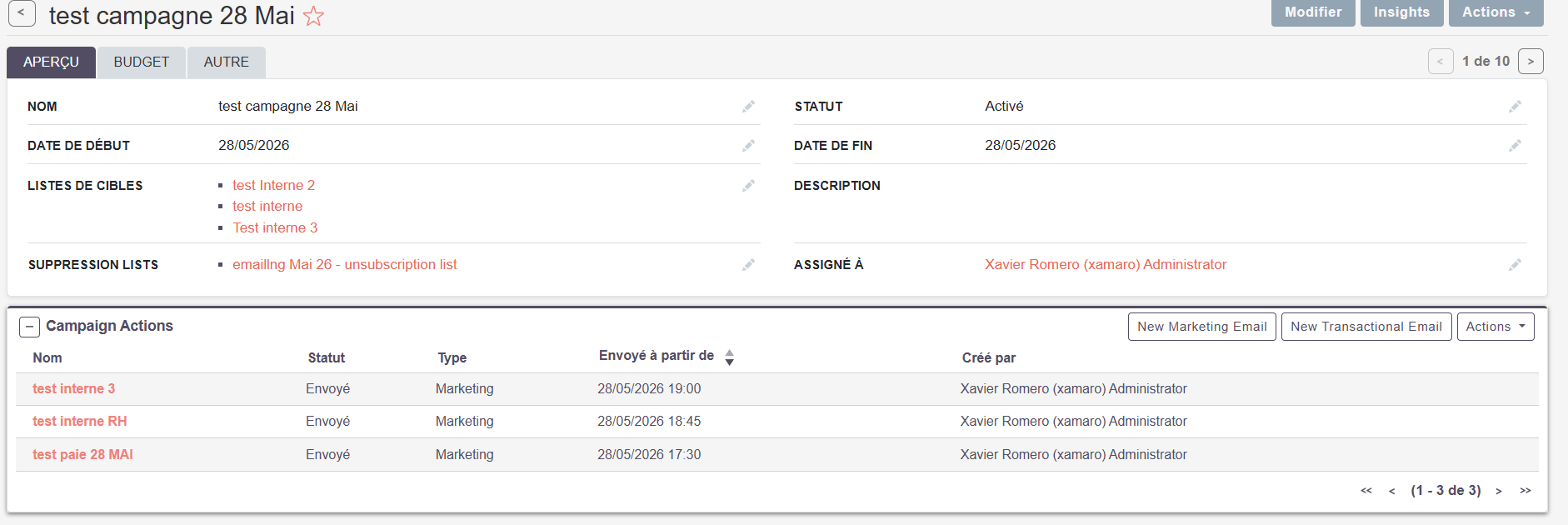
I am having an issue with the camapigns.
I created an email template, and 3 target lists and a campaign.
my goal is to schedule a campaign to send the same message (email) to the 3 different target lists at a 3 different time
after scheduling the first batch is sent correctly but the 2 others are stuck in the queue:
(the test emails in the target lists are defferent emails I own)
thanks,
this issue is happening on suite CRM 8.9.3. the video is on 7.15. the process there is slightly different.
however, I think the campaigns are properly done as the first batch is sent correctly. Only the following batches on the same campain have this issue (not finding the email template, preventing the next batches of emails to be sent) the first time the template is correctly found.
the question is more about sending multiple batches in the same campaign with the same email template
I’m not sure which version exactly it started, but the scheduled jobs chaned there are two new scheduler jobs to add to send and queue campaigns in SuiteCRM 8..