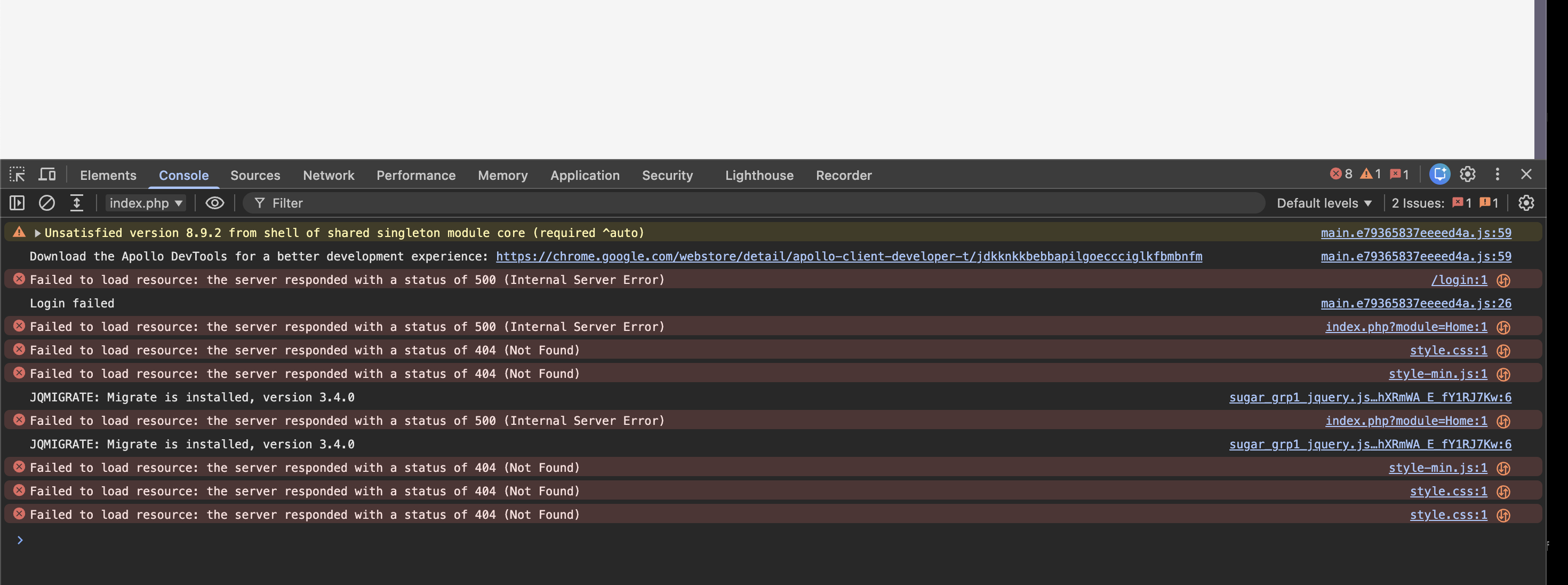
Tried installing suitecrm version 8.10 on ec2 instance multiple times through and cli(also tried version 7 before that).All installation has similiar issue not able to load language and style after installation .Done repairby directly hitting the url also multiple approaches .Updated the permission as well but nothing worked so far stuck in a loop.Basically cache is not getting updated properly .Someone faced this issue before?
hotfix ← pgorod:patch-16
opened 11:06AM - 29 Jun 26 UTC
## Enhanced error handling for directory creation
**TLDR; sugar_mkdir failure… s should be considered critical, and a proper message should _always_ be logged. Failures should be circumvented when possible.**
A good number of people showing up in the forums with broken initial installations is stumbling with the typical ownership-permissions errors. Although this problem is "classical", there are some new factors at play due to the change to Suite8 and to the modernization of PHP.
- Added fallback for permission errors which are appearing in modern Ubuntu's etc due to PHP-FPM hardening
- Improved logging in some early moments of installation when the normal log is not available yet or the log level is not sufficient. This really helps to prevent critical, yet silent failures that leave people clueless
- this new code is much better at showing permissions errors for what they are, instead of letting them creep up later as
- missing CSS
- missing screen elements
- during initial login as "Login credentials incorrect"
## Motivation and Context
I spent two days installing SuiteCRM on Ubuntu 26. I am a pro at installing SuiteCRM. If it takes me 2 days, most other people will likely just give up.
Granted, it took me 2 days because I wasn't just trying to get it to work, I was stubbornly trying to understand _why_ it wasn't working, connecting a debugger, making sure each problem I discovered was getting properly logged etc.
## How To Test This
This helper sugar_mkdir function is used all over the place, so it affects basically everything. But the two main test cases I would recommend looking at:
1. initial installation, in Ubuntu 26, with PHP-FPM, using a permissions scheme which includes a SetGID bit: `2775` or similar.
2. in normal usage after already installed, delete the entire cache dir and see if recovers well: `sudo rm -rf /var/www/suitecrm/public/legacy/cache/`
You can also redo those two test cases but with broken permissions.
1. try an initial install with broken ownerships or permissions, check that you can see a relevant log message indicating this (might show up in `php_errors.log` or in `suitecrm.log` (v7) or in `logs/prod/prod.log` (v8)
2. in normal usage after already installed, delete the entire cache dir and recreate it manually with some incorrect ownerships, for example, so that it is not writable. Check that you can see a relevant log message indicating this.
## Types of changes
- [X] Bug fix (non-breaking change which fixes an issue)
- [X] New feature (non-breaking change which adds functionality)
- [ ] Breaking change (fix or feature that would cause existing functionality to change)
### Final checklist
- [X] My code follows the code style of this project found [here](https://docs.suitecrm.com/community/contributing-code/coding-standards/).
- [ ] My change requires a change to the documentation.
- [X] I have read the [**How to Contribute**](https://docs.suitecrm.com/community/contributing-code/) guidelines.
It could be many things. If you share some more information about your system, we might be able to help.
So I decided to once again attempt to upgrade to the much coveted version 8.10
The installation is an upgrade of my development site running on MAMP with php8.2 (apache).
After following the instructions to the letter I initially was faced with ‘Login credentials are incorrect, please try again’ error.
After some investigation and help from AI, I found that the USERS table did not have the addition fields required for 2fa.
I ran ‘php bin/console suitecrm:app:upgrade-finalize ‘
It logged-in…
PHP Extensions: Ensure you have installed cli, curl, common, intl, gd, mbstring, mysqli, pdo_mysql, openssl, soap, xml, and zip.
File Permissions: Run ownership and permission commands matching your web server user (www-data on Ubuntu/Apache):
sudo chown -R www-data:www-data /var/www/html/suitecrm
sudo chmod -R 2755 /var/www/html/suitecrm
Use code with caution.
Clear Symfony Cache: If running CLI installs or updates, clear and rebuild the cache manually if the installer hangs:
php bin/console cache:clear
Use code with caution.
JohnAntony92:
through and cli
Hello John,
can you try the UI installer?
The following documentation is for SuiteCRM Version 8+; to see documentation for Version 7, click here.
1. Intro This page explains how to use the UI installer for SuiteCRM.
Before going through the steps on this page, please go through the...
It has a nice pre-check page and it’ll already tell you quite a few details that are wrong about your server setup that you can fix right away.
If you need to stick to the CLI, make sure you read carefully through the webserver setup guide:
Tried installation on ubuntu 26.04 EC2 php version 8.4
I tried both initially i tried CLI then with UI but its still the same error.
What do you have as default_permissions in public/legacy/config.php?
P.S. - Ubuntu 26 with PHP 8.4 is exactly the combo that led me to make the PR I linked above. In short (and to my amazement) Ubuntu 26 won’t give the same mkdir/chmod rights to the www-data user when it’s doing command-line chmod, compared to when it’s running inside PHP.
Thanks brother i think its the same issue that you are mentioning.Am downgrading to 24 now let me see whether it gets fixed or now.
Cool, let us know if you are able to run on Ubuntu 24.04 or not.
pgr
27 July 2026 12:06
10
It is not necessary to downgrade to Ubuntu 24, that one is a simple issue to fix (once discovered and understood).
And there is an even easier work-around, which is to avoid sticky bits in the default_permissions. What my fix does is
log more often and earlier in the installation process
retry directory permissions without the sticky bits if it fails with them