Upgrade from 7.15.0 to 8.10.0 problems

So I decided to once again attempt to upgrade to the much coveted version 8.10

The installation is an upgrade of my development site running on MAMP with php8.2 (apache).

After following the instructions to the letter I initially was faced with ‘Login credentials are incorrect, please try again’ error.

After some investigation and help from AI, I found that the USERS table did not have the addition fields required for 2fa.

I ran ‘php bin/console suitecrm:app:upgrade-finalize ‘

It logged-in!

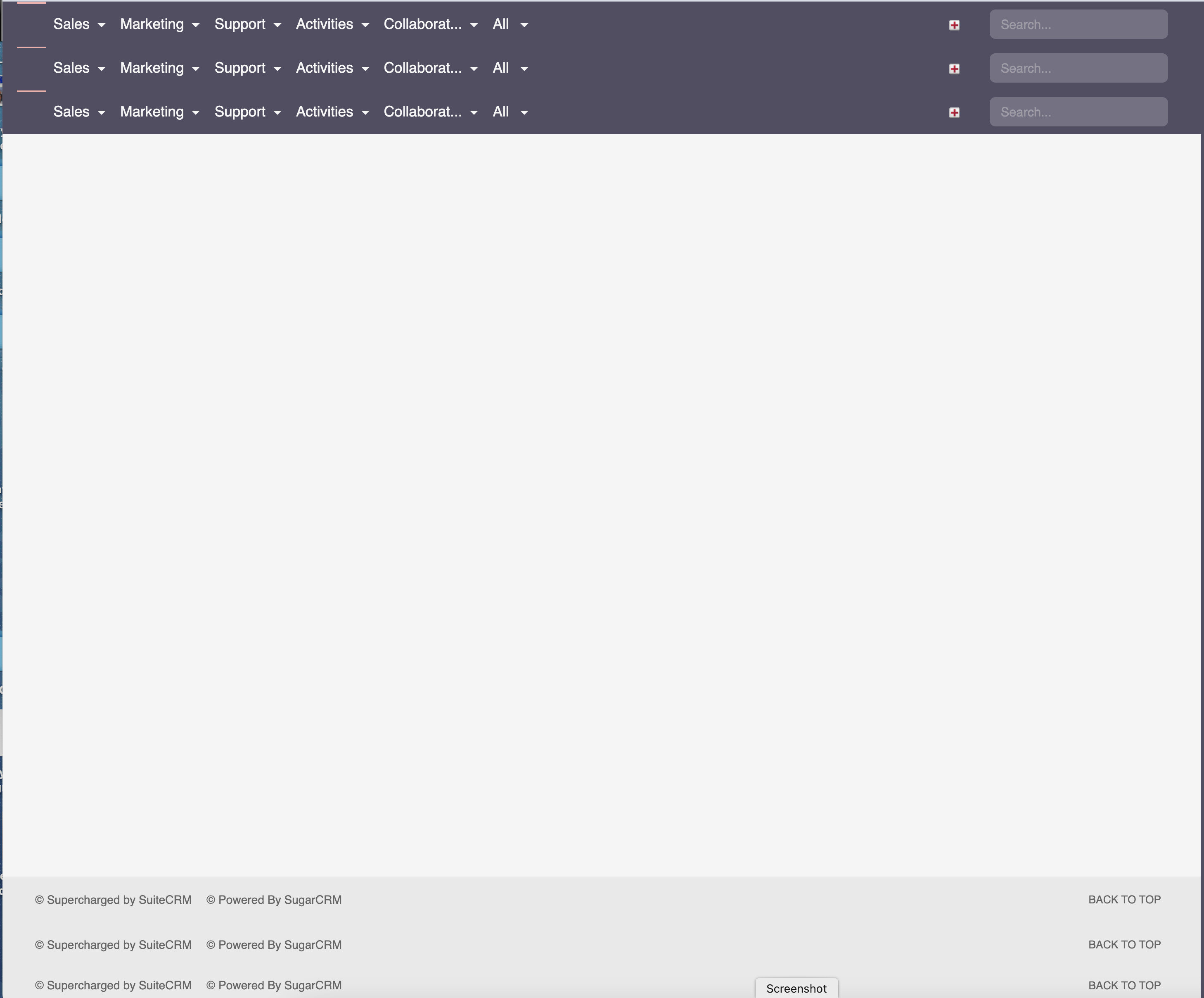
However I am now faced with the top menu replicating 3 times and nothing more as per attached

Can anyone shed some light as to what is happening here please. After a day of going around in circles I am slowly losing my mind.

Thanks in advance

Hello Terry,

do you have some more details from the logs?
upgrade, suitecrm.log, prod.log?

What does the browser in the console and network tab show?

You need to set the file permission and clear symfony cache after each step.

Thanks Bastian,

All logs look ok.

the console tab shows 3 repeating errors of not finding home.png which is a minor error.

The network tab and VSC however, shows me that the legacy index.php is being run 3 times before cancelling. This I think is starting the session over and over.

Any ideas?

Hey
Just from a hunch. can you check your .htacces in both the public and legacy folder. it seems like your crm is loading the public url where it should load the legacy url. basically in suite8 the home page dashboards load in an iframe

Thanks all, decided to start again. Will Let you know if it works.

So I completely start the upgrade again. Everything went smoothly - no errors.

Logged in and got same result, although initially with full icons.

Lost the icons at some point following a ‘bin/console cache:clear ‘.

After 3 days of this, I am at a loss. :weary_face:

No related Errors in any of the logs.

From the Network tab in the browser it looks like ‘index.php?module=Home’ gets called over and over until it cancels after 3rd time.

I have no idea why.:face_with_bags_under_eyes:

Would love to get this working, if anyone can help PLEASE.

Has anyone successfully upgraded on MAMP?

Thanks

Terry

Hey TerryL

Can you please share your htaccess

Thanks for reaching out Abuzar, I appreciate it,

I have the instance is at ‘/Applications/MAMP/htdocs/SuiteCRM8’

MAMP’s document root is set to ‘Applications/MAMP/htdocs’

The /public/.htaccess ;

Use the front controller as index file. It serves as a fallback solution when

every other rewrite/redirect fails (e.g. in an aliased environment without

mod_rewrite). Additionally, this reduces the matching process for the

start page (path “/”) because otherwise Apache will apply the rewriting rules

to each configured DirectoryIndex file (e.g. index.php, index.html, index.pl).

DirectoryIndex index.php

By default, Apache does not evaluate symbolic links if you did not enable this

feature in your server configuration. Uncomment the following line if you

install assets as symlinks or if you experience problems related to symlinks

when compiling LESS/Sass/CoffeScript assets.

Options FollowSymlinks

Disabling MultiViews prevents unwanted negotiation, e.g. “/index” should not resolve

to the front controller “/index.php” but be rewritten to “/index.php/index”.

Options -MultiViews RewriteEngine On
RewriteRule ^index.php.*$ - [L,NC]

# Determine the RewriteBase automatically and set it as environment variable.
# If you are using Apache aliases to do mass virtual hosting or installed the
# project in a subdirectory, the base path will be prepended to allow proper
# resolution of the index.php file and to redirect to the correct URI. It will
# work in environments without path prefix as well, providing a safe, one-size
# fits all solution. But as you do not need it in this case, you can comment
# the following 2 lines to eliminate the overhead.
RewriteCond %{REQUEST_URI}::$0 ^(/.+)/(.*)::\2$
RewriteRule .* - [E=BASE:%1]

# Sets the HTTP_AUTHORIZATION header removed by Apache
RewriteCond %{HTTP:Authorization} .+
RewriteRule ^ - [E=HTTP_AUTHORIZATION:%0]

# Redirect to URI without front controller to prevent duplicate content
# (with and without `/index.php`). Only do this redirect on the initial
# rewrite by Apache and not on subsequent cycles. Otherwise we would get an
# endless redirect loop (request -> rewrite to front controller ->
# redirect -> request -> ...).
# So in case you get a "too many redirects" error or you always get redirected
# to the start page because your Apache does not expose the REDIRECT_STATUS
# environment variable, you have 2 choices:
# - disable this feature by commenting the following 2 lines or
# - use Apache >= 2.3.9 and replace all L flags by END flags and remove the
#   following RewriteCond (best solution)
RewriteCond %{ENV:REDIRECT_STATUS} =""
RewriteRule ^index\.php(?:/(.*)|$) %{ENV:BASE}/$1 [R=301,L]

# If the requested filename exists, simply serve it.
# We only want to let Apache serve files and not directories.
# Rewrite all other queries to the front controller.
RewriteCond %{REQUEST_FILENAME} !-f
RewriteRule ^ %{ENV:BASE}/index.php [L]

<IfModule !mod_rewrite.c>

# When mod_rewrite is not available, we instruct a temporary redirect of
# the start page to the front controller explicitly so that the website
# and the generated links can still be used.
RedirectMatch 307 ^/$ /index.php/
# RedirectTemp cannot be used instead

/public/legacy/.htaccess ;

BEGIN SUITECRM RESTRICTIONS

RedirectMatch 403 ..log$
RedirectMatch 403 /+not_imported_.
.txt
RedirectMatch 403 /+(soap|cache|xtemplate|data|examples|include|log4php|metadata|modules|vendor)/+.*.(php|tpl|phar)
RedirectMatch 403 /+emailmandelivery.php
RedirectMatch 403 /+.git
RedirectMatch 403 /+.cache/
RedirectMatch 403 /+tests
RedirectMatch 403 /+RoboFile.php
RedirectMatch 403 /+composer.json
RedirectMatch 403 /+composer.lock
RedirectMatch 403 /+upload
RedirectMatch 403 /+custom/+blowfish
RedirectMatch 403 /+cache/+diagnostic
RedirectMatch 403 /+files.md5$

Options +SymLinksIfOwnerMatch Options -Indexes Options -MultiViews RewriteEngine On RewriteBase /SuiteCRM8/public/legacy/ RewriteRule ^cache/jsLanguage/(.._..).js$ index.php?entryPoint=jslang&modulename=app_strings&lang=$1 [L,QSA] RewriteRule ^cache/jsLanguage/(\w*)/(.._..).js$ index.php?entryPoint=jslang&modulename=$1&lang=$2 [L,QSA]
RewriteRule ^ep/(.*?)$ index.php?entryPoint=$1 [L,QSA]

# --------- DEPRECATED --------
RewriteRule ^api/(.*)$ - [env=HTTP_AUTHORIZATION:%{HTTP:Authorization}]
RewriteRule ^api/(.*?)$ lib/API/public/index.php/$1 [L]
# -----------------------------

RewriteRule ^Api/authorize$ index.php?module=OAuth2AuthCodes&action=authorize [R=302,QSA,NE]
RewriteRule ^Api/(.*)$ - [env=HTTP_AUTHORIZATION:%{HTTP:Authorization}]
RewriteRule ^Api/access_token$ Api/index.php [L]
RewriteRule ^Api/V8/(.*?)$ Api/index.php [L]
Header unset ETag FileETag None Header unset X-Powered-By Header always unset X-Powered-By ExpiresActive on ExpiresDefault "access plus 1 month"

CSS

ExpiresByType text/css “access plus 1 year”

Data

ExpiresByType application/atom+xml “access plus 1 hour”
ExpiresByType application/rdf+xml “access plus 1 hour”
ExpiresByType application/rss+xml “access plus 1 hour”
ExpiresByType application/json “access plus 0 seconds”
ExpiresByType application/ld+json “access plus 0 seconds”
ExpiresByType application/schema+json “access plus 0 seconds”
ExpiresByType application/geo+json “access plus 0 seconds”
ExpiresByType application/xml “access plus 0 seconds”
ExpiresByType text/calendar “access plus 0 seconds”
ExpiresByType text/xml “access plus 0 seconds”

Favicon

ExpiresByType image/x-icon “access plus 1 week”

HTML

ExpiresByType text/html “access plus 0 seconds”

JavaScript

ExpiresByType application/javascript “access plus 1 year”
ExpiresByType application/x-javascript “access plus 1 year”
ExpiresByType text/javascript “access plus 1 year”

Markdown

ExpiresByType text/markdown “access plus 0 seconds”

Media files

ExpiresByType audio/ogg “access plus 1 month”
ExpiresByType image/bmp “access plus 1 month”
ExpiresByType image/gif “access plus 1 month”
ExpiresByType image/jpeg “access plus 1 month”
ExpiresByType image/jpg “access plus 1 month”
ExpiresByType image/png “access plus 1 month”
ExpiresByType image/svg+xml “access plus 1 month”
ExpiresByType image/webp “access plus 1 month”
ExpiresByType video/mp4 “access plus 1 month”
ExpiresByType video/ogg “access plus 1 month”
ExpiresByType video/webm “access plus 1 month”

Fonts

ExpiresByType font/eot “access plus 1 month”
ExpiresByType font/opentype “access plus 1 month”
ExpiresByType font/otf “access plus 1 month”
ExpiresByType application/x-font-ttf “access plus 1 month”
ExpiresByType font/ttf “access plus 1 month”
ExpiresByType application/font-woff “access plus 1 month”
ExpiresByType application/x-font-woff “access plus 1 month”
ExpiresByType font/woff “access plus 1 month”
ExpiresByType application/font-woff2 “access plus 1 month”
ExpiresByType font/woff2 “access plus 1 month”

Other

ExpiresByType text/x-cross-domain-policy “access plus 1 week”

Header set X-Content-Type-Options “nosniff”

RewriteEngine On
RewriteCond %{REQUEST_FILENAME} !-d
RewriteCond %{REQUEST_URI} (.+)/$
RewriteRule ^ %1 [R=301,L]

END SUITECRM RESTRICTIONS

Sorry about the formatting. This edit box has a mind of it’s own.
The main issue is likely that your MAMP document root is pointing to:

/Applications/MAMP/htdocs

instead of directly to SuiteCRM’s public directory.

For SuiteCRM 8, Apache should ideally serve from:

/Applications/MAMP/htdocs/SuiteCRM8/public

Then restart Apache.


Then update /public/.htaccess

Comment out these two lines:

RewriteCond %{REQUEST_URI}::$0 ^(/.+)/(.*)::\2$
RewriteRule .* - [E=BASE:%1]

and replace the final rewrite rule with:

RewriteRule ^ index.php [L]

because you no longer need dynamic base detection once public/ is the web root.


One more thing

Make sure these Apache modules are enabled in MAMP:

mod_rewrite
mod_headers
mod_expires

Especially mod_rewrite.

Thanks RSP,

Unfortunately it didn’t work. I have been down this track before although didn’t make your suggested change in the /public/.htaccess . So I went down this track again, also changing /public/legacy/.htaccess line 22 to RewriteBase /legacy/

Checked the modules were active in MAMP’s apache - they were.

Cleared cache etc … but got same result. It’s calling index.php?module=Home .

I did wonder whether it has anything to do with dashboards, given that that would be the next to render under the menu. I had a number of dashboards using google charts.
I’m not quite sure how to check this if you have any pointers.

I must say SuiteCRM-8 is a bit of a mystery to me at this stage.

Regards Terry

So it turns out that session data was not being shared properly between MAMP and v7, causing symfony to reboot.
By entering the following in public/legacy/config.sys ;

‘session_dir’ => ‘/Applications/MAMP/htdocs/SuiteCRM8/var/sessions’,

the rebooting stopped.

Menu icons are still missing when in ‘prod’ but are all there when in ‘qa’ strangely. Tried ;
bin/console suitecrm:app:upgrade-finalize
&
php bin/console assets:install public --symlink
but still not working in ‘prod’.

Also dashboards are all working when logging in as user but not as admin.

Unless someone has a quick remedy, I will probably migrate/install again (3rd time).

Thanks for all suggestions so far.
Terry

Terry, you should seriously consider using Ubuntu for SuiteCRM, so many headaches disappear. It is by far the most tested and most adequate platform for SuiteCRM. It is the one used by the developers.

I use it as a separate VM, but also from Windows (my dev environment) inside WSL (Windows Subsystem for Linux). Installing it in a VM also has many additional advantadges for troubleshooting, fault-tolerance, actionable backups, etc.

Hey thanks pgr, I’m taking this on-board. I’m on a mac machine and have been looking at moving my scrm dev to Docker.
Because I have a database full of data and a number of modifications, I’m thinking I should get my existing 7.15.1 running on ubuntu in docker first then do the upgrade to 8.10

Thanks
Terry

Are you running SuiteCRM on a VM machine or on your macOS?

Hi rsp,

Running SuiteCRM-7.15 on MAMP directly on macOS. Not ideal!

As a test I installed 8.10 on Ubuntu on Docker. A quick and easy process. Runs beautifully.
So am now enthusiastic about getting my existing 7.15 on and running the upgrade process from there.

Cheers
Terry

Why Docker and not a full VM?

Your company’s CRM is not a server you want to “spin up” easily and rebuild frequently. It’s also not something for which you want to minimize computing resources.

I don’t get why people turn to Docker for this, except maybe because they’re used to it?

Hello Pedro,

I’ve got a few customers with Docker setups.
The reason is mostly, Docker has been there first.
Additionally, it’s the standard setup for most of the software at the customers.

It is neat to not have to setup the underlaying LAMP part of SuiteCRM.
But the system will have it’s payback time during upgrades, custom development / deployment, backups etc. - knowledge that is gained with time and experience.
I’d prefer a plain LAMP + Suite setup as well.
Docker just adds a big layer of complexity and in case not everything goes really smooth right away, it’s quite difficult.

Saw this recently and had to laugh:

2 Likes

OK OK OK, I hear you! :joy:

I have now considered VMs versus using Docker. I’m still running an Intel based Mac so VirtualBox (because it’s free) would be the comparison here.
Docker is more lightweight in terms of memory usage, it’s faster and it’s quick and easy to switch between php versions with everything defined in a text file (docker-compose.yml). And I like how I can create an image to come back to if everything goes pear shape.

So for now I’m pushing ahead with Docker - I may regret it I know.

The downside will probably come when deploying to a non-containerised Linux server. Permissions may also be a problem, although I have had no issues so far.

At this stage I have successfully transferred my 7.15.0 to Ubuntu in a Docker container and saved an image.
Now next step is upgrading to 8.10

I’ll let you know how I go.

1 Like