Workflow Scheduler doesnt work properly

Hello,

My Scheduler never triggers itself when everything fits for condition.

I have a field named ,Warranty Date and condition was, Warranty Date is Less or Equal Than - Today + 7 days.

But problem is , those workflows never triggers itself.

Cron isnt work correctly.

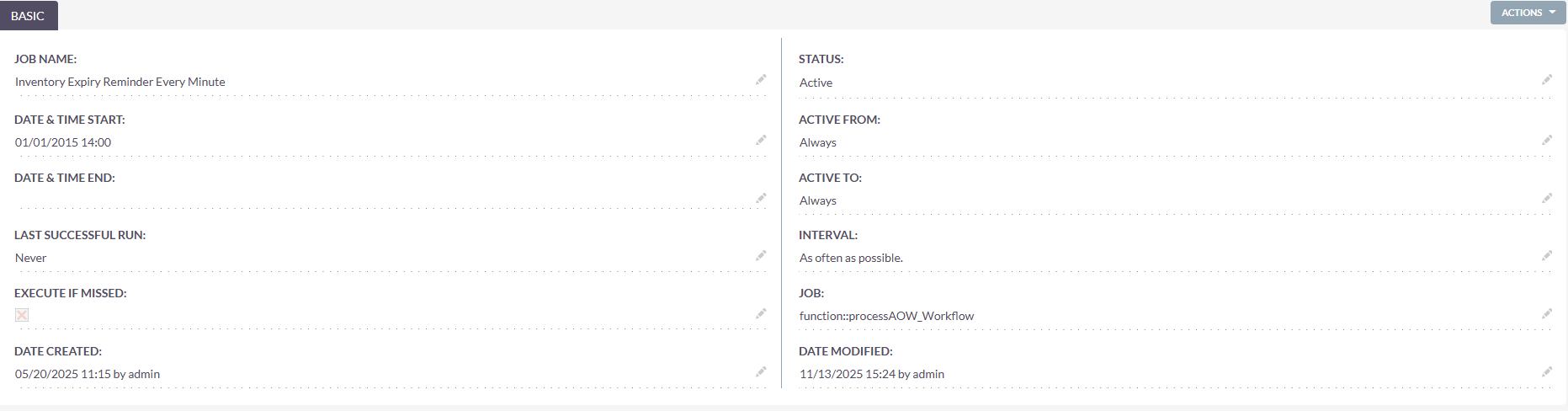
There is a Image as attached

What SuiteCRM version are you using?

https://docs.suitecrm.com/8.x/admin/administration-panel/schedulers/

Hello,

this is a custom scheduler?
Debugging will only work with the full code and all customizations available.

What you can do:
Either use XDebug and go through the standard debugging procedure.
Or comment out all your code and only add one line of code which writes sth. into the log file. Then you gradually add your code from the commented out section to the section which get executed.
In both approaches, you’d simply check when an issue becomes apparent.

SuiteCRM 8.8

The version I used.

This is a custom scheduler but either the default one is not working right now. Custom one wont work either i guess.

Then remove all your custom code first.
Make sure that everything is working properly in the standard setup (it usually is).
Then make small, incremental changes / add your code one by one and see when things break.

Dear Bastian,

Do you mean programming by saying custom code? Because I didn’t write any type of code.

Can you give some more context?

Your version is below 8.9 as it seems, which one is it?
You’re in Admin - Scheduler and then you’ve clicked on your job
“Inventory Expiry Reminder Every Minute”?
Or is this screenshot from somewhere else in the system?
If so, from where?
How did you create the job “Inventory Expiry Reminder Every Minute”?
Hello everyone,

Thanks for your support.

I had to do crontab and permission configurations from stratch. And rebooted webserver and it fixed itself.

Glad to hear.
Watch out for the 8.9 upgrade - things around cron and scheduler changed somewhat and issues with permissions got fixed in 8.9.1.