Probably breaks more, but at least that.
name of field is passed to aow_utils.php fixUpFormatting, and hits this, which expects value as a date and not a name
if (! preg_match(’/^[0-9]{4}-[0-9]{2}-[0-9]{2} [0-9]{2}:[0-9]{2}:[0-9]{2}$/’, $value)) {
[ERROR] convert: Conversion of custom_datetime_field 00.00 from Y-m-d H.i to Y-m-d H:i:s failed
reverting this:
salesagility:hotfix-7.10.x ← JackBuchanan:bugfix-9237
opened 11:40AM - 19 Jul 21 UTC
Fix #9237 where dates in aow actions & conditions are not saved or displayed cor… rectly
Use fixUpFormatting in actions and only display as datetime if field type is datetime else use date
## Description
Use fixUpFormatting in actions the same way its used for condtions
Use to_display_date when field type is date instead of defaulting to to_display_date_time
## Motivation and Context
See #9237
## How To Test This
See #9237
## Types of changes
- [x] Bug fix (non-breaking change which fixes an issue)
- [ ] New feature (non-breaking change which adds functionality)
- [ ] Breaking change (fix or feature that would cause existing functionality to change)
### Final checklist
- [x] My code follows the code style of this project found [here](https://docs.suitecrm.com/community/contributing-code/coding-standards/).
- [ ] My change requires a change to the documentation.
- [x] I have read the [**How to Contribute**](https://docs.suitecrm.com/community/contributing-code/) guidelines.
<!--- If it reports back that there are problems, you can log into the Travis system and check the log report for your pull request to see what the problem was. --->
solved it in my case
opened 11:23AM - 19 Jul 21 UTC
closed 10:37AM - 20 Aug 21 UTC
Type:Bug
Status:Fix Proposed
Priority:Important
Status:Assessed
Area: Workflow
#### Issue
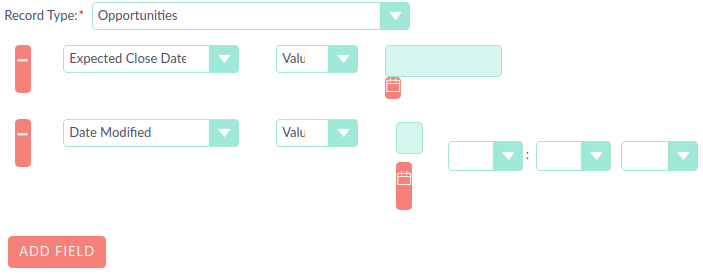
Workflow actions wont save under certain date formats and dates ar… e loaded as date time
#### Expected Behavior
Workflow actions should load after save and date fields should not have time appended
#### Actual Behavior
After save workflow date actions are not loaded and dates are treated as date time

#### Possible Fix
#### Steps to Reproduce
1. Set profile date format to mm/dd/yyyy
2. Create opportunity workflow
3. Set actions & conditions using fields: date modified & expected closed date
4. Save and reload edit view
5. See expected closed date with a time and date modified not loaded
#### Context
#### Your Environment
* SuiteCRM Version used: bug on 7.11.20 and 7.10.31
* Browser name and version (e.g. Chrome Version 51.0.2704.63 (64-bit)): Chrome
* Environment name and version (e.g. MySQL, PHP 7): php 7.3
* Operating System and version (e.g Ubuntu 16.04): Ubuntu 18.04
salesagility:hotfix-7.10.x ← JackBuchanan:bugfix-9237
opened 11:40AM - 19 Jul 21 UTC
Fix #9237 where dates in aow actions & conditions are not saved or displayed cor… rectly
Use fixUpFormatting in actions and only display as datetime if field type is datetime else use date
## Description
Use fixUpFormatting in actions the same way its used for condtions
Use to_display_date when field type is date instead of defaulting to to_display_date_time
## Motivation and Context
See #9237
## How To Test This
See #9237
## Types of changes
- [x] Bug fix (non-breaking change which fixes an issue)
- [ ] New feature (non-breaking change which adds functionality)
- [ ] Breaking change (fix or feature that would cause existing functionality to change)
### Final checklist
- [x] My code follows the code style of this project found [here](https://docs.suitecrm.com/community/contributing-code/coding-standards/).
- [ ] My change requires a change to the documentation.
- [x] I have read the [**How to Contribute**](https://docs.suitecrm.com/community/contributing-code/) guidelines.
<!--- If it reports back that there are problems, you can log into the Travis system and check the log report for your pull request to see what the problem was. --->
Thanks @helgebe I had the exact same problem and reversed the hot fix. Problem solved.