Hi everyone,
I’ve been working with SuiteCRM for over 10 years, developing customizations and extensions for different business needs.
One challenge I’ve frequently noticed is that sales teams often spend a considerable amount of time navigating between different pages just to manage their daily work.
For example, when working on an opportunity, a salesperson might need to:
-
Open the opportunity to review its details.
-
Check previous calls, meetings, emails, and other interactions.
-
Review pending tasks and follow-up activities.
-
Schedule a new call or meeting.
-
Update the opportunity’s sales stage.
-
Return to the opportunity list to continue working on the next record.
While SuiteCRM already supports all these activities, switching between multiple screens can sometimes interrupt the workflow, especially when managing many opportunities throughout the day.
This got me thinking: What if we could bring most of these daily activities together into a single workspace?
From a Simple Kanban Board to a Single-Page Sales Workspace
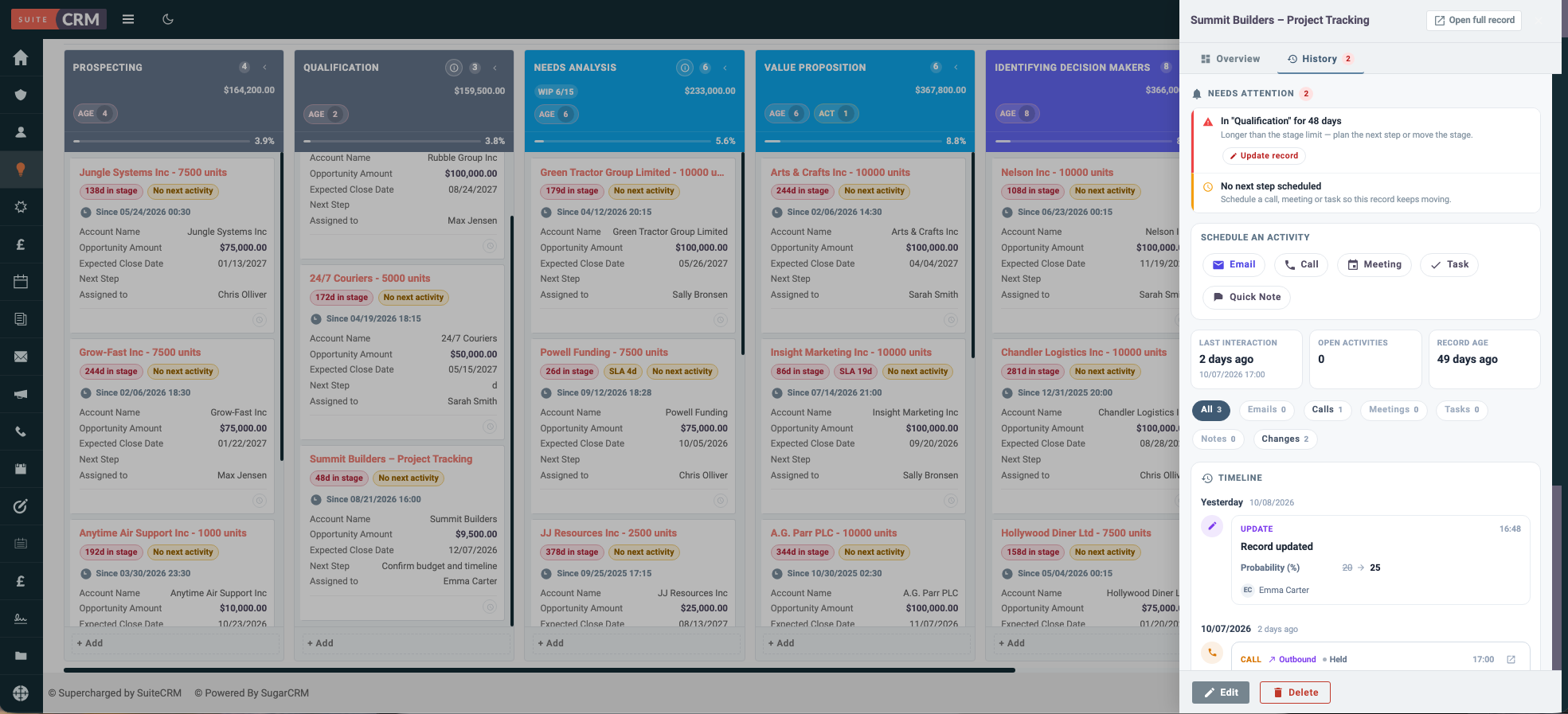
This idea became one of the main motivations behind MTS Kanban, an extension I’ve been developing for SuiteCRM 7 and 8.
Rather than building just another drag-and-drop board, my goal was to create a more practical workspace where salespeople could manage their entire sales process without constantly navigating between different pages.
With this approach, users can:
-
Visualize the sales pipeline: Organize opportunities into columns based on their sales stages and move records using drag and drop.
-
Review activity history: Quickly access previous calls, meetings, emails, notes, and other customer interactions to understand what has already happened.
-
Plan upcoming activities: Create and schedule calls, meetings, tasks, and follow-ups directly from the workspace.
-
Track pending actions: Keep an overview of upcoming activities, outstanding tasks, and what needs attention next.
-
View and update records: Open record details in a popup, make changes, and continue working without leaving the board.
-
Manage multiple workflows: Configure different Kanban boards for different business processes or teams.
-
Highlight important information: Use visual indicators to identify records that require attention based on specific conditions.
The main idea is simple:
One workspace where you can see what has happened, understand what needs to happen next, plan your activities, and take action immediately.
A Practical Example: Managing an Opportunity
Imagine a salesperson starting their day.
Instead of opening multiple SuiteCRM modules, they can start from their Kanban board and see their opportunities organized by sales stage.
They select an opportunity and quickly review its history to understand the previous interactions with the customer.
From the same workspace, they can check pending tasks, schedule a follow-up call, add notes, or update the opportunity details.
After speaking with the customer, they can move the opportunity to the next sales stage using drag and drop.
Then they move on to the next opportunity.
All of this can be done without constantly switching between different SuiteCRM pages.
I believe reducing these small interruptions can make a meaningful difference in daily CRM usage, particularly for sales teams handling a large number of customer interactions.
Beyond Sales Opportunities
Although sales pipeline management was the initial focus, the Kanban concept can also be useful for other workflows within SuiteCRM.
For example:
-
Managing leads through qualification stages.
-
Tracking tasks and their progress.
-
Organizing customer support cases.
-
Managing custom business processes using custom modules.
Of course, different workflows may require different board configurations, card layouts, and activity information.
Sales Workflow Demonstration
I’ve also created a YouTube playlist demonstrating a sales workflow using SuiteCRM and Kanban boards.
YouTube playlist:
https://youtube.com/playlist?list=PLB4V5B4lY_es
Note: The videos are in Vietnamese, but the visual demonstrations should still be helpful for understanding how the workflow operates, even if you don’t speak the language.
I’d Love to Hear Your Thoughts
As the developer of MTS Kanban, I’m always interested in learning how other SuiteCRM users and developers approach these challenges.
A few questions I’d love to discuss:
-
Would having activity history, upcoming tasks, and quick actions available in a single workspace improve your team’s daily workflow?
-
How do your salespeople currently manage follow-ups and track pending activities in SuiteCRM?
-
What additional information or actions would you find useful directly on a Kanban card?
-
Have you implemented similar single-page workflows or visual interfaces in SuiteCRM?
I’m also happy to exchange technical experiences around implementing these interfaces, including record updates, activity integration, customization, and performance considerations.
My goal in sharing this is to exchange ideas about making SuiteCRM workflows more efficient and user-friendly.
Looking forward to hearing your experiences and suggestions!