Greetings. My customer has a Configuration Management Database (CMDB) and I want to use SuiteCRM to manage scheduled service reminders and SLA contract renewal campaigns. In these use cases, most of the pipeline Management features of SuiteCRM are unnecessary. Please can you point me to documentation/tutorials that will help me setup the data feed from the CMDB and turn off the SuiteCRM features my client doesn’t need for these processes. Thank you.
You can use hide/display modules from the admin panel.
What features do you want to hide?
Hi, RSP, Thanks for the response.
I don’t need to manage or track Leads, web site activities or SEO stats for this application. The CMDB only deals with existing customers with active equipment in the field, and so, from what I understand about the design of SuiteCRM, they can be considered qualified Opportunities. I want to define automated email campaigns to those customers for tasks like Preventive Maintenance reminders, contract renewals and equipment end-of-life alerts.
I have only just started getting to grips with SuiteCRM but I think it will fit the bill nicely if I can get the information I need into SuiteCRM and make it simple for the end users to use.
Kind regards, Kevin Joubert.
Hello Kevin,
in that case (and the others) you can simply create a role to “hide” the modules from the users in the role.
So you’d be using the Accounts and Contacts for your customers in a B2B situation and only Contacts for B2C.
Active equipment sounds like it could be products or a custom module, depending on your specifics.
in the field - how do the processes look in detail here? What details do you have to track?
Maybe a custom module as well or simply a field in another module.
Look into the standard contract module and into its setup in the admin area. There is a notification option.
It works as well via reports and / or scheduled workflows to trigger something like:
The campaigns would contain only one / very few target contacts?
In that case, a simple workflow email would do the trick.
Try a white list approach:
Build the process that you need first.
All modules that you haven’t touched afterwards can be ‘hidden’ by your roles.
(All but the alerts module).
Hello Bastian,
I have a scenario related to roles and record visibility.
We have three users: A, B, and C.
All three users have Owner rights on the Tasks module.
User A creates a task and assigns it to user B.
However, after assigning the task to B, user A is not able to see the task in his task list.
Our requirement is that the creator of the task should be able to view the record even after it is assigned to another user.
Could you please advise how we can configure roles or permissions to achieve this behavior?
Thank you.
Hello Bhavin,
best to start your own thread for this. 
If you work with security groups, that will match your requirements.
Then, you have Sec Groups A, B and C.
For a record created by A, assigned to B, it will have two Sec Groups related and both users can see the record accordingly.
Hi Bastian, thanks for all the links! I have begun working my through them using my localhost system - it’s a BIG system!
I have not gone into a lot of detail on the design of the business processes yet - I first wanted to understand what’s possible in SuiteCRM. Below is a top level view of the proposed workflow for selling Scheduled Maintenance slots. If it makes sense to you, I would appreciate any pointers you may have about which modules I should use to implement it.
Thanks again for the help.
Kind Regards, Kevin Joubert.
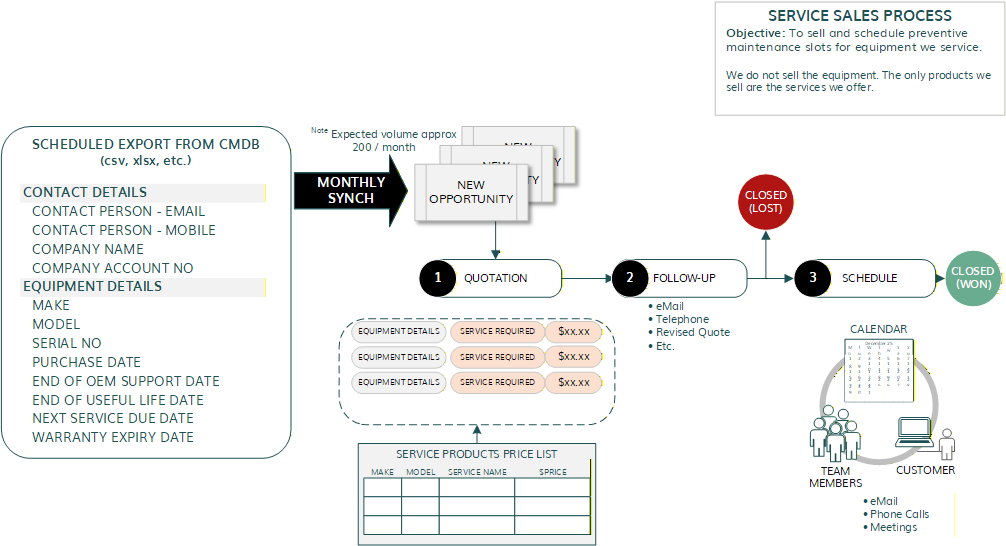
Hello Kevin,
how exactly you’d implement / use your CRM is fairly specific.
It’s generally good to stay close to the standard, but it seldom works 100%.
From the top level view, the standards look fine and good (that’s often true for many companies).
For equipment details and services required, you might be able to use products and just add them to your quotes / invoices / contracts.
Whether this is really working for you can only be found out in two ways:
- you implement and test the processes fully
- you’d hire someone with experience to go through your processes / conceptualize the implementation in the CRM / implement them in the CRM (contact me, if you are interested)
Most often, I’d say a business case is possible with SuiteCRM.
Sometimes, requirements are so specific, that a second / third system needs to be integrated (marketing automation = Mautic, customer portal = Drupal, dms = NextCloud / paperless-ngx etc. / e.g.).
Some rare times, the business case would work with SuiteCRM, but it’s not the “right” software for the job (onboarding plenty of external users in the CRM was one example project I had).
Thank you Bastian, I am going to try to set up the process as you suggest. I have a dummy export file I can use to create new opportunities and I will try to implement as much of the flow as I can without requiring custom modules. If I get stuck I will request a budget for a consultant and I will contact you.
Much obliged for your assistance so far, regards, Kevin.