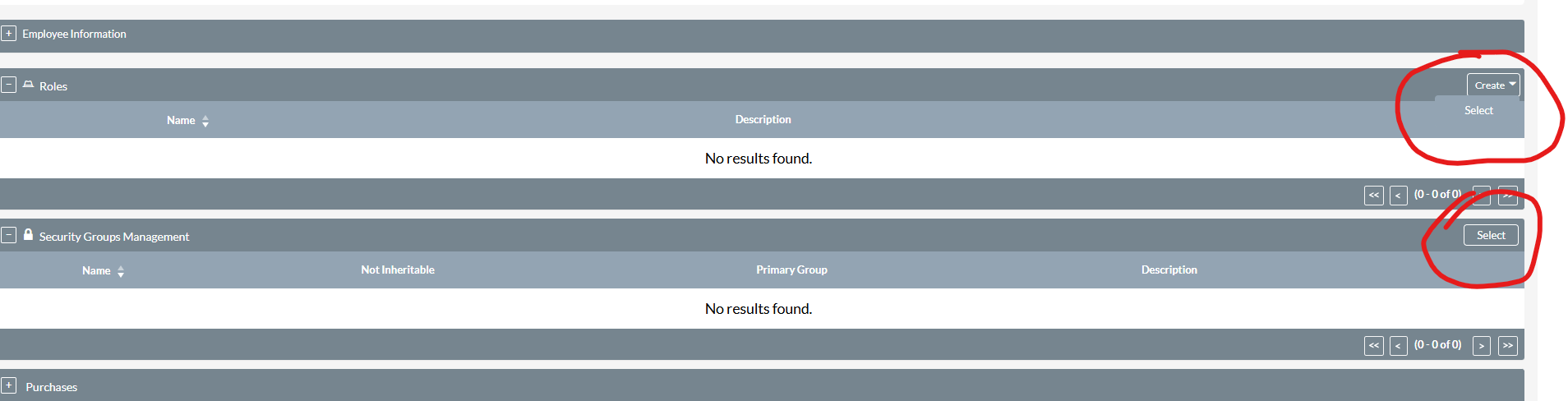
im loggedin as an system administrator and currently im not added any roles to that user. then i tried to open one of users detail view page that detailview page showing as an blank page.
then i tried to open the loggedin user’s detail page that time that opened… but in console some errors are showing
Uncaught TypeError: $(…).sugarActionMenu is not a function
at HTMLUListElement. (style-min.js?v=W5hn9bm3-LHI5eewX_3FBg:22:468)
at h.each (style-min.js?v=W5hn9bm3-LHI5eewX_3FBg:2:14099)
at h.fn.init.each (style-min.js?v=W5hn9bm3-LHI5eewX_3FBg:2:11961)
at Object.actionMenu (style-min.js?v=W5hn9bm3-LHI5eewX_3FBg:22:434)
at executeItem (sugar_grp1.js?v=W5hn9bm3-LHI5eewX_3FBg:457:21)
at Object._doWhenCheck (sugar_grp1.js?v=W5hn9bm3-LHI5eewX_3FBg:457:274)
at q (sugar_grp1.js?v=W5hn9bm3-LHI5eewX_3FBg:780:6316)
(anonymous) @ style-min.js?v=W5hn9bm3-LHI5eewX_3FBg:22
each @ style-min.js?v=W5hn9bm3-LHI5eewX_3FBg:2
each @ style-min.js?v=W5hn9bm3-LHI5eewX_3FBg:2
actionMenu @ style-min.js?v=W5hn9bm3-LHI5eewX_3FBg:22
executeItem @ sugar_grp1.js?v=W5hn9bm3-LHI5eewX_3FBg:457
_doWhenCheck @ sugar_grp1.js?v=W5hn9bm3-LHI5eewX_3FBg:457
q @ sugar_grp1.js?v=W5hn9bm3-LHI5eewX_3FBg:780
setInterval
later @ sugar_grp1.js?v=W5hn9bm3-LHI5eewX_3FBg:780
_startDoWhenInterval @ sugar_grp1.js?v=W5hn9bm3-LHI5eewX_3FBg:451
doWhen @ sugar_grp1.js?v=W5hn9bm3-LHI5eewX_3FBg:451
(anonymous) @ index.php?offset=1&module=Users&action=DetailView&record=44d5f635-ac93-5284-bf8a-664c2c7b06e0:89Understand this error
style-min.js?v=W5hn9bm3-LHI5eewX_3FBg:3 Uncaught TypeError: $(…).sugarActionMenu is not a function
at HTMLUListElement. (style-min.js?v=W5hn9bm3-LHI5eewX_3FBg:3:224)
at h.each (style-min.js?v=W5hn9bm3-LHI5eewX_3FBg:2:14099)
at h.fn.init.each (style-min.js?v=W5hn9bm3-LHI5eewX_3FBg:2:11961)
at HTMLDocument. (style-min.js?v=W5hn9bm3-LHI5eewX_3FBg:3:190)
at f (style-min.js?v=W5hn9bm3-LHI5eewX_3FBg:2:37787)
at Object.fireWith [as resolveWith] (style-min.js?v=W5hn9bm3-LHI5eewX_3FBg:2:38600)
at h.ready (style-min.js?v=W5hn9bm3-LHI5eewX_3FBg:2:40434)
at HTMLDocument.H (style-min.js?v=W5hn9bm3-LHI5eewX_3FBg:2:1164)
then trying to change the tab for user profile to advanced that also failed with one error in console:-
sugar_grp1_jquery.js…bm3-LHI5eewX_3FBg:2 Uncaught Error: Syntax error, unrecognized expression: #
at se.error (sugar_grp1_jquery.js…I5eewX_3FBg:2:13639)
at se.tokenize (sugar_grp1_jquery.js…I5eewX_3FBg:2:21650)
at se.select (sugar_grp1_jquery.js…I5eewX_3FBg:2:22477)
at S.se (sugar_grp1_jquery.js…HI5eewX_3FBg:2:7116)
at S. (sugar_grp1_jquery.js…HI5eewX_3FBg:6:2847)
at e. [as find] (sugar_grp1_jquery.js…HI5eewX_3FBg:6:1566)
at e..find (sugar_grp1_jquery.js…I5eewX_3FBg:2:25047)
at a.show (sugar_grp1_jquery.js…5eewX_3FBg:14:35891)
at HTMLAnchorElement. (sugar_grp1_jquery.js…5eewX_3FBg:14:35421)
at S.each (sugar_grp1_jquery.js…HI5eewX_3FBg:2:3003)
Wed Nov 19 2025 at 05:54:29 [3292][44d5f635-ac93-5284-bf8a-664c2c7b06e0][FATAL] Exception handling in C:\xampp\htdocs\ops_crm_g_8_1\public\legacy\include\MVC\Controller\SugarController.php:402 Wed Nov 19 2025 at 05:54:29 [3292][44d5f635-ac93-5284-bf8a-664c2c7b06e0][FATAL] Exception in Controller: Unable to load template ‘file:include/DetailViewGroup/header.tpl’ in ‘themes\suite8\modules/Users/tpls/DetailView.tpl’ Wed Nov 19 2025 at 05:54:29 [3292][44d5f635-ac93-5284-bf8a-664c2c7b06e0][FATAL] backtrace: #0 C:\xampp\htdocs\ops_crm_g_8_1\vendor\smarty\smarty\libs\sysplugins\smarty_internal_templatebase.php(238): Smarty_Internal_Template->render(false, 0) #1
i facing this kind of error… actually as per the suitecrm 8.8.0 we dont have this public\legacy\include\DetailViewGroup (DetailViewGroup) folder right but that is expecting my build…
i created one folder with that name and i copied what all i have here public\legacy\include\DetailView that to DetailViewGroup… then i checked the users detail view page… interestingly now that got worked but small issues are there but now detail page got loaded…
Most import one first: move away from Windows.
SuiteCRM 8 isn’t officially compatible anymore with Windows / WAMP: https://docs.suitecrm.com/8.x/admin/compatibility-matrix/
So assume, that it’ll never work in your current environment.
Try to first migrate your SuiteCRM 7 system to a Linux server (tip: don’t use any GUI / admin interface, just vanilla Ubuntu Server LTS LAMP to make sure that the server is properly setup).
To validate a proper working environment, install a fresh 7.10.x, 7.14.x and 8.9.1 first on your new Linux system before attempting the SuiteCRM 7 migration.
Then do the upgrade / migration process on the Linux environment.
Assume, your target version is always broken if you don’t stick to the supported environments - because some parts of the upgrade might not work properly.
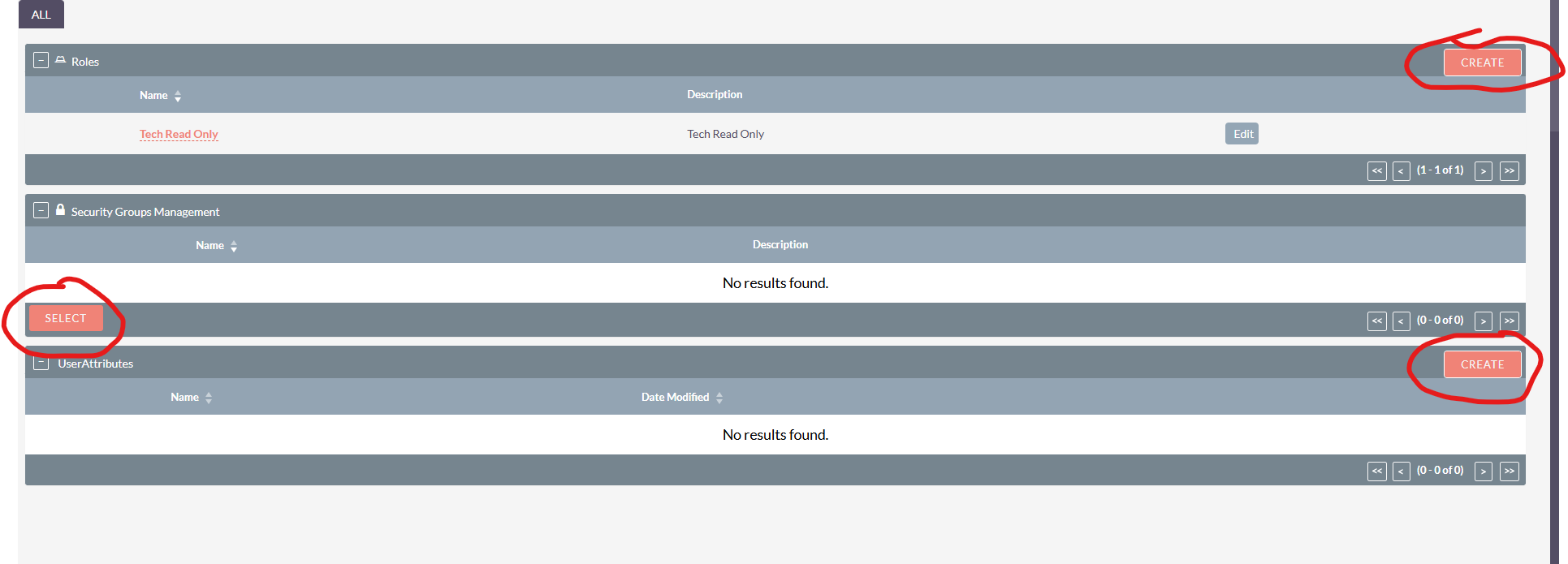
server running on linux, but im working in local with windows after all modules are working properly as per suite crm 8 but here in users detail view page is making small issues.. blank page issue resolved right now but now in the relationship part the create button for roles are not the proper one.
Actually i upgraded my two crms one is all good one is making some some problems… here im attching the screenshot:-
Check for customizations
If you had custom layouts or extensions under custom/modules/Users/, temporarily rename that folder to rule out custom code conflicts.
Verify PHP version compatibility
SuiteCRM 7.x/8.x may break on unsupported PHP versions.
Check suitecrm.log and php_error.log for fatal errors.
what are the differences on the file system now, specifically in the areas where things deviate?
I had a similar issue after an upgrade, where I had to delete the custom Suite7 vardef file and then the standard Suite8 file kicked in again.
User Attributes and Purchases are custom modules as well? Look into those files and into the code, specifically around the vardefs.
To make it easy to compare, you could install a fresh 8.8.0 somewhere and re-create those modules from scratch and see the file structure / details after deploying on this new temp environment.