pcdata
15 January 2026 18:04
1
Hi all,
I’m currently stuck upgrading SuiteCRM 7.14.x → 7.15.x and I’m hoping someone can clarify the correct and supported upgrade procedure , especially regarding PHP version switching .
I’ve successfully upgraded through many previous versions (7.6 → 7.7 →7.8 → 7.9 → 7.10 → 7.11 → 7.12 → 7.14), so I’m familiar with the Upgrade Wizard and general upgrade process. This particular step consistently fails.
Environment
Current SuiteCRM version: 7.14.x (tested 7.14.5, 7.14.6, 7.14.8)
Target version: 7.15.x
OS: Ubuntu (fresh VM, snapshots used)
Web server: Apache 2.4
Database: MariaDB (supported version)
PHP versions tested:
phpinfo() confirms PHP 8.2 is correctly loaded by Apache and required extensions are enabled.
What happens during upgrade
Upload SuiteCRM-Upgrade-7.14.x-to-7.15.x.zip
System Check & Preflight Check pass
Upgrade starts
During commit phase:
After restarting Apache / server:
There is no clear indication of heavy CPU or memory usage during the hang.
Key concern / confusion
According to the official compatibility matrix :
SuiteCRM 7.14.x supports PHP 8.1, 8.2
SuiteCRM 7.15.x supports PHP 8.1, 8.2, 8.3, 8.4
However:
If I upgrade PHP to 8.x before upgrading SuiteCRM, the upgrade crashes.
If I stay on PHP 7.4, the upgrade package refuses to install.
This seems to create a catch-22 :
Questions
What is the officially supported PHP version during the upgrade itself from 7.14.x to 7.15.x?
Should PHP 8.x be enabled before , during , or after the SuiteCRM upgrade?
Is there a recommended PHP configuration or migration strategy specifically for this upgrade?
Are there any known issues with the 7.14.x → 7.15.x upgrade packages?
Any guidance or confirmation of a working procedure would be greatly appreciated.
Thanks in advance.
rsp
15 January 2026 19:39
2
Do you have any customization?
Do you have any add-on?
Make sure you have correct permissions set for files & folders.
You can change log level. Check the error_reporting in php.ini file.
pcdata
16 January 2026 13:50
4
Hi RSP,
Thank you very much for replying and trying to help.
I don’t have any add-ons installed. When I try to use
sudo tail -f /var/log/apache2/error.log Apache doesn’t log any errors.
sudo tail -f /var/log/apache2/error.log
[Fri Jan 16 09:17:49.463150 2026] [mpm_prefork:notice] [pid 26475] AH00163: Apache/2.4.58 (Ubuntu) configured – resuming normal operations
[Fri Jan 16 09:17:49.463244 2026] [core:notice] [pid 26475] AH00094: Command line: ‘/usr/sbin/apache2’
When running the upgrade. The browser screen will stay on “file copying in progress“. It doesn’t matter which browser I user. I tried Firefox ande Edge.
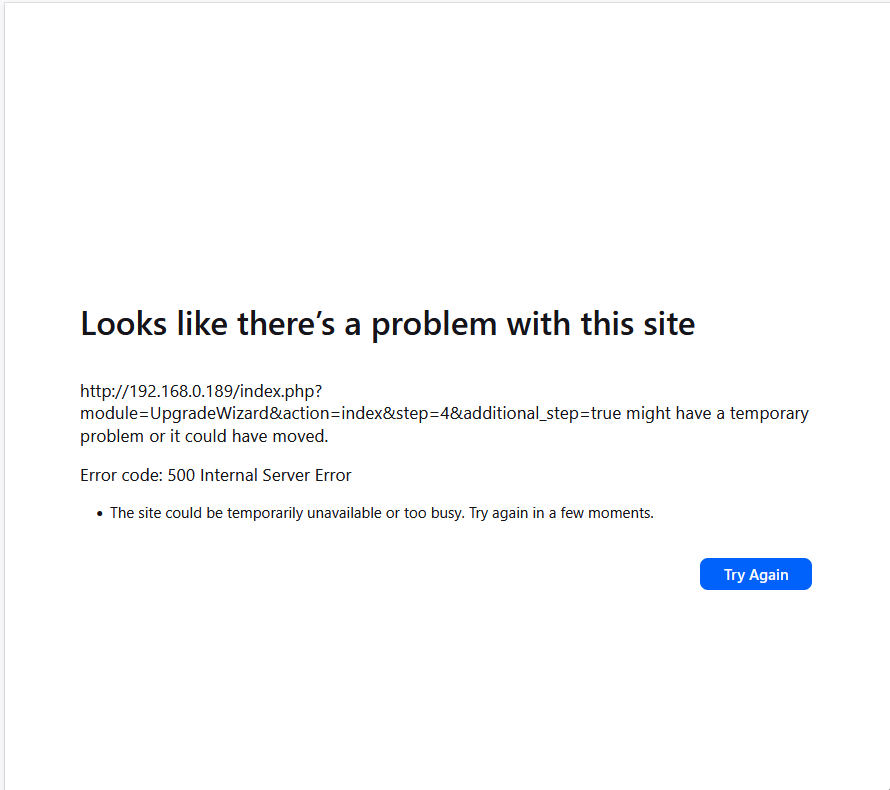
Eventually, after 5 minutes (max age timer, and upload time are set to 1 hour) I will get an HTTP 500 error. Even when rebooting the server, the suitecrm instance isn’t available anymore. The HTTP error 500 page will always be presented. Even when I try to delete cookies, doesn’t make any difference.
The only way to get suitecrm back up and running is restoring the 14.X snapshot.
rsp
16 January 2026 14:59
5
You need to check log files in suitecrm folder.
SuiteCRM uses a couple of logs that give you helpful clues as to what is going on in your system. In fact, if you need to troubleshoot a problem, this is always worth checking.
suitecrm.log
You’ll find suitecrm.log in the base directory of your...
The only way we can help you is if you can tell us what the 500 error is.
pcdata
19 January 2026 09:58
7
I fixed it.
I hadn’t installed the php8.2-intl class. After installing the upgrade when flawlessly.
If you’re still interested. Here is the log:
[Mon Jan 19 08:40:18.492796 2026] [php:error] [pid 27338] [client 192.168.0.168:56822] PHP Fatal error: Uncaught Error: Class “IntlDateFormatter” not found in /var/www/sugarcrm/include/SugarLogger/SugarLogger.php:243\nStack trace:\n#0 /var/www/sugarcrm/include/SugarLogger/SugarLogger.php(150): SugarLogger->setDateFormatter()\n#1 /var/www/sugarcrm/include/SugarLogger/SugarLogger.php(137): SugarLogger->_doInitialization()\n#2 /var/www/sugarcrm/include/SugarLogger/LoggerManager.php(241): SugarLogger->__construct()\n#3 /var/www/sugarcrm/include/SugarLogger/LoggerManager.php(109): LoggerManager->_findAvailableLoggers()\n#4 /var/www/sugarcrm/include/SugarLogger/LoggerManager.php(202): LoggerManager->__construct()\n#5 /var/www/sugarcrm/include/entryPoint.php(151): LoggerManager::getLogger()\n#6 /var/www/sugarcrm/index.php(47): require_once(‘…’)\n#7 {main}\n thrown in /var/www/sugarcrm/include/SugarLogger/SugarLogger.php on line 243, referer: ``http://192.168.0.189/index.php
Thanks everyone for the help and support.
2 Likes
pgr
19 January 2026 09:59
8
It’s possible you’re missing quite a few other PHP extensions, here’s a quick copy-paste from what I usually install in Ubuntu:
sudo apt install php8.2-common php8.2-mysql php8.2-xml php8.2-xmlrpc php8.2-curl php8.2-gd php8.2-imagick php8.2-cli php8.2-dev php8.2-imap php8.2-mbstring php8.2-opcache php8.2-soap php8.2-zip php8.2-intl php8.2-ldap -y
I also install xdebug in dev environments.
2 Likes
pcdata
20 January 2026 07:53
9
Thank you very much for the list. Definetely going to check if I missed some.
I had problems too on updating 7.14 to 7.15 with apache and php-fpm, the 7.15 update ran into an timout because it took a little bit too long. You may have to wait more than 5 minutes for the update to complete.
Had to increase the timout in /etc/apache2/apache2.conf
#
# Timeout: The number of seconds before receives and sends time out.
#
Timeout 900
2 Likes
Dear @pstevens ,
I am also facing issues with the setup SuiteCrm 7.15 while using PHP 8.2.9 with MS SQL Server.
Warning: Undefined array key “setup_db_type” in C:\Apache24\htdocs\SuiteCRM\install\install_utils.php on line 596
Warning: Undefined array key “setup_db_manager” in C:\Apache24\htdocs\SuiteCRM\install\install_utils.php on line 596
Cannot load DB manager
Fatal error: Uncaught Exception: Cannot load DB manager in C:\Apache24\htdocs\SuiteCRM\include\utils.php:1976 Stack trace: #0 C:\Apache24\htdocs\SuiteCRM\include\database\DBManagerFactory.php(101): sugar_die(‘Cannot load DB …’) #1 C:\Apache24\htdocs\SuiteCRM\install\install_utils.php(596): DBManagerFactory::getTypeInstance(NULL, Array) #2 C:\Apache24\htdocs\SuiteCRM\install\checkDBSettings.php(321): getInstallDbInstance() #3 C:\Apache24\htdocs\SuiteCRM\install\checkDBSettings.php(54): copyInputsIntoSession() #4 C:\Apache24\htdocs\SuiteCRM\install.php(357): checkDBSettings() #5 {main} thrown in C:\Apache24\htdocs\SuiteCRM\include\utils.php on line 1976