you can keep your public_html folder (I assume, you’re installing Suite in a subdomain) and then you’d have to point your VHost to the (SuiteCRM) public folder inside your public_html.
(Not sure whether Enhance can do that - you’d have to check with their docs. Usually, I avoid any form of control panel, since I’ve got too little control with those ).
That is not officially supported - however, it might work.
As for the installation process itself: I usually use the GUI.
The most important thing is, to get the server setup right - then the CRM installation is very simple and usually always works.
Hey, thanks for your reply. Enhance works with containerized PHP and that was the reason it didn’t work. Thanks to the amazing support of Adam from Enhance it’s working. He wrote the reason that was needed was to remove the port setting to prevent the app trying to use tcp. The reason tcp doesn’t work to 127.0.0.1 is that PHP is containerised and 127.0.0.1 is the loopback of the container and not the host o/s.
The above is what prevented Enhance to work on both 127.0.0.1 and localhost. I’m exited it works!
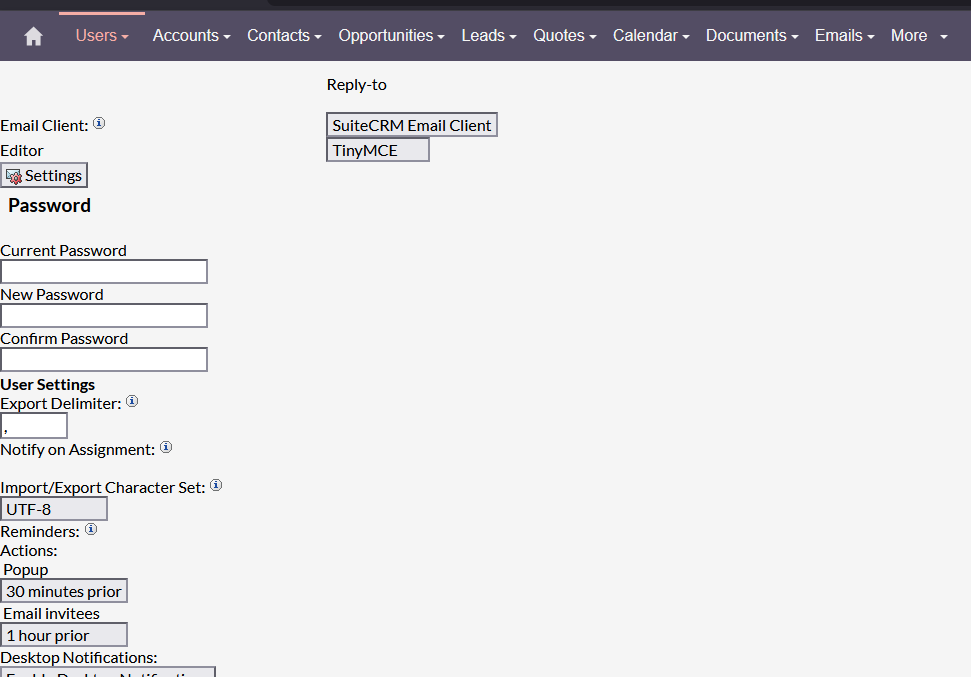
I think I missed some steps with the setup, SuiteCRM feels a little sluggies and the most of CSS is missing,
The nav bar is fine, but the rest of the page looks from the stone age
The error there is due to a combination of Redirect/.htaccess not being set correctly.
Please ensure that Litespeed properly supports all of the required Apache .htaccess Redirect/ReWrite rules and that the .htaccess in both the public and public/legacy folders are present and correct.
 ).
).