When Logging in “Too many failed login attempts, please try again later.” this popups after 3 failed attempts.
Is the any way to overcome this
You can update this property in you .env file or .env.local
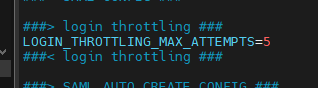
2 Likes
Thankyou for your timely update.
One more clarification
Eg. Incase by mistake if i wrongly entered 3 times. It took approximately 30mins for me to relogin correctly. Is there any possibility of setting this time ?
It’s right there the following option interval
2 Likes
Thankyou very much 
This is pretty cool guys, but how do I unlock a “blocked” account instantly?
How did user account get blocked?
Did you try Chrome or incognito mode?
1 Like
I never tried this, but you can try setting a low interval, wait it out, then put things back as they were.
I am not sure what needs to be restarted for these settings to take effect. Maybe a Symfony cache clear, or a web server restart.
1 Like
Thank you guys for your replies. I was thinking maybe someone knows straight up what key in the database I have to blank out so the user can log back in instantly, but hey 30 minutes passed quicker than I anticipated.
So, how did you unlock users?
I waited 30 minutes 
In case the issue comes up again for someone, I’ve published a video with some details around that:
1 Like
Dear @BastianHammer After migrating our instance from SuiteCRM 7.15 to SuiteCRM 8.9.2, I am currently unable to log in to the application. Prior to the migration, the login process was functioning correctly. Post‑migration, however, login attempts fail, and no logs are being generated to help diagnose the issue.
Check out this topic:
It is not working .thanks
Hello Abhishek,
no logs is tricky.
If you switch to dev mode, can you see anything then?
What changed around DB versions?
Do you use passwords with special characters? I had some issues with those before.
If you create an admin user in a new / fresh 8.9.2 CRM and copy that user / db record into your upgraded instance, does it work then?
1 Like
Hello @BastianHammer ,
I changed the APP_ENV setting to dev, but the log is still not being generated. I am using MariaDB 10.4.32.
To resolve the login issue, I set up a fresh SuiteCRM 8.9 instance, copied the admin password from its database, and inserted it into the migrated CRM database. After doing this, I was able to log in successfully to the migrated version.
I have a question: if I want to implement custom validation without using Studio, and the validation involves multiple conditions, is this possible?
Thanks,
Abhishek
(Best to start a new thread with your question)
Depending on your requirements, there are multiple options for you.
Check out these examples:
And in general, then front end documentation: