I have some questions about front end Angular development. There are a lot of simple things that are super easy to do in SuiteCRM 7 like populating a field with the value of another field (in the browser, not backend) and populating a field with a value from a related record.
I do this stuff like every day and it’s super easy to achieve in SuiteCRM 7.
I h aven’t really got into Angular Dev and I’m not sure where to start. I understand these things are achievable with the documentation and tutorials provided.
However, Angular Dev is new to me and I have some questions (I’m sure many have the same questions). Hoping someone that does this can help clarify.
I sort of get the general idea of creating a dev env and then compiliing it over to prod (I’m sure Chatgpt can help me with that part).
However, what are the implications? If I do customizations on the front end, are they upgrade safe? Do they have to be recompiled every time there is an update? Can anyone shed any light on what the implications off these kind of customizations are?
Also, I would love a general overview of the process for creating a dev environment and compiling and pushing it to prod if you feel so inclined.
You always need to recompile when you change front-end code. It pays to have a truckload of RAM. You can make do with 24 - 32GB, but 48GB is the sweet spot for me.
It’s important to get the versions right (same as the ones currently used by the core team). This goes for Node, Angular, and possibly others I don’t remember.
Your upgrade-safe changes go in the extensions folder.
Reading up on generic Angular stuff is recommended, and you should look at it as a relatively large investment. I wish I had found time to do this part myself, but I haven’t. The upside is that these well designed frameworks make you a better developer. They teach you how to think and how to organize code. In the back-end, Symfony definitely does that for me, I love learning Symfony stuff.
It is important to note that the design philosophy of SuiteCRM 8 aims to move many common tasks into back-end configuration.
Generally, it would be expected that you would only need to dive into Angular front-end changes if you are performing ‘high-level’ customisations—such as building entirely new field types, views, etc.—that fall outside the scope of the standard framework
For many common use cases, you can achieve your requirements using Front-end Logic. This allows you to manage field states, visibility, and basic interactions through metadata and PHP, rather than writing custom Angular components from scratch. You can find several practical examples of how to implement this in the documentation here: SuiteCRM 8 Front-end Logic.
It is likely that more configurations will follow in future updates. If you have specific use cases or behaviours that you cannot currently achieve using the existing logic framework, we would be very happy to hear about them.
Thanks @Matt pardon my ignorance, this is not my comfort zone, maybe a stupid question…. so the front end logic examples don’t require Angular development?
Absolutely agree with your points, as I am facing the same issue, especially when you’ve had an old habit of doing UI changes, and repair&rebuild does the job and compiling sounds like a hassle.
I have found a way to create JS files and add them in
suitecrm/public/dist/index.html
through <script src> tag.
Just clearing the front-end cache and obligatory (and ritualistic) repair&rebuild reflects the changes.
However, this is not upgrade-proof, as compiling the application would overwrite the file. The good thing is you just have to add your <script> tag after recompilation/upgrade, as long as you’ve placed your JS file somewhere in the custom folder or the root directory.
Point to note is that SuiteCRM8 loads most of the legacy pages in an iframe, so directly accessing DOM elements doesn’t work; you have to wait for the iframe to load before accessing its elements.
I’d love to hear an easier way to achieve this. But until then, I’ll stick to this approach.
I’d also like to hear constructive criticisms on this approach, as I find myself a little biased towards this approach.
@fynsis I think what I’m being told, and to my utter amazement is that you don’t need to hack the front end. With all the available tools you can achieve all the front end business logic and more in SuiteCRM 8 that you could achieve in SuiteCRM 7 that you would have previously done via smarty and JS insertion. All without rebuilding Angular.
To clarify the approach for front-end configuration and customisations:
Front-end Logic requires no Angular development. It is entirely PHP-based and can be implemented using legacy metadata and vardefs, or with PHP extensions in the extensions folder (e.g., defaultExt). This is the recommended, upgrade-safe path for most UI behaviours.
If you do need to do Angular customisation, this should be done locally. You should never need to install Node.js or Angular etc dependencies on your production server. By using the SuiteCRM dev package (which includes the pre-compiled core), you only compile your specific extension. This means memory requirements are significantly lower than when recompiling the entire core project.
Otherwise, we don’t recommend using native JS files. The extension architecture is designed so you can benefit from Angular’s internal resources. Compiling just your extension via the framework ensures a much more robust and upgrade-safe result. There are some basic guides on Angular development within SuiteCRM 8 available here: Frontend Extension Examples, with more to be added in the future."
@Matt OMG what a whole new World that has opened up. I was under the impression (and I can’t be the only one!) that all these customizations required rebuilding Angluar.
I just built a calculation button this morning to populate a field with a value when the button is clicked using:
calculateValueBackend
This is really incredible!!! If I didn’t know this from the documentation and I work in SuiteCRM everyday, I’m sure I’m not the only one that didn’t realize this (I guess the other possibility is I’m just slow!).
I would love to be able to have a handler like: calculateValueBackend
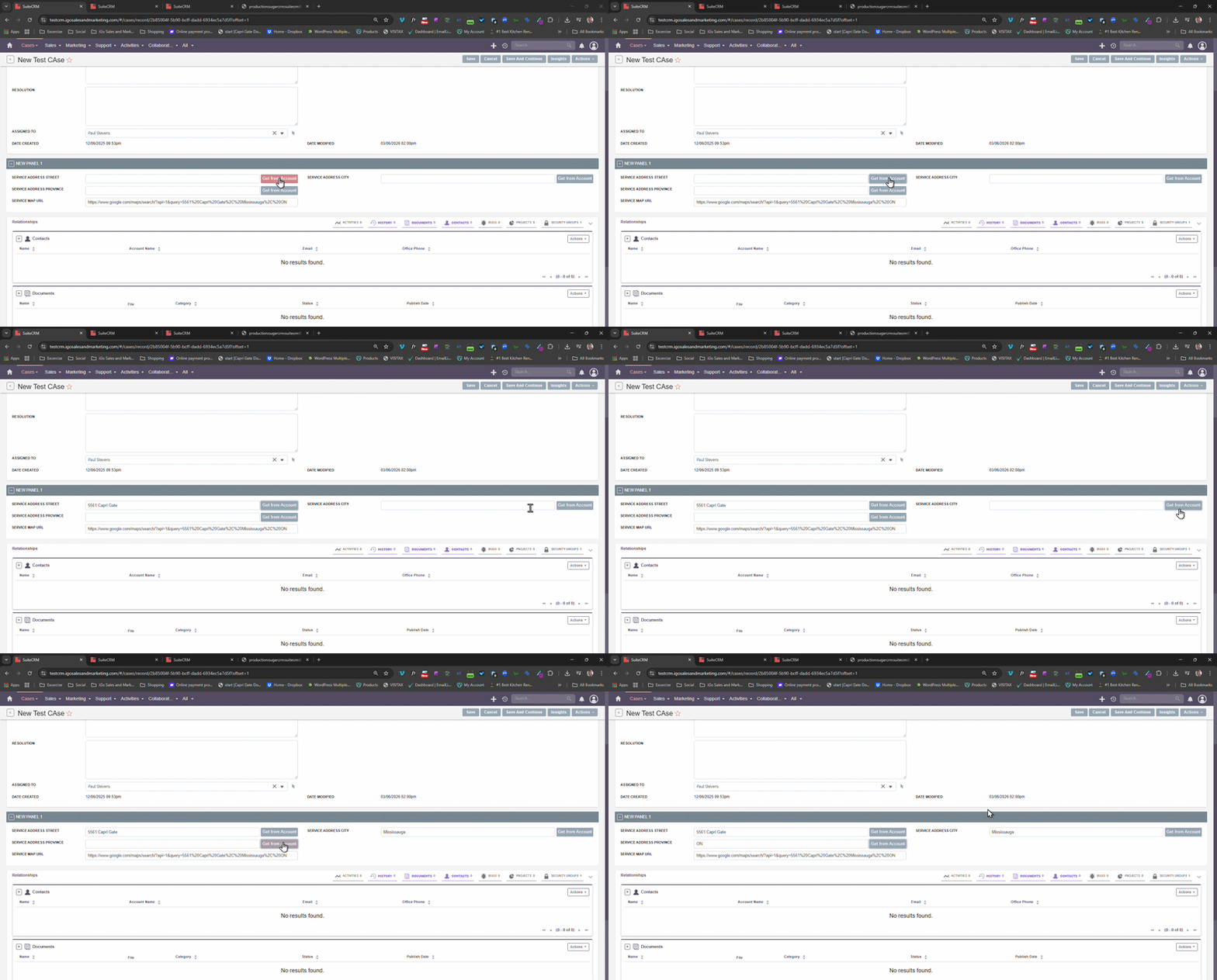
That I could use to populate multiple fields. That would be super useful. For example, when account is selected populate the address fields (on the front end, I realize I can do this with a hook in the back end). I can populate a single field with calculateValueBackend. Is there a methodolgy I’m missing that could accomplish this? I’m experimenting with record actions but not sure if that affects front end.
You’re certainly not the only one with that impression. I’m quite sure that more than 90% of users on the forum are unaware of this as well, which is probably one of the main reasons many users and organizations have been hesitant to upgrade their SuiteCRM instances to version 8.x.
It would be nice to be able to pass custom parameters to the process handler. Being able to pass custom parameters to the process handler would allow me to make essentially the same functionality as “populate_list” from SuiteCRM 7. I can make it work on a field by field basis, which requires a unique process handler for each field, but would love to be able to pass parameters to the process handler and then it could look up values from any record. Like this:
It would have been nice if I could have had one button to populate all three. I tried a bunch of different tactics but this was the best I could do with available tools. If anyone has any ideas, it would be appreciated. I tried to populate the other two based on population of the first one, but that’s kind of awkward if the user just manually types it in.
The videos and tutorials on the Developer Insights page, I recommend you guys go through all of them and implement it and play around with different settings.
They allow you to get a feel of how complicated - or how surprisingly simple - these things are.
As always, there are several levels of customization. This was there since the beginning in old SuiteCRM, and is still there for the new front-end, also.
If you change the things that are configurable via declarative configuration files, such as YAML or PHP array definitions (think vardefs, viewdefs, etc), then the code loads that up at runtime, or at “repair-and-rebuild time”.
On the back-end PHP code, there is never a build or compile process, due to the nature of the language. There are only different ways of loading and refreshing. For example, Symfony often requires the “cache clear”.
The new front-end also has some declarative configurations (field logic, display logic). These can be made active with a Symfony cache clear; and not even that is necessary if you are in Dev mode.
I’ve used this in very few projects before.
So far, this UI is so clumsy that I mostly got push back from customers.
Yes, it’s better than nothing, but have one or more buttons behind every field when the goal for everyone should be to reduce clicking is going into the wrong direction.
Of course, it depends on the use case, sometimes it could make sense, but so far, customers aimed for less click-work and more things happening in the background / automatically.
I’d prefer custom action buttons at the top which can just do stuff / fill multiple fields at once or conditional logic similar to this:
Hey @BastianHammer I tried that approach but unfortunately it does not support related fields as a trigger. A save hook is not ideal in this case as you can’t always count on the address being the service address of the account, although it’s highly likely. I wish I could populate multiple fields on one click, that would have been ideal. Also like in accounts from SuiteCRM 7, “copy billing to shipping address”u



 I didn’t cotton on to this either…