SuiteCRM 8.8 / 8.9 – Is LDAP / Windows authentication required during installation?

We are installing SuiteCRM 8.8/8.9 and intend to use native SuiteCRM authentication only (no LDAP / AD / Windows SSO).

The documentation states LDAP is optional, however during installation we encounter errors unless LDAP-related components are present or configured.

Our IT team believes Windows credential listening is unnecessary, but the installer appears to detect LDAP capability and fails when it is not fully configured.

Questions:

  1. Is LDAP detection required during install even if native auth will be used?

  2. What is the supported method to bypass LDAP cleanly during installation?

  3. Should php-ldap be completely removed, or is there a config flag to disable LDAP validation?

We want to confirm whether:

  • This is expected installer behavior, or

  • There is a documented workaround to install without LDAP present at all.

Any guidance from maintainers or others running 8.8/8.9 without LDAP would be appreciated.

As per my knowledge, it is not mandatory and not require to have LDAP in order to install SuiteCRM successfully.

Make sure you’ve installed all required packages, set web server properly, set correct permissions and follows the installation guide.

Could you please share errors with us? You can check log files under Logs folder or browser console.

This is the error when we attempt to remove it from the composer

Have you tried UI installation?


Yes, but the API wasn’t responding, so I followed this guide next, which recommended using the “install composer” command.
https://docs.suitecrm.com/developer/api/developer-setup-guide/json-api/

Hello,

that’s an interesting one.
So far, I’ve ignored the LDAP warning in the UI installation on systems without plans to use LDAP.
Just recently, I need to do some CLI stuff and suddenly there, LDAP was required.
It was a different error / scenario, but the same requirement.
I simply installed LDAP and everything worked - so no troubles there.

Meaning?
Look into that first.
If the UI installation doesn’t work smoothly and quickly, something is wrong with the server and your environment is prone to issues in the future.
What was the problem there?
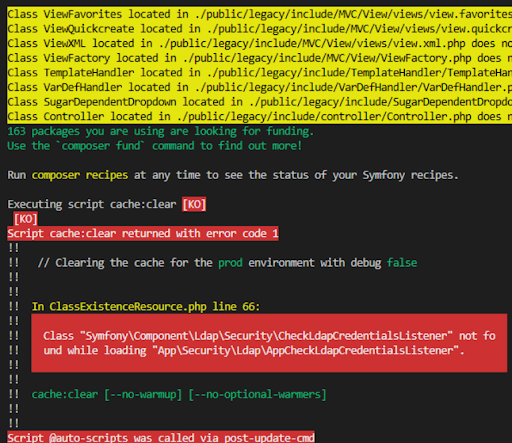
I suggest installing everything normally - PHP LDAP modules, and leaving the original composer intact; and then simply not using LDAP.

The fact that using LDAP is not required doesn’t mean that the software is ready to be “amputated” of LDAP components - that’s too complex.

How do you “not use LDAP” - can it be disabled to not look for it?

You basically install LDAP and then do nothing.

Perhaps your original error was a missing PHP module (e.g. php8.2-ldap). Install that, put composer.json back to the original state, and try again.

Or maybe it’s better to just start a fresh installation with everything intact.

If this happens again post the exact text of these messages - the original ones, not the ones after editing composer.json.