Hi DJuser,
thank you for your answer.
I have the SuiteCRM 8.1 and I wanted to update it to SuiteCRM 8.2.1. I will tell you step by step what I did.
1.) I downloader the SuiteCRM 8.2.1 zip file and uploaded it into mysuitecrmfolder/tmp/package/upgrade.
2.) I executed the command ./bin/console suitecrm:app:upgrade -t SuiteCRM-8.2.1
3.) I executed the command ./bin/console suitecrm:app:upgrade-finalize -t SuiteCRM-8.2.1
4.) After that I login into SuiteCRM and it shows the broken page. The problem is also, that i had a theme which showed, for example, the navbar on top in blue. But all the colors from my theme are gone too.
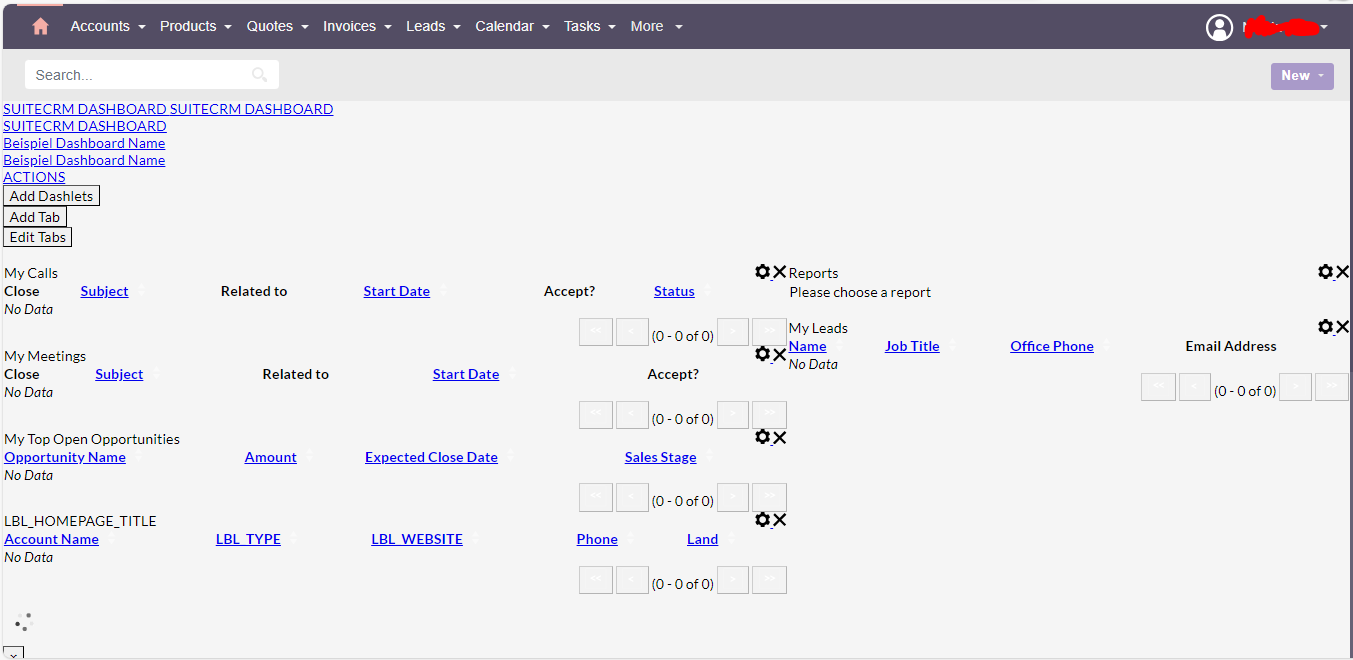
this is what I did to fix the problem, but it did not fix it.
1.) my RewriteBase is “/legacy/” I tried to change the RewriteBase to all possible options. I tried “public/legacy/”, “/public/legacy/”, “/mysuitecrmfolder/public/legacy” and a lot more options…
2.) a lot of people said that this is a permission problem. I change the permissions like this:
sudo chown -R myuser:mygroup ( I did not need this because my user was already the owner, I teste it with “whoami” and “ls -la”)
sudo chmod -R 755
sudo chmod -R 775 cache custom data modules themes upload
sudo chmod 775 config_override.php
3.) I also executed this commands with my user: find . -type d -not -perm 2775 -exec chmod 2775 {} ;
find . -type f -not -perm 0664 -exec chmod 0664 {} ;
find . ! -user <apache_user> -exec chown <apache_user>:<apache_group>{} ;
chmod +x bin/console
4.) In my public/legacy/cache/themes/suite8/css/Dawn folder the styles.css is missing. I uploaded it manually.
After every step I did i cleared the browser cache and did a quick repair and rebuild. Thank you.