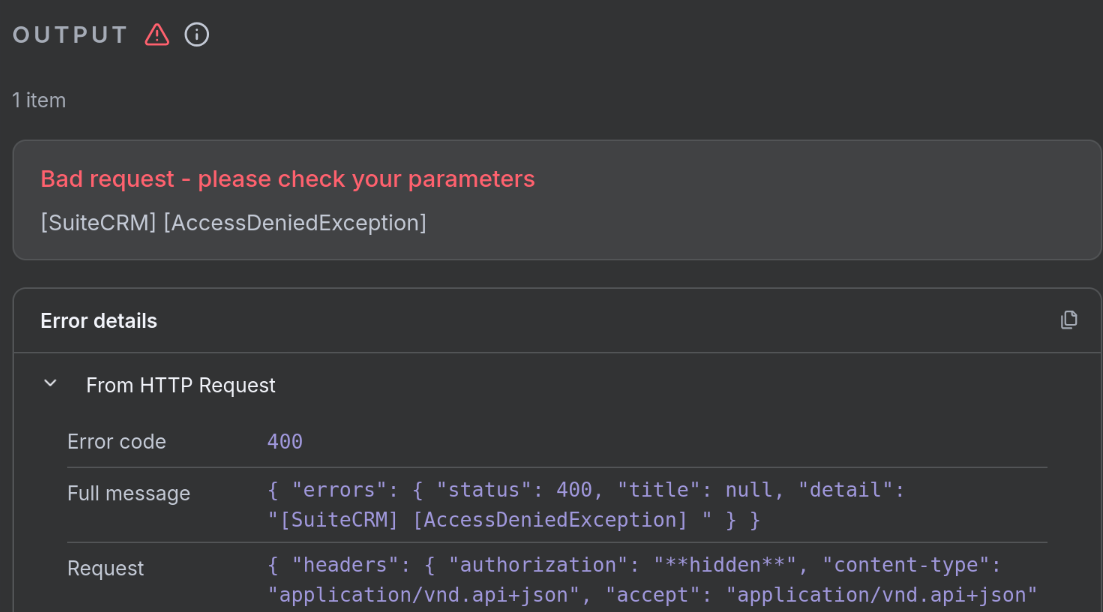
I was playing with SuiteCRM API and have a few questions (based on real life issue):
I noticed that within API I only have filter as an option and I am wondering if there is actual search option as well?
I get some documents which have identifier. Idea is to get the file, extract the identifier and upload it to the CRM in its proper place (tied to appropriate account or contact or lead), but this identifier might be stored in couple of different fields within CRM modules. So do I have to filter on all possible combinations or is there a search which will find exact phrase in any field where it might be stored?
(think for example description field which is avaliable in almost all modules, my data migh be stored in one of those, but I do not know which; maybe of a contact, account, lead or maybe a file)
Also, how is security model applied to API? I am not entirely sure that it applies at all, does roles and groups have any effect on read/write rights?
Let me ask you a preliminary question - this process you’re describing, how is it started? Is it the user clicking a button? In which view?
Or is it started in the SuiteCRM PHP back-end?
Or is it started by something external to SuiteCRM?
Depending on this, you might be better off doing it all in a back-end process, and yes, it will go through the API, but you won’t be so dependent on details of the API.
What happens is that we receive a document related to particular case (which in turn is connected to an account or contact). Idea is to just drop this document into a hot-folder which will trigger automation software (N8N in my case) to do something in API (find document identifier, find if this identifier is connected to account or contact, upload the file and add additional attributes we extracted along the way).
So, API will be executed by a an external software outside of suiteCRM.
The external system calls successive entry-points to search, get info, do changes
The external system calls a single custom entry-point written by you which “does it all”.
I would definitely go with 2, because it’s more familiar territory for me, and gives me full control, and better performance. But your option may be different.
Note that none of this is very documented; but on the other hand, the entire v8 codebase uses the API, so the code base is the best source of examples.
I haven’t seen any search option via the JSON API.
There is nothing in my swagger as well: Getting Available Resources :: SuiteCRM Documentation
Via GraphQL, it might be possible - but I assume it’s a custom endpoint now (on the UI)? Or some legacy routing for the UI, without an endpoint or similar.
Might just be the easiest option currently, yes.
The roles should be working with the API.
You’ve got an API user. If you assign a role to it and try to retrieve a record, you should be getting an error, if the role doesn’t permit it.
I would agree with @pgr really, I suggest you write a custom entry point:
Your automation software, then sends the doc to the entry point (along with any data you have extracted/determined) and the entry point that has access to the SQL etc can do the searching/filtering before then adding the document appropriately.
Alternatively, the entry point can JUST do the finding of the correct record (ie just send data), the automation software could then do a second stage that uploads and links the document via the API (JSON API :: SuiteCRM Documentation)
Please note there are a multitude of different API’s now, so we have V4 (the original api) then there is the V8 API (linked just above) this is a REST API that i think you are talking about and the V8 refers to the API and NOT the suite version. In Suite 8 there is also the GraphQL API which is completely undocumented and difficult to use/understand outside of the Angular interface.
I am not sure if the V4 API is working again in the last updates, however this DOES have ability to search (you can send SQL queries API v4.1 Methods :: SuiteCRM Documentation)
You are absolutely right, I completely forgot to clarify my install, which is SuiteCRM 8.8.1 and API I use is v8.
My general idea is to use standard tools (which are hopefully documented), I do have understanding on how systems work, I can program and fix things up to a point but I am also not a developer.
In the meantime I have made some changes to my existing system and used N8N and standard API to fill the database and create apropriate relationships. My next task is to create usable workflow which will actually improve our work process (there will be more questions I am sure).
I am trying to integrate some IA to enrich my leads. Leads are ok , integrated with my website. But when I try to enrich It with PATCH function I receive the feedback error 405. Using V8 API.
Maybe I didn’t find the right documentation. After trying some ways I have found the right directories to make the right requests. Maybe it is clear in SuiteCRM documentation but I didn’t find it.
I found the right directories and it worked properly. Anyway, I was making bad requests.
For CRUD operations I used the following directories:
my_url/legacy/Api/access_token to generate the token
my_url/legacy/Api/V8/module/Leads/ to read and delete leads
my_url/legacy/Api/V8/module to Create and Upload the leads
yes, there is a difference between documentation and actual path, if you have (closely) looked at Bastians videos you would see that he points out this difference (I think in API v8 setup video). Without seeing the video I would have likely spent days figuring out why it does not work.
Yes, exactly - the documentation and paths are for Suite 7.
Suite 8 has its stuff now in the legacy folder.
I’ve tried redirects on the webserver level to rewrite the legacy but there have been side effects - so legacy it is for now.
The future will be GraphQL - however, it seems like V8 is easier to grasp (and there is close to 0 documentation on GraphQL so far, unless you can read JS code. The whole Suite 8 Angular UI is using GraphQL)