Hello everyone,
I’m facing a persistent partial translation issue, even after successfully upgrading my system from SuiteCRM 8.8.0 to 8.9.0 (using the command-line/CLI upgrade process).
The Portuguese (pt_BR) language pack is installed, enabled, and set as the default.
The Problem:
The translation appears to be split into two parts:
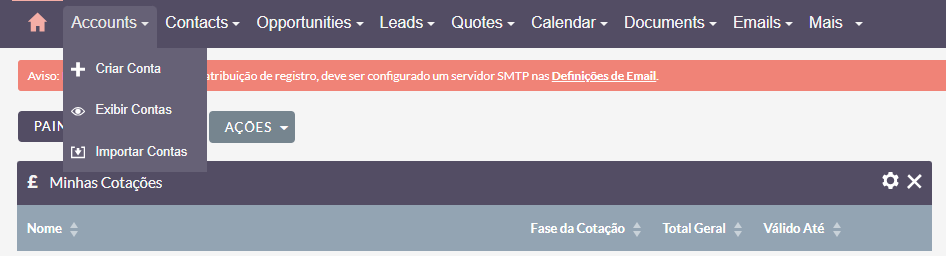
- What WORKS (is translated to Portuguese):
- The entire Administration (Admin) section.
- The action menus (submenus). For example, when I click on the “Accounts” tab, the dropdown menu that appears is correctly translated (“Criar Conta”, “Exibir Contas,” etc.).
- [I recommend you attach your image
image_d607c4.pnghere]
- What DOES NOT WORK (remains in English):
- The main module tabs in the top navigation bar. They stubbornly remain in English: “Accounts”, “Contacts”, “Opportunities”, “Administration”, “More”, etc.
This indicates to me that the backend (Legacy/PHP) is translated correctly, but the frontend (Angular/JS) is not updating the module tab names.
What I Have Already Tried (multiple times):
- Ran “Quick Repair and Rebuild”.
- Ran “Rebuild Javascript Languages” (the most critical step for the frontend).
- Checked my User Profile and confirmed that the “Language” is set to “Português” (Portuguese).
- Cleared my browser cache completely (Ctrl+Shift+R) after every repair attempt.
- Set all recommended server permissions (
sudo chown -R www-data:www-data .,sudo chmod -R 775 cache/ public/ tmp/,sudo chmod -R 775 public/legacy/custom/etc.) immediately after the upgrade.
Even after upgrading to 8.9.0 and performing all these repair steps, the main module tabs remain in English.
It seems the frontend cache is “stuck” and is not being properly updated by the “Rebuild Javascript Languages” action.
My Question: Is there another, separate frontend (Angular) cache that I need to clear manually via the command line? For instance, are there specific files in public/dist/ or cache/ that I can safely delete to force a complete rebuild of the frontend?
Thank you for your help!