After 2 days of trial and error I finally got gmail working with OAuth without resorting to App password.
I’m running SCRM 7.14.7
-
Setup your google stuff in console.google.com first. There are plenty of Tutorials to do this. This will give you Your Client Id & Client Secret to enter in the next next step on SCRM.
-
Setup an External OAuth Provider. (Admin>Email>External OAuth Providers)
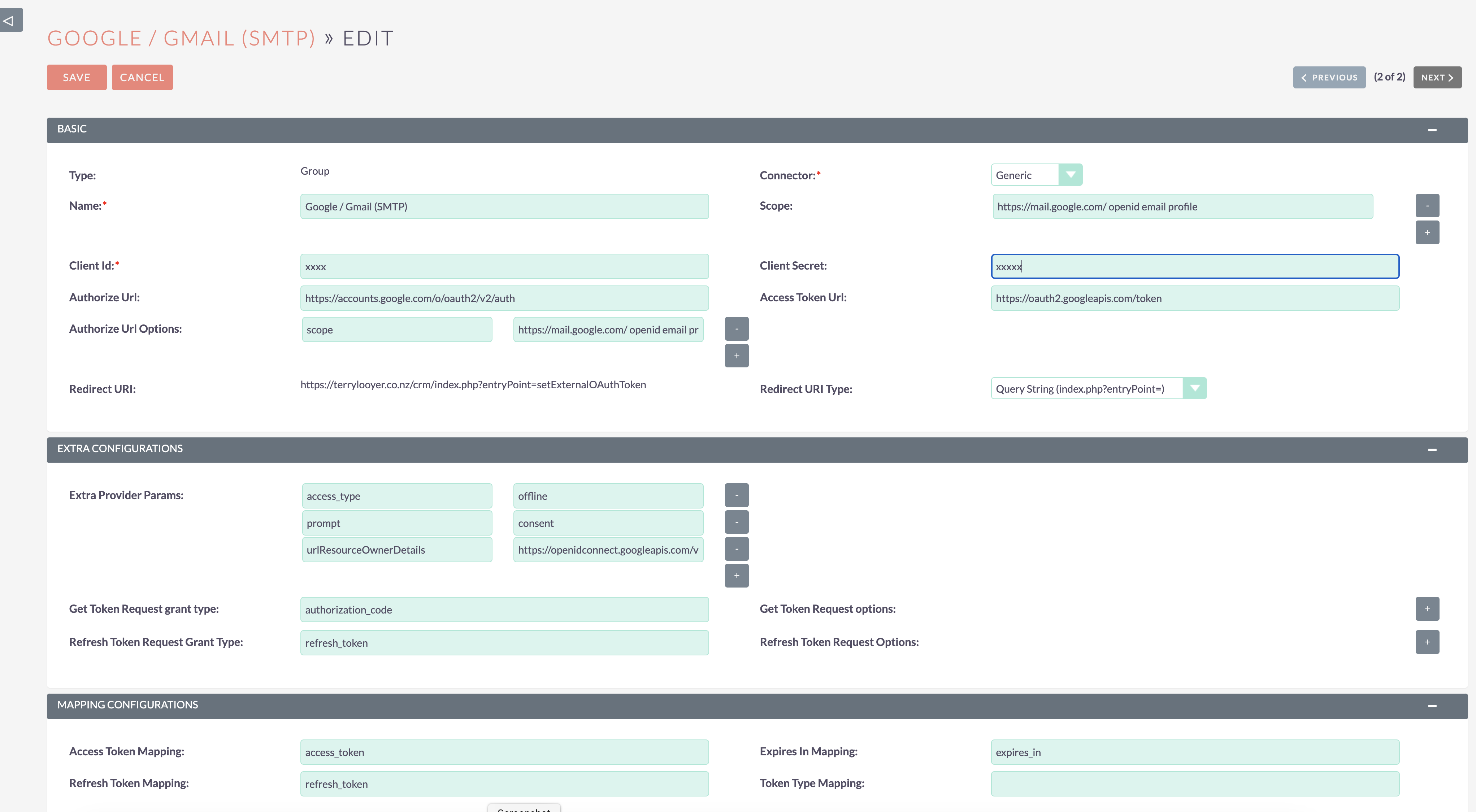
Authorize Url Options is ‘Scope’ & ‘https://mail.google.com/ openid email profile’.
The 3rd Extra Params is ‘urlResourceOwnerDetails’ & ‘https://openidconnect.googleapis.com/v1/userinfo’.
- Make the following code changes;
in Modules/ExternalOAuthConnection/provider/ExternalOAuthProviderConnector.php
Comment out line 122
add lines as follows;
        //$authUrl = $provider->getAuthorizationUrl($this->getAuthorizeURLOptions($config));
        $authUrl = $provider->getAuthorizationUrl([
            'scope'        => $scopes,
            'access_type'  => 'offline',
            'prompt'       => 'consent',
        ]);
in vendor/league/oauth2-client/src/Provider/AbstractProvider.php
Comment out line 423;
//'approval_prompt' => 'auto'
(this setting is deprecated)
- Setup an External OAuth Connector. (Admin>Email>External OAuth Connectors)
Give it a name and choose the Provider created earlier.
Click Authorise and complete the Google Account login.
When you are returned an Access Token and a Refresh Token should be populated.
If it only says ‘array’ in the Refresh Token, you may not have made the code changes described above correctly.
If all went well, inbound and outbound emails can now be setup.
Good luck.
