I’m new to SuiteCRM and I need some clarification about setting up a notes opportunity.
When I fill in a note associated with an opportunity, I can select a contact, but I would like to associate it with the company.
I would like to see this note inside the chronology of the company, but I only see it in the chronology of the contact and obviously inside the chronology of the opportunity.
How can I do?
Thanks for the advices.
It will be shown in the records to which is related. So if you relate the Note to the Account, it will show there.
Notes uses a flex relate, which is a single relation that can link to several kinds of modules (Accounts, Opportunities, etc)
However, if you need it to show in two records (both Opportunity and Account), you need to do one of two things:
-
Use the flex relate for one relationship, and add a new relationship in Studio for the other. You will need to attach records to both, as appropriate.
-
Keep only one relationship but make some custom code to traverse the relationship and show you more stuff in the Acitvities subpanel (so in Accounts, it would show you records related to the Account, but also records related to Opportunities which are related to the Account).
OK, but then it would be better to allow the user to choose whether to relate it to the contact or company.
And if this is not possible, then it is better to associate it by default with the company: the contacts change, the company remains 
You can relate it to a bunch of stuff through the relate flex field (on the right):
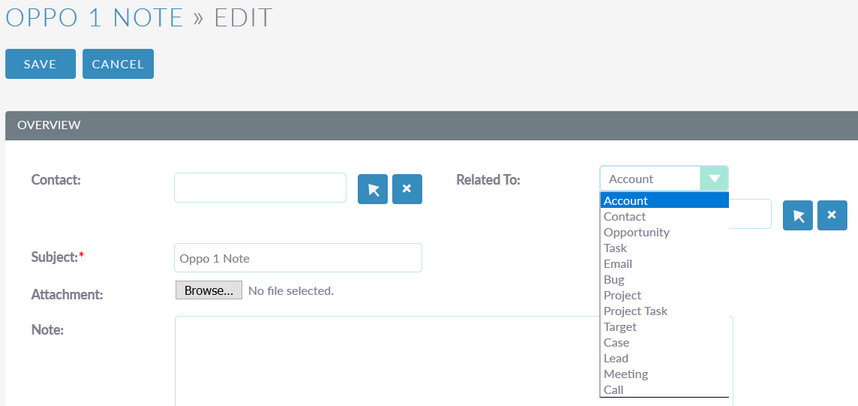
This includes Account and Contact.
You DO have an extra thing on the left that only allows links to Contact. Somebody must have had a good reason to do that this way, but I can’t think of one now.
Probably it relates automatically to the record you are in, when you click to create Note from within an Detail view (Activities subpanel).
If you need to enforce a specific way to link notes, you will either have to educate your users or make some small code customizations to make sure things get done right.
I’m sorry if I do not explain correctly, but I’ve been working on SuiteCRM for only two days.
I have read all the User Guide and the Administrator Guide; I have seen several videos and read several posts on this forum, but I am always a beginner.
I give an example.
I create an opportunity and connect it to the Company1 and contact JohnSmith.
I want to add a note to the opportunity to report that Company1 is a bad payer. I relate the note on Opportunity, but there is no field to relate it to account; so I have no way of seeing it on the Company1 list. I should duplicate it.
I want to add an another note to the opportunity to also report that JohnSmit was working with one of my competitors. In this case I have the filed contact and so I see the note in the JohnSmith list, but again I do not see it in the Company1 list.
I’m trying to create relationships, but I start with a simpler form.
(See my other post).
Sorry, which one do you mean?
Don’t worry about your ignorance, we all started there. I’m perfectly ok with helping people at all levels of knowledge. I don’t know everything about SuiteCRM either (and never will)…
I understand you requirement. It can’t be done without a bit of code customization. It’s not very complicated, but it has to be done in code. I can get you a quote for professional services providing this, if you want. If you want to keep learning and do it yourself, that’s fine too. Just ask me technical questions and I’ll do my best to reply. 