I am not getting the quick charts to show opportunities by pipeline. It shows “No Data.” Is there a way to reset the sales_stage_dom key list? I modified this dropdown, BUT there are some of the defaults left there. Is that the issue? How do I reset, through the UI, the default items/keys in the sales_stage_dom dropdown list?
Hello ,
that’s the default in 8.9:
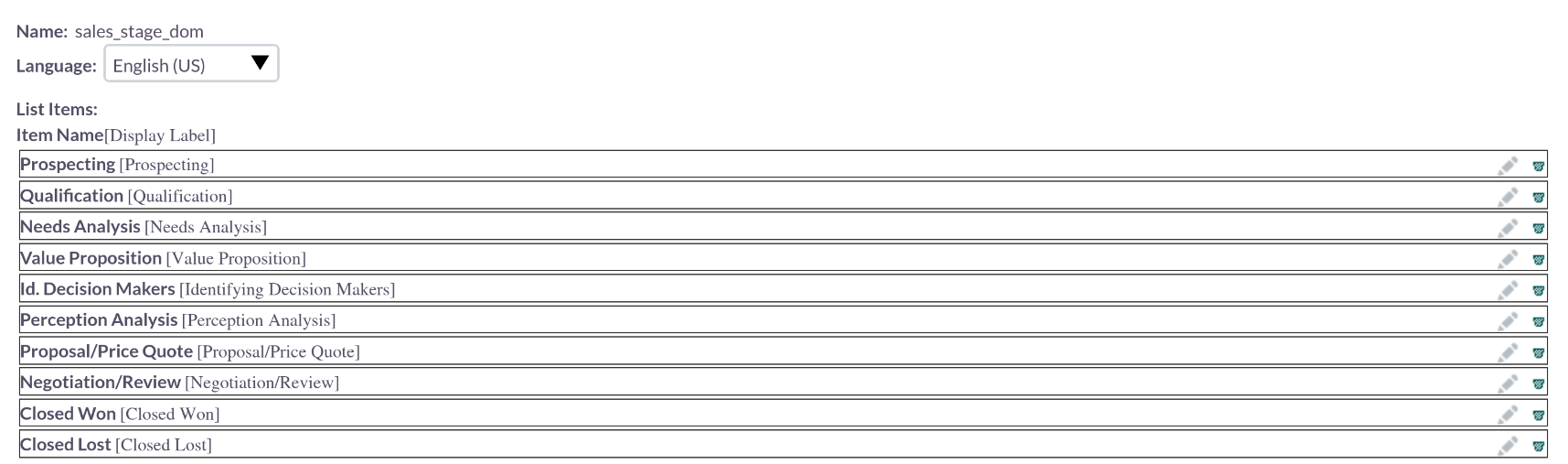
“resetting” probably the easiest way is manually entering the original data.
It’s possible to build custom charts:
https://docs.suitecrm.com/8.x/developer/extensions/frontend/examples/add-charts-extension/
Did you change the the display values only or did you delete original values and add new ones?
Deleted the originals and added new ones.
I reset the server to back when I first installed the software. For some reason, even with the default sales stages now, when in the view opportunities screen, when I click insights, the quick charts “pipeline by sales stage” shows no data.
That implies, that you’re using the demo data?
Do you have your installation on a domain? With HTTPS?
I am using my own URL, on my own server, with real data.
I am running on 8.8.1. The domain has https. It’s Ubuntu.
And I assume you’re on MySQL, not MariaDB?
In that case, there is a bug ticket already online:
I am using MySQL. Thanks.
Hello Bastian. Merry Christmas. I tried to follow the solution presented on GitHub, but it did not work. Could you help me out with this?
The issue is that the DB is MySQL, not MariaDB.
Hello,
on Github that’s not a finished solution to apply - mostly some debugging help / info.
What I’ve done on one server is a MySQL to MariaDB migration.
Make sure to plan / tell your MySQL DB dump to prepare the dump file for MariaDB / without the MySQL features.
If that’s not an option, .. are you a developer?
You can look into the code, test and fix it and create a pull request.
Alternatively wait for a fix / hire someone to fix it (contact me / let me know if I should support there).
I am not a developer. Just a regular guy who uses ChatGPT to install apps on a server and maintain a server.
Is it a fresh server / installation?
Sometimes, just starting over with MariaDB is fast / simple / easy.
As long as everything works, the system is quite smooth.
If you have some ‘special’ setup / something that’s not directly within the compatibility matrix, server / sys op tasks can get time consuming.
Those custom values are somewhere under the custom directory.
Do a “find in files” looking for a distinctive value.
When you find the file, I think you can delete it but please be careful and back it up before trying, just in case you break your system and need to go back.
It’s not a fresh install. I have quite a bit of data now in the db/on the app.
@BastianHammer , any thoughts on this?
Still the same, I migrated from MySQL to MariaDB and it’s working out of the box.
In that case, I didn’t need to spend time on a bug which doesn’t exist in a DB that I’m totally fine with.
Try the migration with AI. It’s really not that difficult.
Just tell the AI to pay attention to the MariaDB compatibility for the dump.
All other applications have been working directly as well for me - WordPress, NextCloud, Drupal and several other SuiteCRM instances.
Looking into the the code with an AI is more difficult to setup and be certain.
You’ll get a lot of solutions and ideas from the AI, which could all be wrong and lead down a rabbit hole.
Alternatively, if you need to stick to MySQL, hire someone to fix the issue?
Just send me a PM if you’re interested.
Thanks @BastianHammer . I think I will look into migrating, not fixing the error.