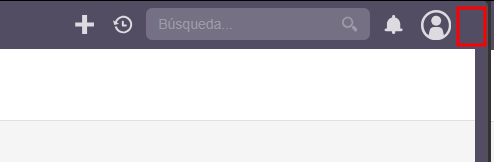
Good morning,
I’ve been struggling for days with the code and the configuration options in my SuiteCRM 8.9.0 installation. What I’m trying to do is display the username of the currently logged-in user next to the user icon in the navbar, on the right side of the icon.
Could anyone tell me where this change should be made? I’ve tried working with both legacy and Angular, but I can’t get the username to appear in that part of the navbar.
In case this helps anyone, here are the steps I followed to display the username next to the profile icon in the SuiteCRM navbar.
In short, the solution consists of creating a custom JavaScript file that injects the username into the navbar, registering it in angular.json, and rebuilding the Angular frontend so the changes take effect.
The steps were:
Create a backup of the angular.json file.
Create the directory core/app/shell/src/custom/js to store the custom script.
Develop a JS file that waits for the navbar to load and dynamically adds the username next to the icon.
Set the appropriate file permissions.
Modify angular.json to include the script in the scripts section and add the custom folder to assets.
Validate that the JSON is correct.
Rebuild the Angular frontend (yarn build) and clear the SuiteCRM cache.
Set final permissions and verify that the script is included in the generated bundle.
With this approach, the username is correctly displayed next to the avatar in the navbar without modifying the application core.
After reviewing your response, I see that the code you mentioned is already included by default in the template you suggested modifying. However, I believe what you are referring to corresponds to the information displayed when expanding the profile picture menu, as shown in the attached screenshot.
The issue is that I need the username or first name to be displayed directly to the right of the profile picture (as shown in screenshot), rather than inside the dropdown menu.
an example of the code would be this, but there are several ways to do it. I’ve already implemented it in different CRMs and each alternative has worked in all of them. I’m leaving you one of them below. Sorry for the delay in replying.
(function waitForNavbar() {

const maxAttempts = 60;

let attempts = 0;

const interval = setInterval(function () {

attempts++;

const userIcon = document.querySelector('scrm-image\[image="user"\]');

const nombre   = document.querySelector('.global-user-name');

if (userIcon && nombre && nombre.textContent.trim()) {

  clearInterval(interval);

  if (document.querySelector('.custom-navbar-username')) return;

  const nameText = nombre.textContent.trim();

  const span = document.createElement('span');

  span.className = 'custom-navbar-username';

  span.textContent = nameText;

  span.style.cssText = 'display:inline-flex;align-items:center;color:#ffffff;font-size:0.85rem;font-weight:500;margin-left:6px;vertical-align:middle;white-space:nowrap;cursor:default;pointer-events:none';

  userIcon.parentElement.appendChild(span);

}

if (attempts >= maxAttempts) {

  clearInterval(interval);

  console.warn('navbar_username: no se encontró el icono tras', maxAttempts, 'intentos');

}

}, 1000);

})();