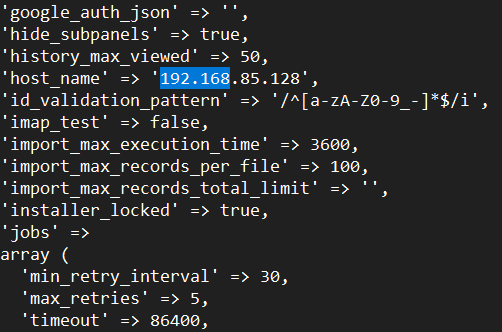
Hi I´m having troubles with the conection some times when my users try to access certain information on the CRM, it uses the IP 192.168.85.128 I don’t remember if this is from the test eviroment but i found out in the config file this information, should I change the IP to the actual cloud IP?
It should actually be the actual hostname ie:: “mycrm.com” unless it’s hosted internally only on a lan ip, then in that case, yes the hostname would be the internal IP address.
Hi @Rulelawyer ,
If your users are accessing SuiteCRM via a public cloud URL or public IP, then:
host_name should be set to the public hostname or domain (e.g., crm.example.com)
It should match the hostname used in site_url Recommended fix
Update config.php:
‘host_name’ => ‘your-public-domain-or-cloud-ip’,
‘site_url’ => ‘https://your-public-domain-or-cloud-ip’,