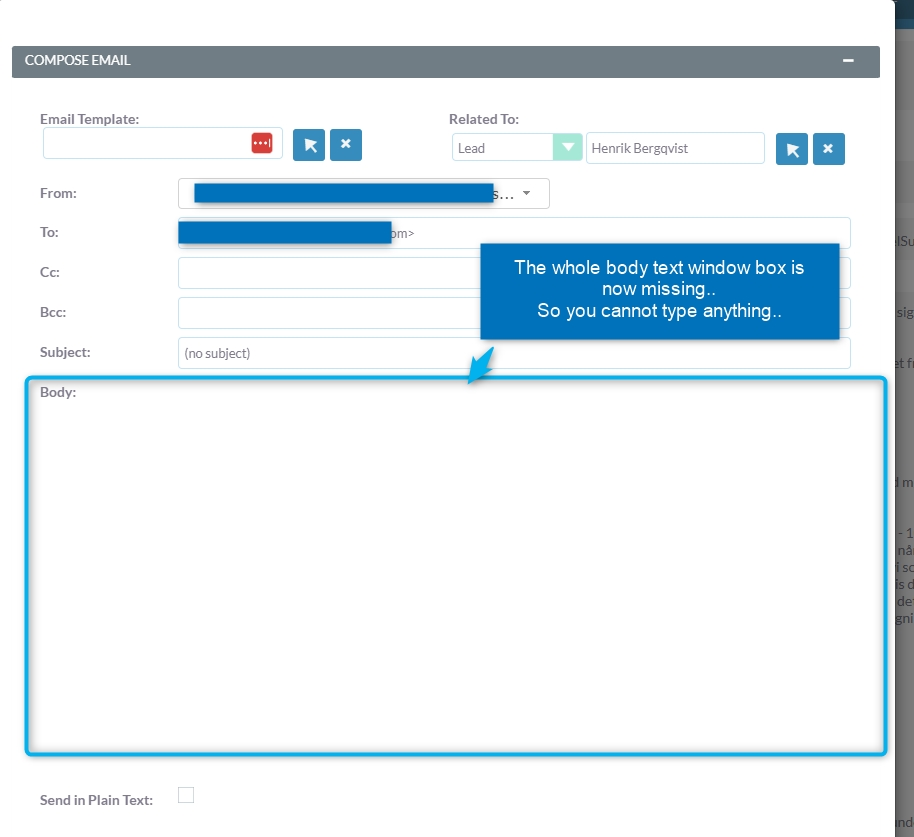
So i just ran the upgrade on our CRM instance and now the whole body text window is gone and basically blank so you cannot type anything at all. See screenshot below:
Also I have always in the past tweaked the EmailsComposeView.js to add more tools on the editor but that has changed too ind the code so you cannot do that anymore?
New code after upgrade: $.fn.EmailsComposeView.defaults = { “tinyMceOptions”: window.emailTinyMCEConfig }; }(jQuery));
I had the same problem. Its just a browser cache and/or SuiteCRM cache issue. I had Shift F5, multiple times on any page that had the TinyMCE both before and after it opens.I also did this:
So i got some questions because I was after updating yesterday “I was caught with my pants down” because I just expected regular update process with no huge changes.
Oh boy I was wrong!
Fortunately I had taken a full backup before updating (I always do that), so I could revert our SuiteCRM instance back to a working state so we could continue the production. But this is obviously not long term viable solution, but a quick fix as I need need to update our CRM system.
I just need to get it right this time!
We do not use any external caches /CDN’s on our CRM Intentionally as I don’t want it to be cached since SuiteCRM generates somethings on the fly dynamically.
So with that said, educate me like I was 5 years old and tell me please…
1.) So after you did the upgrade like me yesterday. Did you like PGR
also rebuild everything in admin?
Which repair functions did you use (I’m asking because there is a TON of repair options in admin UI), could you please tell me which are the relevant ones in this case?
After you done that did you then clear the cache:
manually? ANy other step you did to get your CRM up and running normally again too?
2.) So this update seems pretty change and “life” changing in that the whole tinymce has been moved from the current old location (modules/Emails/include/ComposeView/EmailsComposeView.js) to user UI in the profile where each user can set his own “tools” preferences?
3.) Have the location of the file responsible for the listed number of “favorites” and “recently viewed leads” been changed too? E.g. “_headerModuleList.tpl“ usually located at: custom/themes/SuitePImproved/tpls/_headerModuleList.tpl
where you change the number 6 and increase it to your preferred number (in my case 15): {if $smarty.foreach.lastViewed.index < 12}
Is there other huge changes in this critical update that I need to be aware of by the way?
From my perspective (I’ve been using it for about a week now). This was one of the easiest, least problem updates I’ve ever done. Especially with all the major changes, I was expecting lots of problems. Other than the cache issue with the TinyMCE, everything else is working great. The TinyMCE wasn’t really a big issue as I’ve experienced this before the last time they upgraded it. I’d suggest the following, I don’t know exactly which one will solve it for you:
Do ALL the repairs and rebuilds. Espeically the JS ones
Delete the cache folders I’ve shown already.
SHIFT F5 everywhere, multiple times wherever you see the TinyMCE, before and after popups that contain it as well.
This has worked for me in the past, and worked for me in this case.
I don’t have any custom options in the toolbar. I don’t see the favorites or anything working any differently than they did before in the sidebar on my install. However, I don’t use them that much so nothing pops out to me as having changed.
In my case there was a directory and file permission issue with the newly added files/folders from the update. So i reset them to755 / 644.
I haven’t figured out the last part with favs/last viewed and adding/editing tools to the TinyMCE. But I guess I get there sooner or later when I find time for it. At least SuiteCRM is now updated to latest version.
I did find in the knowledge base there is a reference to the old tiny mce. Not sure if this is evident elsewhere in SuiteCRM, but changing the value in the custom editviewdefs.php fixes:
Thanks!
But could you kindly enlighten me what is the actual server path to that file (editviewdefs.php), as there is several of them named “editviewdefs.php“
My issue “I think” was that I had customized the layout in studio, so I had a /custom/ metadata file for knowledge base and the custom file did not get updated to the new tiny mce. Fixing that one line solved the problem. Other modules didn’t seem to be a problem. I think some of the older modules that used the wysiwyg by default had this line (my guess) and it got copied over to /custom/ at some point in the past as I’ve been using this install for years.