I created a relate field in my custom module to pick a Contacts item:
The value from the Contacts module display: First_name Last_Name
Only in this case, I need to display the value of a custom fields from the Contacts module.
How can I do that? changing the vardefs? logic hook?
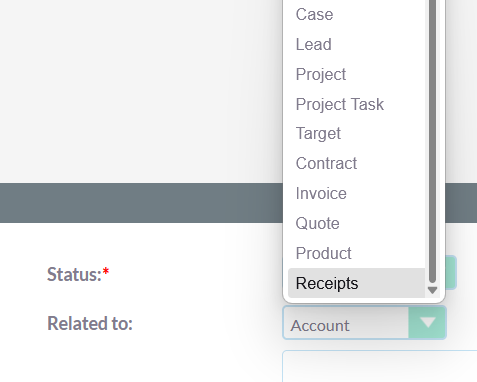
Create a new file at custom/Extension/application/Ext/Language/en_us.relatefields.php with the entries for the relate fields.
$app_list_strings['parent_type_display']['Receipts'] = 'Receipts';
Quick Repair & Rebuild
I can’t changed in the global extension because I have more then one relate fields from the Contacts module and it’s only in this case that I need to display another value.
Also, the value that I need to display in my relate field is a custom field saved in contacts_cstm table.
I think you may have to add a new field with a property ‘rname’ => ‘custom_field_name’, ‘module’=>‘Contacts’ in custom/Extension/modules/YourModule/Ext/Vardefs/fieldrelate.php file.
Add this field in detailviewdefs.php at custom/modules/YourModule/metadata/detailviewdefs.php in the panel row where you want to display.
Quick Repair & Rebuild.
Do you have an example of what I need to put into the
I saw that it was possible to do it in the doc, but there was no example
What are Vardefs The Vardefs are used to supply information to SuiteCRM about a particular bean. These generally specify the fields, relationships and indexes in a given module as well as additional information such as whether it is audited, the...
Do I put only this?
<?php
$dictionary["DestinationModule"]["fields"]["fieldrelate"]['module'] = 'Contacts';
$dictionary["DestinationModule"]["fields"]["fieldrelate"]['rname'] = 'contactsCustomField_c';
?>
Or I need to put something like:
<?php
$dictionary["DestinationModule"]["fields"]["fieldrelate"] = array (
    'name' => 'fieldrelate',
    'type' => 'relate',
    'source' => 'non-db',
    'module' => 'Contacts',
    'rname' => 'contactsCustomField_c',
    'comment' => 'Related field from Module Contacts',
    other fields need??
);
?>
In the custom/Extension/modules/YourModule/Ext/Vardefs/fieldrelate.php file, you need to put the below:
<?php
$dictionary["DestinationModule"]["fields"]["fieldrelate"]['module'] = 'Contacts';
$dictionary["DestinationModule"]["fields"]["fieldrelate"]['rname'] = 'contactsCustomField_c';
?>
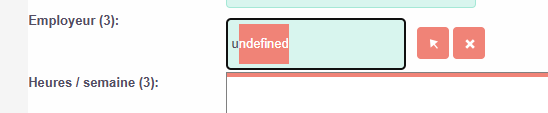
Maybe it missing something, because now I have undefined instead of displaying the default firstName lastName :
Here what I have:
In the Contacts module, I created the custom field
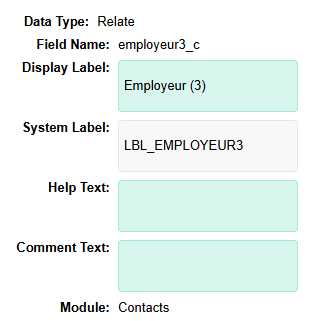
In the new module, I created the relate field
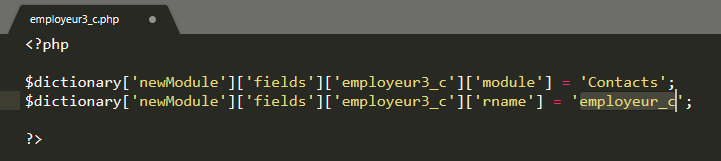
I created a new file as discussed in this post: custom/Extension/modules/newModule/Ext/Vardefs/employeur3_c.php
Can you check if the following works?
Add the following entry
$dictionary["DestinationModule"]["fields"]["fieldrelate"]['id_name'] = 'contact_id';
Ok, it’s better with contact_id, but probably missing other infos.
Not working:
If I write in the field, the drop down is empty
After a second, my “Em” switch to undefined
Working
If I use the arrow to search, I can find my item and selected it
Not working
but when I’m saving the data, my selected item disappeared
Please refer this, it may help.
Since ‘name’ is the field which is used to identify unique records in most of the modules, so can be used to search records. We can use the ‘Select’ record from the popup. But if we really want to add new field or change the default field for searching the record from a related module, the following changes would help to implement this.
The following steps I tried to implement this.
Override vardefs for Opportunities module by creating a new php file at
legacy\custom\Extension\modules\Opport…
Hi Harshad,
I tried to follow your example with the phone_home field instead of a custom field as wanted, but it’s no more working:
I can search the contact by phone number:
But the save is not working:
I changed my file as your example
<?php
$dictionary['newModule']['fields']['employeur3_c'] = array(
		'name' => 'employeur3_c',
        'rname' => 'phone_home',
        'id_name' => 'contact_id',
        'vname' => 'LBL_EMPLOYEUR3',
        'type' => 'relate',
        'table' => 'contacts',
        'join_name' => 'contacts',
        'isnull' => 'true',
        'module' => 'Contacts',
        'dbType' => 'varchar',
        'link' => 'contacts',
        'len' => '255',
        'source' => 'non-db',
        'unified_search' => true,
        'required' => false,
);
?>
After I done a Quick Repair & Rebuild
Any hint on what is wrong?