Hello
I am running SuiteCRM 7.14.7 and a random regular user lost the layout of the contact details view.
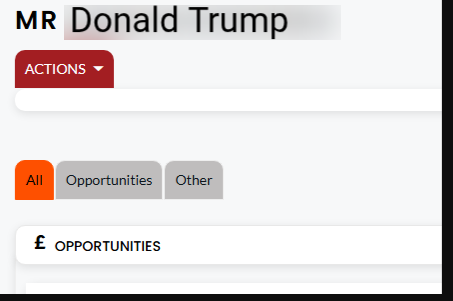
Does anyone know this issue?
What is the cache template path?
Hello
I am running SuiteCRM 7.14.7 and a random regular user lost the layout of the contact details view.
Does anyone know this issue?
What is the cache template path?
Set the correct permissions on the SuiteCRM directory (Linux):
  sudo chown -R www-data:www-data .

  sudo chmod -R 755 .

  sudo chmod -R 775 cache custom modules themes data upload

  sudo chmod 775 config_override.php 2>/dev/null
That www-data needs to be replaced by the actual system user that your web server runs under. This varies depending on your operating system. Common web server users are as follows:
www-data (Ubuntu Linux/Apache)
apache (Linux/Apache)
nobody (Linux/Apache)
IUSR_computerName (Windows/IIS) The commands/steps taken to setting permissions differ depending on your operating system. If you are experiencing issues with setting permissions on your SuiteCRM instance, visit our support forums.
Did you change anything in the contacts module?
@rsp remember that different people run different systems - your commands can totally break somebody’s installation if it’s not using www-data user for the web server. And then people might not be able to easily bring things back online.
So it’s better to be extra careful when providing help…
There is no issue with file permissions.
Yes, we are using “apache (Linux/Apache)” .
Folder permission: 775 (Owner/Group apache:apache)
File Permission: 644 (Owner/Group apache:apache)


I haven’t changed anything in the contact module.
Can you find anything in the server logs?
Or in the browser developer console?
Also, try a different browser to see if it makes any difference.
I didn’t find anything wrong.
I’m getting it randomly. That’s why I don’t see any problem with it.
The files in the cache folder are constantly being recreated over and over again.
How can I stop it?
Do you know how to read and write cache file paths?
Yes, folders and files inside cache folder are auto generated.
What do you mean?
suitecrm/cache/
How does it automatically generate the file?
I found the problem with the below path
vendor/smarty/smarty/libs/sysplugins/smarty_internal_data.php
The data directory of detailviewdefs.php was not found, so it was not merged.
/**
     * Follow the parent chain an merge template and config variables
     *
     * @param \Smarty_Internal_Data|null $data
     */
    public function _mergeVars(?Smarty_Internal_Data $data = null)
    {
        if (isset($data)) {
            //$fp = fopen('fi_log/'.date('d-m-Y h:i:s').'_smarty_mergvars_send_debug.txt', 'a+');
            //fwrite($fp, "\r\n" . var_export($data,true));

            if (!empty($this->tpl_vars)) {
                $data->tpl_vars = array_merge($this->tpl_vars, $data->tpl_vars);
            }
            if (!empty($this->config_vars)) {
                $data->config_vars = array_merge($this->config_vars, $data->config_vars);
            }
        } else {
            $data = $this;
        }
        if (isset($this->parent)) {
            $this->parent->_mergeVars($data);
        }
    }
cache/themes/SuiteP/modules/Accounts/DetailView.tpl
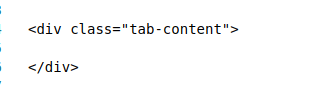
<script language="javascript">
{literal}
SUGAR.util.doWhen(function () {
return $("#contentTable").length == 0;
}, SUGAR.themes.actionMenu);
{/literal}
</script>
<table cellpadding="0" cellspacing="0" border="0" width="100%" id="">
<tr>
<td class="buttons" align="left" NOWRAP width="80%">
<div class="actionsContainer">
<form action="index.php" method="post" name="DetailView" id="formDetailView">
<input type="hidden" name="module" value="{$module}">
<input type="hidden" name="record" value="{$fields.id.value}">
<input type="hidden" name="return_action">
<input type="hidden" name="return_module">
<input type="hidden" name="return_id">
<input type="hidden" name="module_tab">
<input type="hidden" name="isDuplicate" value="false">
<input type="hidden" name="offset" value="{$offset}">
<input type="hidden" name="action" value="EditView">
<input type="hidden" name="sugar_body_only">
{if !$config.enable_action_menu}
<div class="buttons">
{if $bean->aclAccess("edit")}<input title="{$APP.LBL_EDIT_BUTTON_TITLE}" accessKey="{$APP.LBL_EDIT_BUTTON_KEY}" class="button primary" onclick="var _form = document.getElementById('formDetailView'); _form.return_module.value='Accounts'; _form.return_action.value='DetailView'; _form.return_id.value='{$id}'; _form.action.value='EditView';SUGAR.ajaxUI.submitForm(_form);" type="button" name="Edit" id="edit_button" value="{$APP.LBL_EDIT_BUTTON_LABEL}">{/if}
{if $bean->aclAccess("delete")}<input title="{$APP.LBL_DELETE_BUTTON_TITLE}" accessKey="{$APP.LBL_DELETE_BUTTON_KEY}" class="button" onclick="var _form = document.getElementById('formDetailView'); _form.return_module.value='Accounts'; _form.return_action.value='ListView'; _form.action.value='Delete'; if(confirm('{$APP.NTC_DELETE_CONFIRMATION}')) SUGAR.ajaxUI.submitForm(_form); return false;" type="submit" name="Delete" value="{$APP.LBL_DELETE_BUTTON_LABEL}" id="delete_button">{/if}
{if $bean->aclAccess("edit") && $bean->aclAccess("delete")}<input title="{$APP.LBL_DUP_MERGE}" class="button" onclick="var _form = document.getElementById('formDetailView'); _form.return_module.value='Accounts'; _form.return_action.value='DetailView'; _form.return_id.value='{$id}'; _form.action.value='Step1'; _form.module.value='MergeRecords';SUGAR.ajaxUI.submitForm(_form);" type="button" name="Merge" value="{$APP.LBL_DUP_MERGE}" id="merge_duplicate_button">{/if}
<input type="button" class="button" onClick="showPopup();" value="{$APP.LBL_GENERATE_LETTER}"/>
{if $bean->aclAccess("detail")}{if !empty($fields.id.value) && $isAuditEnabled}<input id="btn_view_change_log" title="{$APP.LNK_VIEW_CHANGE_LOG}" class="button" onclick='open_popup("Audit", "600", "400", "&record={$fields.id.value}&module_name=Accounts", true, false, {ldelim} "call_back_function":"set_return","form_name":"EditView","field_to_name_array":[] {rdelim} ); return false;' type="button" value="{$APP.LNK_VIEW_CHANGE_LOG}">{/if}{/if}
</div>
{/if}
</form>
</div>
</td>
<td align="right" width="20%" class="buttons">{$ADMIN_EDIT}
</td>
</tr>
</table>
{sugar_include include=$includes}
<div class="detail-view">
<div class="mobile-pagination">{$PAGINATION}</div>
<ul class="nav nav-tabs">
{if $config.enable_action_menu and $config.enable_action_menu != false}
<li id="tab-actions" class="dropdown">
<a class="dropdown-toggle" data-toggle="dropdown" href="#">ACTIONS<span class="suitepicon suitepicon-action-caret"></span></a>
<ul class="dropdown-menu">
<li>{if $bean->aclAccess("edit")}<input title="{$APP.LBL_EDIT_BUTTON_TITLE}" accessKey="{$APP.LBL_EDIT_BUTTON_KEY}" class="button primary" onclick="var _form = document.getElementById('formDetailView'); _form.return_module.value='Accounts'; _form.return_action.value='DetailView'; _form.return_id.value='{$id}'; _form.action.value='EditView';SUGAR.ajaxUI.submitForm(_form);" type="button" name="Edit" id="edit_button" value="{$APP.LBL_EDIT_BUTTON_LABEL}">{/if} </li>
<li>{if $bean->aclAccess("delete")}<input title="{$APP.LBL_DELETE_BUTTON_TITLE}" accessKey="{$APP.LBL_DELETE_BUTTON_KEY}" class="button" onclick="var _form = document.getElementById('formDetailView'); _form.return_module.value='Accounts'; _form.return_action.value='ListView'; _form.action.value='Delete'; if(confirm('{$APP.NTC_DELETE_CONFIRMATION}')) SUGAR.ajaxUI.submitForm(_form); return false;" type="submit" name="Delete" value="{$APP.LBL_DELETE_BUTTON_LABEL}" id="delete_button">{/if} </li>
<li>{if $bean->aclAccess("edit") && $bean->aclAccess("delete")}<input title="{$APP.LBL_DUP_MERGE}" class="button" onclick="var _form = document.getElementById('formDetailView'); _form.return_module.value='Accounts'; _form.return_action.value='DetailView'; _form.return_id.value='{$id}'; _form.action.value='Step1'; _form.module.value='MergeRecords';SUGAR.ajaxUI.submitForm(_form);" type="button" name="Merge" value="{$APP.LBL_DUP_MERGE}" id="merge_duplicate_button">{/if} </li>
<li><input type="button" class="button" onClick="showPopup();" value="{$APP.LBL_GENERATE_LETTER}"/></li>
<li>{if $bean->aclAccess("detail")}{if !empty($fields.id.value) && $isAuditEnabled}<input id="btn_view_change_log" title="{$APP.LNK_VIEW_CHANGE_LOG}" class="button" onclick='open_popup("Audit", "600", "400", "&record={$fields.id.value}&module_name=Accounts", true, false, {ldelim} "call_back_function":"set_return","form_name":"EditView","field_to_name_array":[] {rdelim} ); return false;' type="button" value="{$APP.LNK_VIEW_CHANGE_LOG}">{/if}{/if}</li>
</ul>
</li>
<li class="tab-inline-pagination">
{$PAGINATION}
</li>
{/if}
</ul>
<div class="clearfix"></div>
<div class="tab-content">
</div>
<div class="panel-content">
<div> </div>
</div>
</div>
</form>
<script>SUGAR.util.doWhen("document.getElementById('form') != null",
function(){ldelim}SUGAR.util.buildAccessKeyLabels();{rdelim});
</script> <script type="text/javascript" src="include/InlineEditing/inlineEditing.js"></script>
<script type="text/javascript" src="modules/Favorites/favorites.js"></script>
{literal}
<script type="text/javascript">
var selectTabDetailView = function(tab) {
$('#content div.tab-content div.tab-pane-NOBOOTSTRAPTOGGLER').hide();
$('#content div.tab-content div.tab-pane-NOBOOTSTRAPTOGGLER').eq(tab).show().addClass('active').addClass('in');
$('#content div.panel-content div.panel').hide();
$('#content div.panel-content div.panel.tab-panel-' + tab).show();
$('#content div.panel-content div.panel.oepl-panel-only').show();
};
var selectTabOnError = function(tab) {
selectTabDetailView(tab);
$('#content ul.nav.nav-tabs > li').removeClass('active');
$('#content ul.nav.nav-tabs > li a').css('color', '');
$('#content ul.nav.nav-tabs > li').eq(tab).find('a').first().css('color', 'red');
$('#content ul.nav.nav-tabs > li').eq(tab).addClass('active');
};
var selectTabOnErrorInputHandle = function(inputHandle) {
var tab = $(inputHandle).closest('.tab-pane-NOBOOTSTRAPTOGGLER').attr('id').match(/^detailpanel_(.*)$/)[1];
selectTabOnError(tab);
};
$(function(){
$('#content ul.nav.nav-tabs > li > a[data-toggle="tab"]').click(function(e){
if(typeof $(this).parent().find('a').first().attr('id') != 'undefined') {
var tab = parseInt($(this).parent().find('a').first().attr('id').match(/^tab(.*)$/)[1]);
selectTabDetailView(tab);
}
});
});
</script>
{/literal}
How can I solve it?
Revisa tu log, abre el registro del detailview y revisa el log, hay te dice que esta fallando, en mi experiencia, esos casos de visualizacion es porque algo esta mal en el archivo detailview.defs o en el vardefs, que cuando se realiza la renderizacion no se puede completar los datos.
Again, I repair & rebuild, and it works fine.