there is no easy configuration / UI option for that.
You should be able to use the JSON API for that:
however, youâd need a trigger - either a webhook to an external system or a logic hook.
If youâre going down the logic hook route, you can use PHP code directly as well.
Since your required feature is fairly simple in many marketing automation software, I usually do this in Mautic. There, youâd simple build the appropriate nocode workflows.
I have this debate with clients all the time. They always want to âcleanâ dead leads and bad emails, etc.
NO!!! The is valuable information. You know know you have treid to target this person and their email is invalid. This will prevent you from trying to contact them again. This is valuable information. Why would you want to delete it?
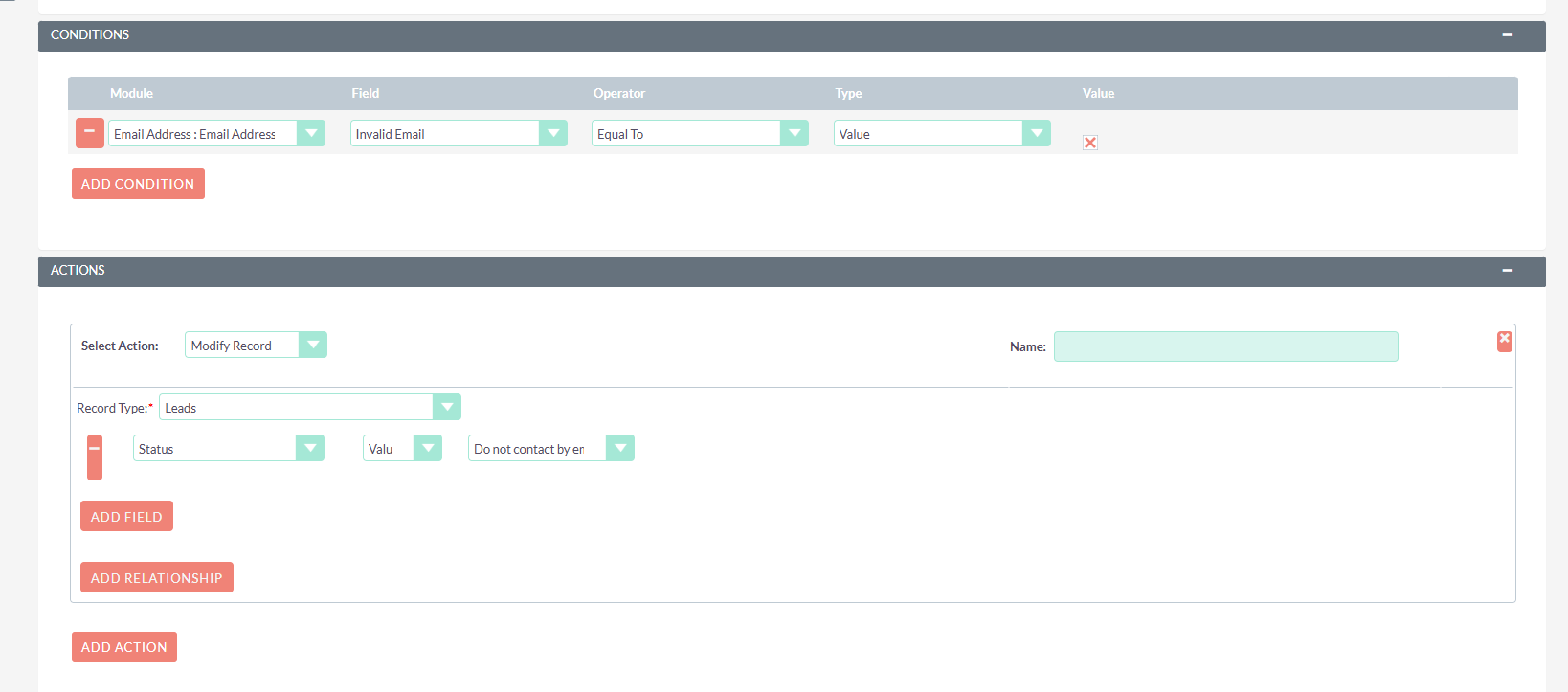
Most cases clients just donât know how to filter views properly to see only active targets, leads and contacts. You just have to mark them in some way in which you can filter on. Basically you can mark them by status as âdeadâ or âinvalidâ and then just filter them from your views.
hereâs an example (after you run this workflow you could if you REALLY want to delete them select only records with invalid emails)
My bad I misread it. Yeah, you canât do that with workflow I donât think. You can add a relationship but not delete one.
I would write a scheduled job to run once a day or something to look for leads or targets that have an invalid email and a relationship to prospects lists and just delete the relationship to prospects lists if that returns true.
Naah all good, itâs just strange that SuiteCRM doesnât have an inbuilt function, and maybe even add to the description field a line like âtaken of target list XVZ due to invalid addressâ.
You can use worklfow like I demonstrated above to populate a field or a status or a description if you like. Thatâs easy exaclty like I screen capped it.
@jobst Iâm not sure youâre still needing this but maybe it will help you or others. Here is a scheduler task that I created for our Marketing people that does what youâre asking. I have ours set to run nightly. It removes Opt-out and Invalid email addresses from all of our Target Lists (Prospect Lists) and creates a note that explains why the email address was removed.
Youâll need to create 2 files on your server and add the Scheduler Task.
<?php
$job_strings[] = 'cleanup_prospect_lists_job';
function cleanup_prospect_lists_job() {
return cleanup_prospect_lists();
}
function cleanup_prospect_lists() {
global $db, $current_user;
// Set a current user so the Note has a 'Created By' ID
if (empty($current_user->id)) {
$current_user = BeanFactory::getBean('Users', '1'); // Default Admin
}
$query = "SELECT plp.id as rel_id, plp.related_id, plp.related_type, plp.prospect_list_id, pl.name as list_name
FROM prospect_lists_prospects plp
INNER JOIN prospect_lists pl ON plp.prospect_list_id = pl.id
INNER JOIN email_addr_bean_rel eabr ON eabr.bean_id = plp.related_id
AND eabr.bean_module = plp.related_type
INNER JOIN email_addresses ea ON ea.id = eabr.email_address_id
WHERE plp.deleted = 0
AND (ea.opt_out = 1 OR ea.invalid_email = 1)";
$result = $db->query($query);
while ($row = $db->fetchByAssoc($result)) {
// Soft delete the relationship
$now = $db->now(); // More reliable DB timestamp
$updateQuery = "UPDATE prospect_lists_prospects
SET deleted = 1, date_modified = $now
WHERE id = '{$row['rel_id']}'";
$db->query($updateQuery);
$noteTitle = "Removed from Target List: " . $row['list_name'];
// Check if note exists
$checkNote = "SELECT id FROM notes
WHERE parent_id = '{$row['related_id']}'
AND name = " . $db->quoted($noteTitle) . "
AND deleted = 0 LIMIT 1";
$noteExists = $db->getOne($checkNote);
if (!$noteExists) {
$note = BeanFactory::newBean('Notes');
$note->name = $noteTitle;
$note->description = "System automatically removed this record due to Opt-Out or Invalid email status.";
$note->parent_type = $row['related_type'];
$note->parent_id = $row['related_id'];
// Explicitly link to Contact for History Subpanel visibility
if ($row['related_type'] === 'Contacts') {
$note->contact_id = $row['related_id'];
}
$note->assigned_user_id = $current_user->id; // Assign to admin
$noteID = $note->save();
if (!$noteID) {
$GLOBALS['log']->fatal("CLEANUP JOB: Failed to save note for {$row['related_type']} {$row['related_id']}");
}
}
}
return true;
}
<?php $mod_strings['LBL_CLEANUP_PROSPECT_LISTS_JOB'] = 'Cleanup Opt-Out/Invalid Records from Prospect Lists';
Do a âQuick Repair and Rebuildâ and refresh your browser cache. Then go to Admin â Scheduler â Create Scheduler. You should see the new job called âCleanup Opt-Out/Invalid Records from Prospect Listsâ in the dropdown jobs list. Select that and fill in the rest of the scheduler details and you should be good to go. Obviously you should back everything up first and test that itâs working as expected.