I have created custom module and now I am stuck with search options (ver 8.8.1 in my case), here are some of the issues I noticed:
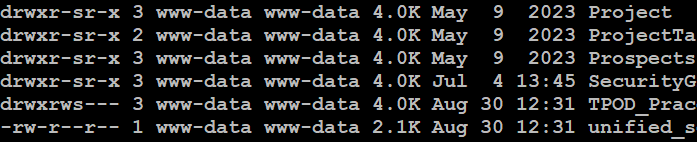
- first of all when I deploy my new custom module it will create folders but with wrong (incorrect) access rights (see next to last item, this is screenshot of my /var/www/suitecrm/public/legacy/custom/modules folder - I don’t know if this has any consequence later on, but it happens
-
when I try to add my custom module to the global search (in admin area), my custom module is missing completely - (I am not sure why , as my old (testing) custom module is visible), I likely need to rebuild something in order to be visible but I am not sure what or where? Any ideas what to do to make it visible in global search settings?
-
according to the info from the forums (particulary @BastianHammer video https://www.youtube.com/watch?v=Zm1T70YWkOw once again thanks!) within my custom module folder I should have metadata folder, but this folder does not exist. Do I need to build it somehow and if yes how, I hope there is some automated process to do it?