DJuser
1
NB I searched the forums and Github issues - but didn’t see anything related.
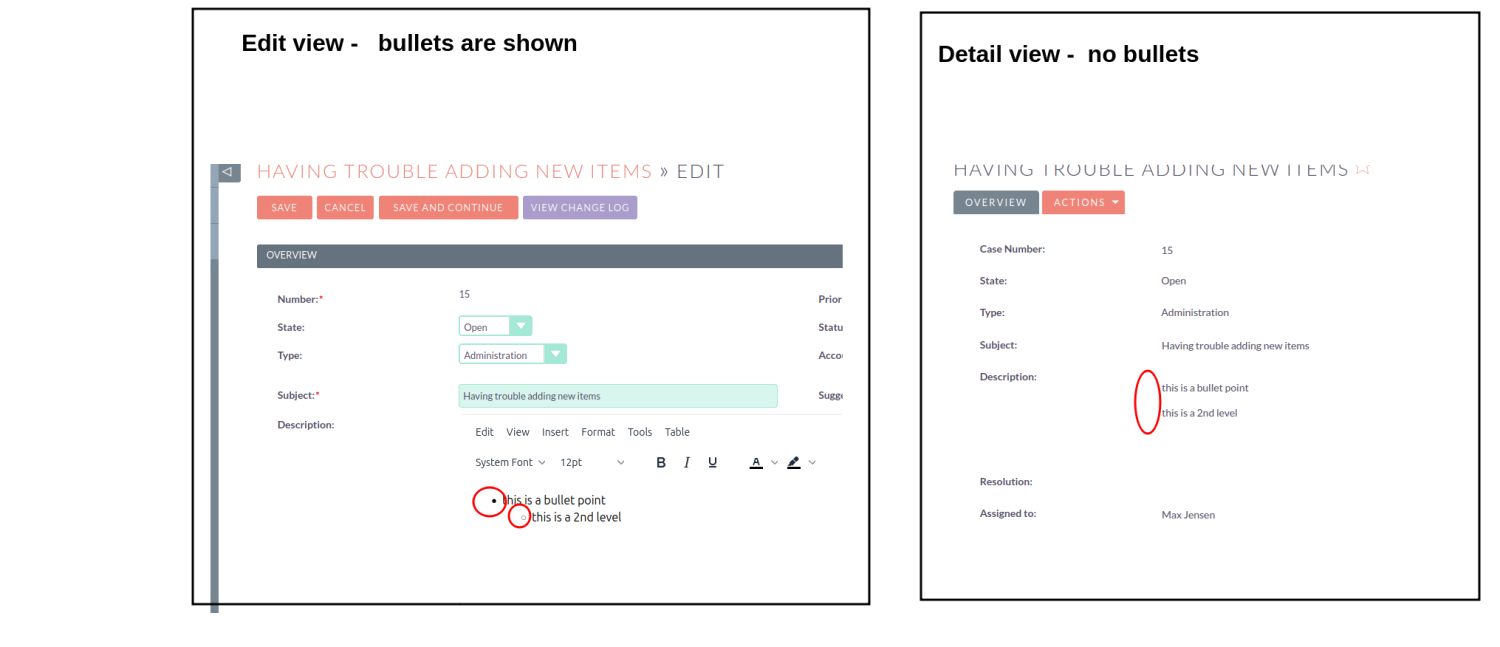
DETAILS: The bullet icons and layout is visibly correct in Edit view
But not in Detail view - (i) no visible bullets (b) no indentation
Proved in 7.15 - on the demo.suiteondemand.com site.
I don’t have Suite 8 to test on: and on the demo site, it seems that TinyMCE is disabled for Case description field anyway.
The page HTML in Detail view is:
<div class="col-xs-12 col-sm-12 detail-view-row-item" data-field="description">
<div class="col-xs-12 col-sm-2 label col-1-label">
Description:
</div>
<div class="col-xs-12 col-sm-10 detail-view-field inlineEdit" type="text" field="description" colspan="3">
<span class="sugar_field" id="description"><ul><br>
<li>this is a bullet point<br>
<ul><br>
<li>this is a 2nd level</li><br>
</ul><br>
</li><br>
</ul></span>
<div class="inlineEditIcon col-xs-hidden">
<span class="suitepicon suitepicon-action-edit"></span>
</div>
</div>
</div>
DJuser
2
Weirdly: But the bug is NOT present, on my local 7.15, when creating in Studio a custom field of type WYSIWYG:.
The html in Detail view of the working WYSIWYG field - is different, it mentions WYSIWYG in the setup: and has an iFrame.
So maybe a maybe a solution - is Vardefs - change the Description field to match the new WYSIWYG I created?
<div class="col-xs-12 col-sm-10 detail-view-field" type="wysiwyg" field="tinymcetest_c" colspan="3">
<iframe id="tinymcetest_c" name="tinymcetest_c" srcdoc="<p>base text</p>
<ul>
<li>bullet level 1
<ul>
<li>bullet level 2
<ul>
<li>bullet level 3</li>
</ul>
</li>
</ul>
</li>
</ul>" style="width:100%;height:230px"></iframe>
</div>
</div>
Hello,
there is a bug report about sth. fairly similar and I’ve linked your thread here:
It makes sense to think about what HTML is allowed and what is stripped.
2 Likes