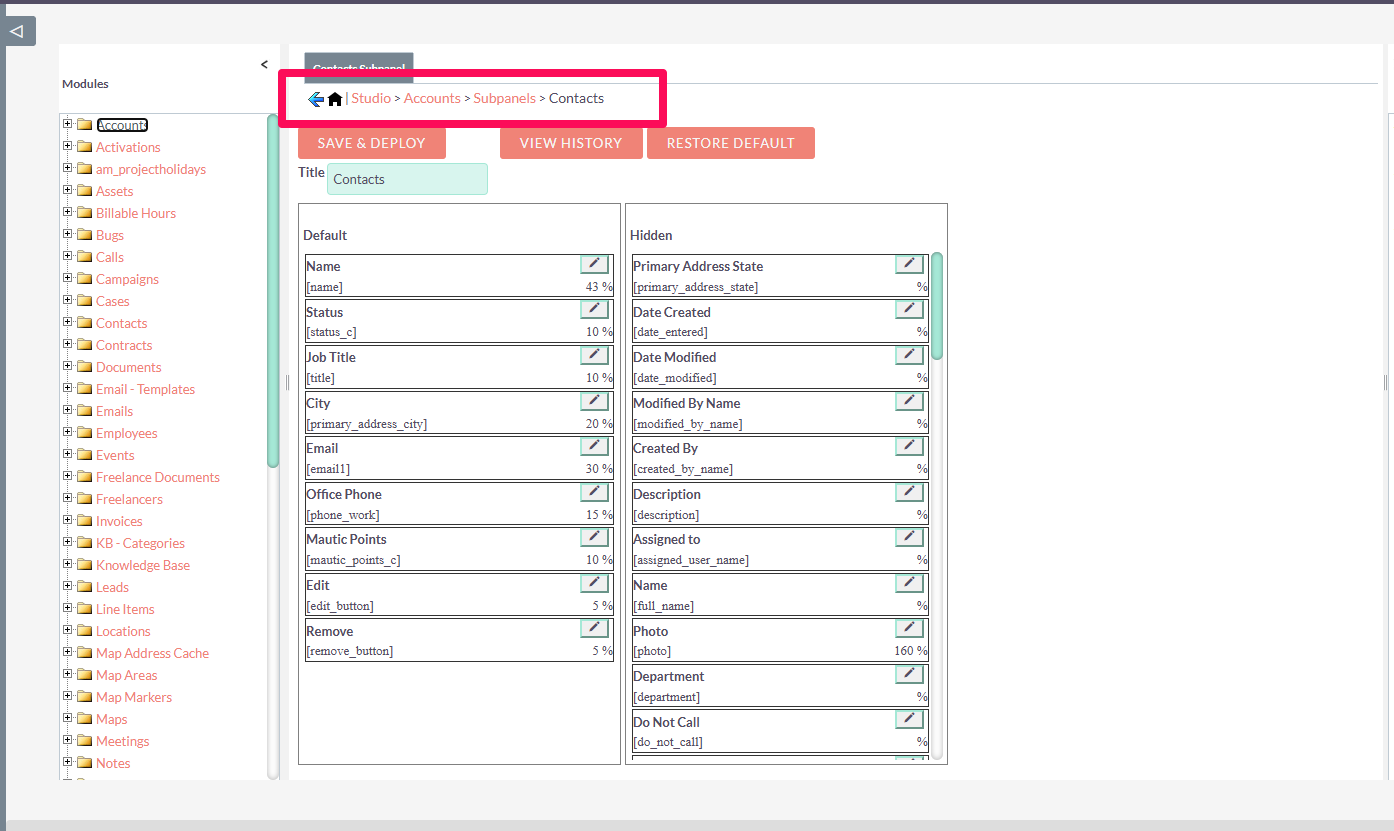
In the UI for accounts there is a contact subpanel. I reduced the information in the list and
In the Accounts user interface, there is a subpanel for contacts. I reduced the information in the list and wanted to add additional fields/value. The fields (first name and last name) I wanted to add are, in fact, part of a contact. Unfortunately, I haven’t been able to figure out how to add the first name to that subpanel.
Can someone send me a link or explain how I can add the first name to the contacts subpanel in the Accounts section?
Thank you in advance
For the Accounts → Contacts subpanel, you usually need to edit the Contacts subpanel definition and add the first_name field explicitly.
public/legacy/custom/Extension/modules/Accounts/Ext/Layoutdefs/
Look for a file related to contacts subpanel definitions.
You’ll see something similar to:
$layout_defs["Accounts"]["subpanel_setup"]['contacts'] = array(
Add first_name like this:
'first_name' => array(
    'vname' => 'LBL_FIRST_NAME',
    'width' => '15%',
    'default' => true,
),
After editing:
- Run Quick Repair and Rebuild
- Admin → Repair → Quick Repair and Rebuild
- Clear cache if needed:
php bin/console cache:clear
- Reload the browser.
Related: SuiteCRM Developer Insights - Adding Subpanel Filters
Generally, you just go here, but “first_name” is a subfield of “name” So you can’t just add it this way. You’ll have to do it by code as RSP suggests.