Hi everyone,
Full disclosure first: I’m the developer of this add-on (MienTrung Soft). I’m sharing it here because “how do I call an external API/webhook from a workflow?” comes up regularly, and SuiteCRM’s AOW Workflows have no built-in action for it.
What it does
It adds a new action type, Call Webhook, to the standard AOW Workflow module, next to Send Email, Create Record and Modify Record. When a workflow fires, for example on save or in the scheduler, the action sends the record’s data to any HTTP endpoint: n8n, Zapier, Make, Power Automate, or your own API.
It is configured like the other workflow actions (field pickers, add/remove rows). No code or template syntax is needed.
What it looks like
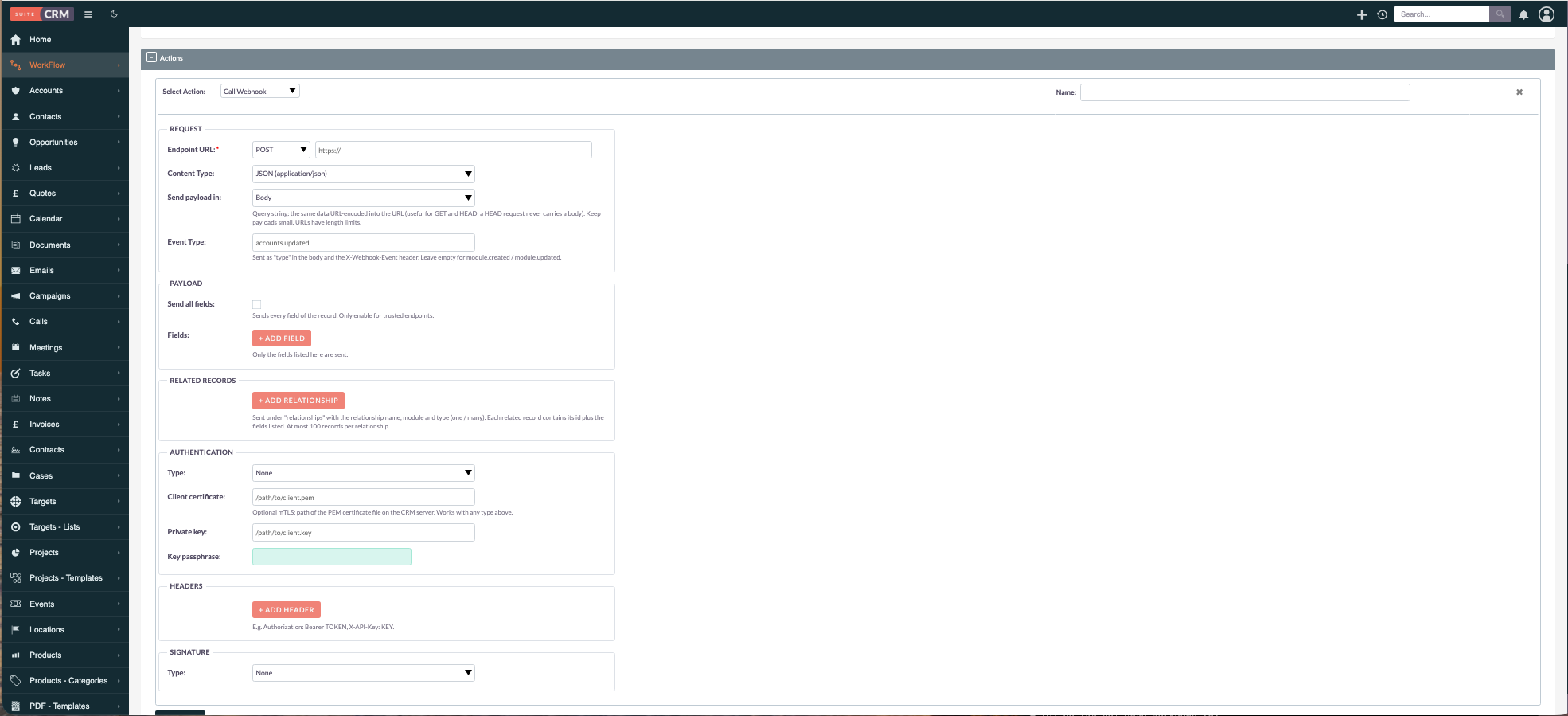
The action’s configuration form inside a workflow
Features
Request
- Methods: GET, POST, PUT, PATCH, DELETE, HEAD, OPTIONS
- JSON or form-urlencoded; the payload can go in the body or the query string (useful for GET)
- Custom event type (e.g.
contact.synced); by default<module>.created/<module>.updated
Payload
- You choose which fields are sent and the JSON key for each one. Nothing is sent unless you pick it; there is a separate “Send all fields” option for trusted endpoints.
- Related records: pick a relationship (e.g. Account, Opportunities) and the fields you need from it
- Relate fields are sent as
{id, name}, dates as ISO 8601 (UTC)
Example payload:
{
  "type": "contacts.updated",
  "timestamp": "2026-09-27T09:16:31Z",
  "data": {
    "module": "Contacts",
    "id": "009386e7-...",
    "record": {
      "firstName": "Carol",
      "lastName": "Windom",
      "email": "carol@example.com",
      "account": { "id": "a1bf1149-...", "name": "JAB Funds Ltd." }
    },
    "relationships": {
      "opportunities": {
        "link": "opportunities",
        "relationship": "opportunities_contacts",
        "module": "Opportunities",
        "type": "many",
        "data": [
          { "id": "d791fd2a-...", "title": "JAB Funds Ltd. - 500 units", "amount": "5000", "closeDate": "2026-04-01" }
        ]
      }
    }
  }
}
Authentication
- Basic, Digest, NTLM, Bearer token / JWT
- API key in a header or the query string
- OAuth 2.0 client credentials: the token is fetched from your token URL and cached until it expires
- Optional client certificate (mTLS)
- Custom header rows for anything else
Security
- Every request carries
webhook-idandwebhook-timestampheaders, so the receiver can drop duplicates - Optional payload signing: Standard Webhooks (
webhook-signature, compatible with Svix-style verification) or an HMAC-SHA256 header (GitHub style) - Credentials (passwords, tokens, secrets) are stored encrypted (AES-256-GCM), and a saved secret is never shown again in the form
Result
- A 2xx response marks the action Complete in the workflow’s Processed list; anything else marks it Failed, with details in the log
Getting it
There are two options, depending on how you’d use it.
1. Personal / internal use: free
If you run SuiteCRM for yourself or your own organisation, I’m happy to give it to you for free. Feature requests are welcome, but I can’t promise when (or whether) they’ll be done. If a feature matters to you, a small contribution or help with development (testing, feedback, code) helps get it prioritised.
2. Commercial use: deploying it for your clients
If you’re a partner or consultant and want to use it in client projects, I ask for a one-time fee per client project, at an amount you consider fair for the project. That includes bug fixes and support, and further features can be developed depending on the effort involved. Happy to discuss the details.
For either option, send me a private message here on the forum. More about what we do is on mientrungsoft.com.
Questions, ideas, or ways you’d use it: please reply in this topic, so the answers help others too.
Thanks!