Hi Team,
I want to create Add button when i click on that name1 text field show,when i again click on add button name2 field show same like ten name field within name field delete button show , when i click on delete button alert come are you sure you want to delete if i click on ok it hide.How i acheive this on in Account module.
Thanks
Hi @Vishal11
that is a very long sentence and not easy to understand. It would help people make quick helpful answers -if you could add more details - and use bullet points to seperate the points out.
Eg -answer these questions too:
- the WHY question - what is the User trying to achieve with this, and why will it help them
- show a picture - just a mock-up, or Paint type picture of how you want it to look: and where it’ll fit into the existing Account page.
- what version of Suite are you on
- is it used in production by regular Users: or not yet (and if it is live: how long has it been used there: )
- are you familiar with, and have used the powerful WorkFlow feature?
1 Like
Hi Team,
i want to this type of layout in Account module Edit view, when i click on Add button Name3 display, again i click on Add button Name4 display. when i click on Delete button show alert then name field remove, how to acheive this.kindly help me.
Thanks
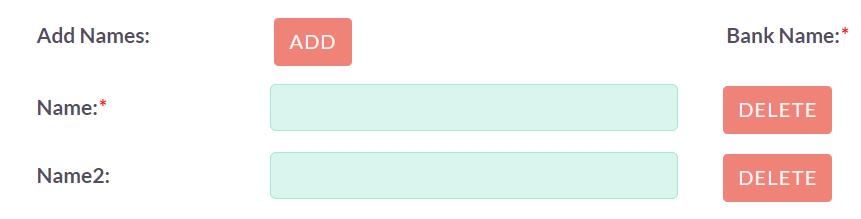
Hi,
i write code for this, but problem is that it delete randamoly i want to delete when i click on 2nd gst only 2nd gst delete,when i click 3rd gst only third gst delete like that.Kindly help me
//Hide gst fields
                var gst3 = $('#gst3_c').closest('.edit-view-row-item').hide();
                var gst4 = $('#gst4_c').closest('.edit-view-row-item').hide();
                var gst5 = $('#gst5_c').closest('.edit-view-row-item').hide();
                var gst6 = $('#gst6_c').closest('.edit-view-row-item').hide();

//Show Delete button just after text field.

                var htmlCoden = '<input tabindex="0" class="names_delete" type="button" name="names_delete_" id="names_count" onclick="remove_gst();" value="Delete" style="margin-left: 50%;margin-top: -5%;float: left;">';

	            $('#gst2_c').after(htmlCoden);
	            $('#gst3_c').after(htmlCoden);
	            $('#gst4_c').after(htmlCoden);
	            $('#gst5_c').after(htmlCoden);

// add name function start

// Initialize index to track which text field to show next
    var currentIndex = 2;
       function add_name(){

// Show the text field at the current index
                       $('#gst' + currentIndex + '_c').closest('.edit-view-row-item').show();

// Increment the index for the next click
                              currentIndex++;

// If all text fields are shown, reset index to 2 (for the second text field)
                          if (currentIndex > 5) {
                                   currentIndex = 2;
                          }


                }
//End of start name

// Remove GST function start

var Index = 2;
function remove_gst() {
           var result = confirm('Are you sure you want to delete');

     if (result) {

// Hide the text field at the current index

                $('#gst' + Index + '_c').closest('.edit-view-row-item').hide();

            }else{
                console.log('Nothing happen');
            }

//Increment the index for the next click
             Index++;


// If all text fields are shown, reset index to 2 (for the second text field)
           if (Index > 5) {
              Index = 2;
           }
     }
Hi @Vishal11
Which PHP debug /stack-trace tools are you using? What do they show is happening?