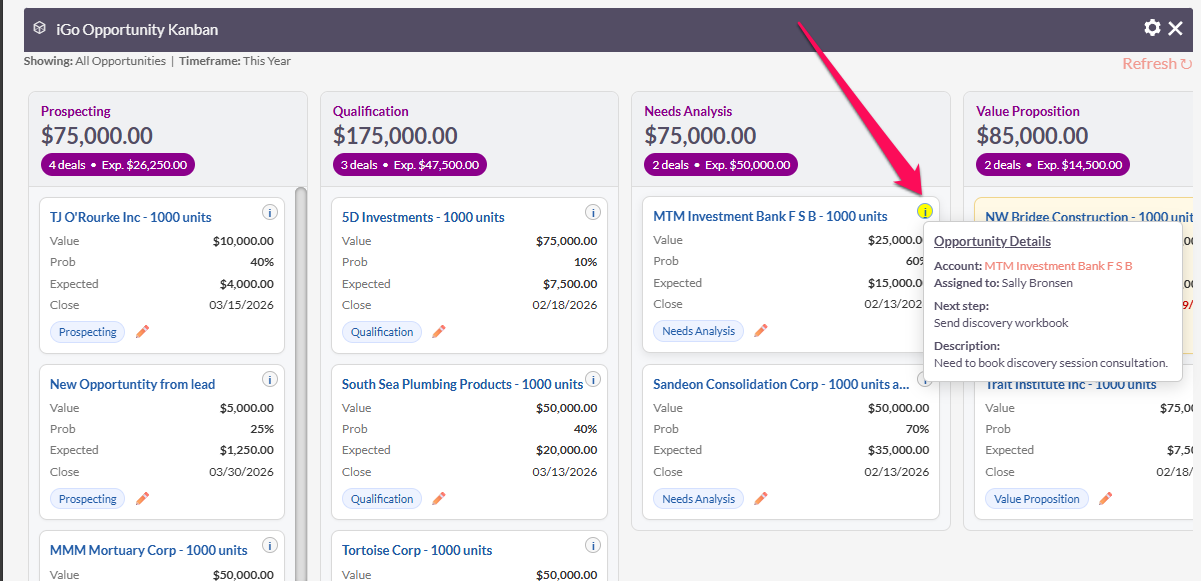
Today’s progress, yes I plan to give this away for free.
1 Like
One more new feature:
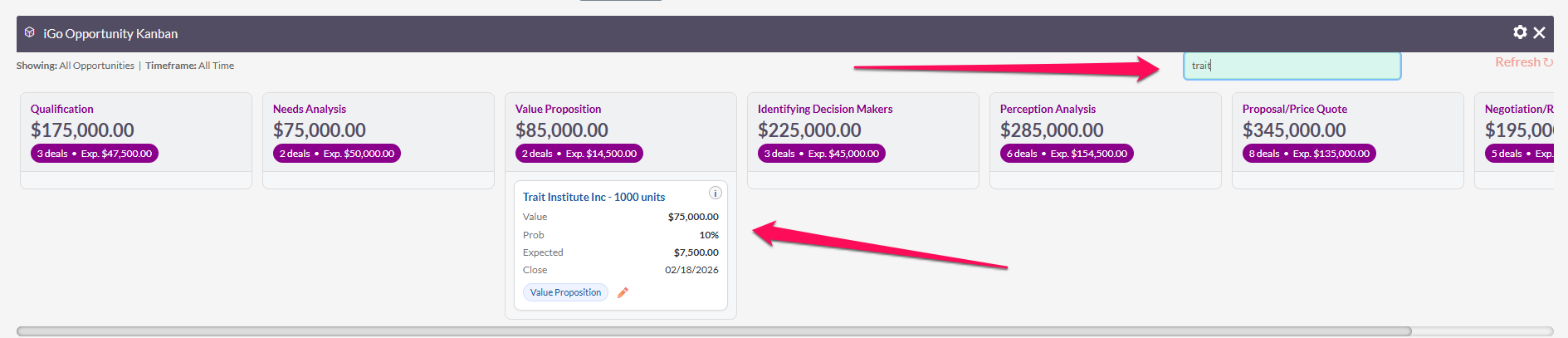
What are people’s thoughts about drag and drop? I already have a click to update stage for the card which is super user friendly to manage stages. I think drag and drop doesn’t add alot of UI value beyond the “cool” factor and makes it infinately more complex to deal with (from a coding perspective).
Thinking I’m going to move on to projects next. That should be a fairly easy transition from Opps.
Yes  , I agree with your assessment. At this stage, it appears to be in good shape, and I don’t believe that adding drag-and-drop functionality would provide significant additional value.
I’d be interested to hear the thoughts of other forum members as well.
I think that if you try the drag-and-drop you will find it is easier to achieve than you think. Browsers are good at this kind of stuff, and AI’s are good at explaining it.
People definitely expect it when using a Kanban…
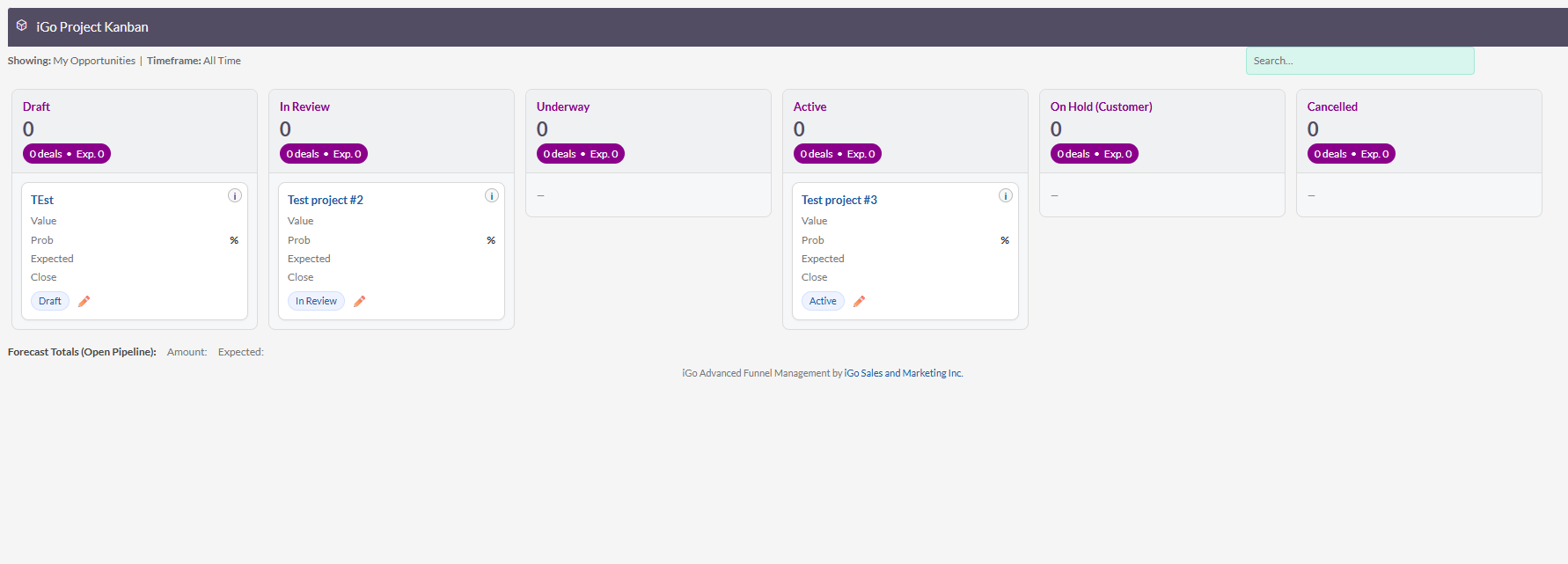
Got the basics of projects working…
Still have to build out the features and the counts, etc. and overdue logic but it translates pretty well to other modules with minimal adjustment.
One of the major hurdles drag and drop brings up is concurrency. If mutiple people are editing whose drag and drop wins.
I kind of address this with the dropdowns by refreshing the board after each change.
I don’t think there’s any real concurrency you need to worry about.
Only a Drop corresponds to an edit of the record.
This goes out as a web request to the back-end, and the normal SuiteCRM handling takes place there, multiple requests are necessarily handled sequentially.
I know this can create a confused user once in a while (very rarely) but it’s no different than other “who edited my record?” surprises common in multi-user systems.
Some info about drag-a-drop design:
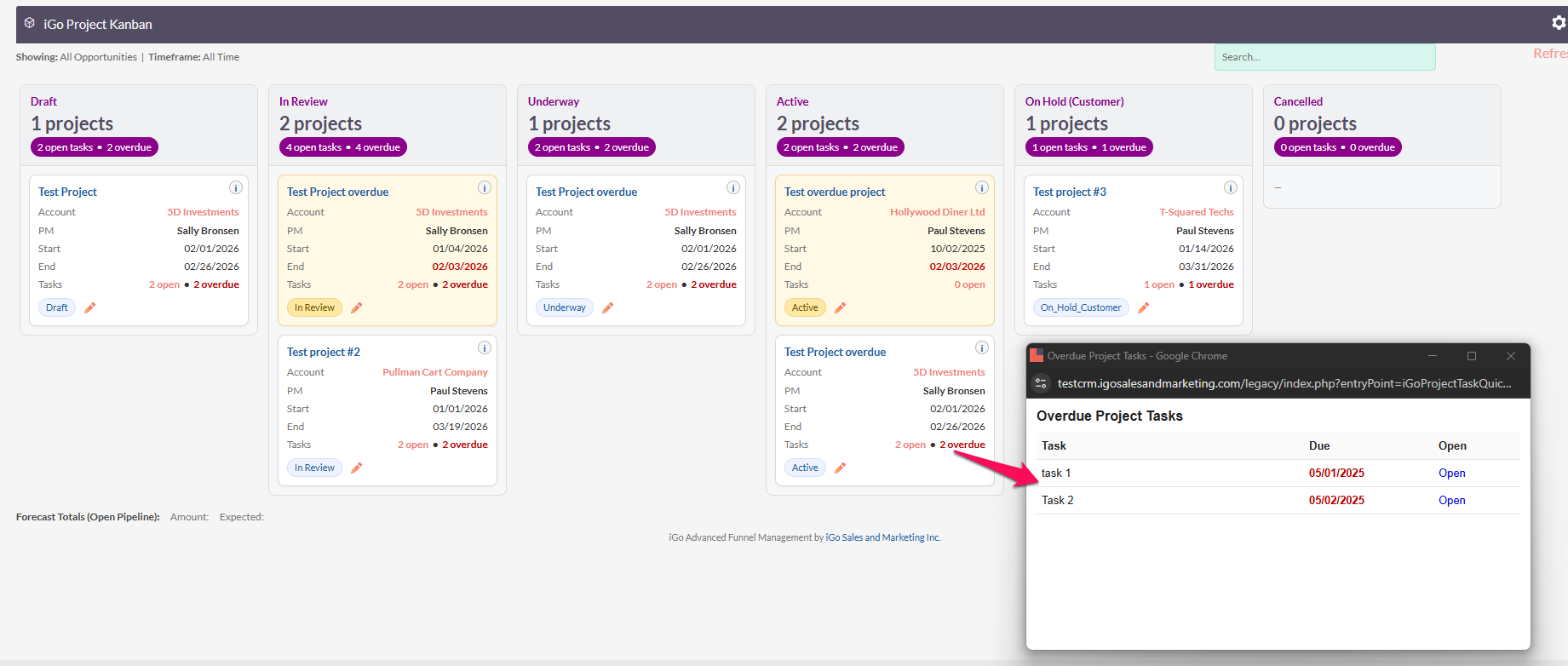
Today’s progress, finished up the project stats, and added a drill down popup for open tasks and overdue tasks for the project card.
1 Like
Hello everyone,
We are currently finalizing and packaging the module. It will be available on the Store soon, depending on how long the Store team takes to review the plugin.
Below are the main features included in our plugin. For this paid version, we plan to stop at these features:
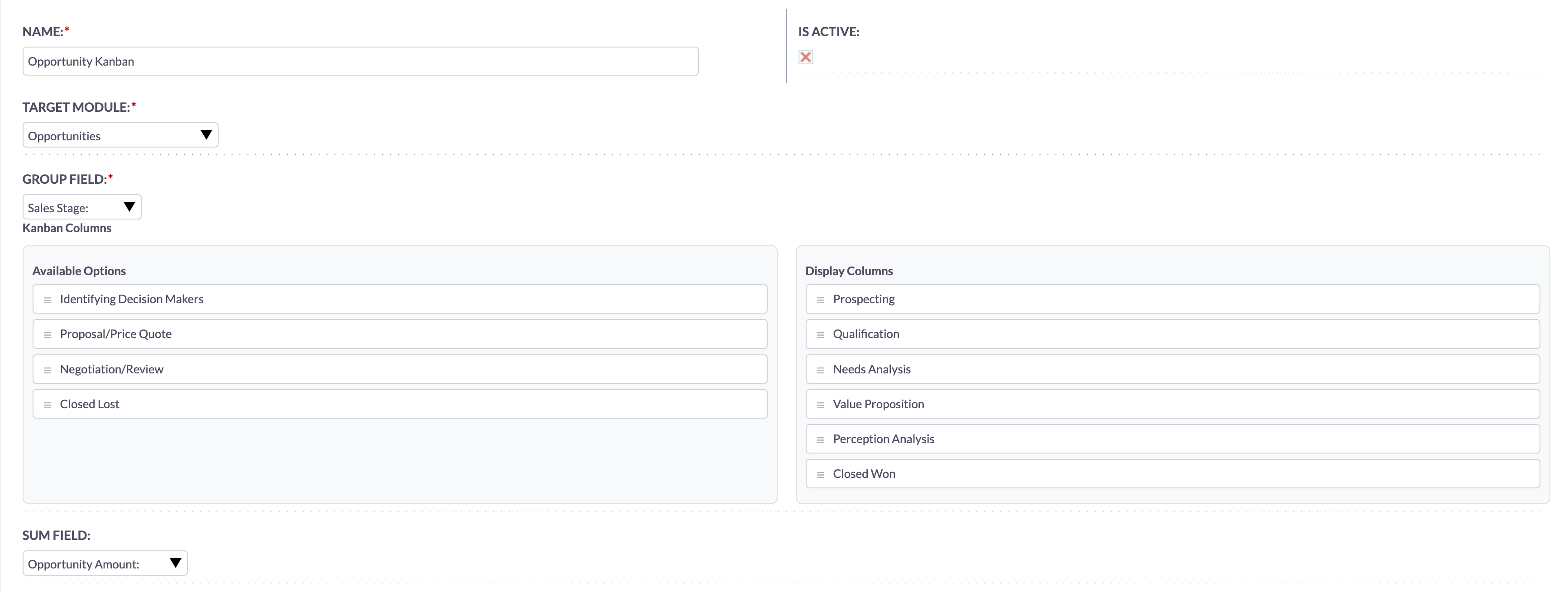
 Flexible configuration for any module
The plugin works with any module, as long as the module has at least one enum field (including custom fields) to be used as the Kanban category (column).
Configuration features include:
-
Select a field to use as the category.
-
Support summing any numeric field and displaying the total in each column header.
-
Choose which enum options should be displayed on the Kanban board.
-
Drag and drop to reorder columns directly from the configuration page.
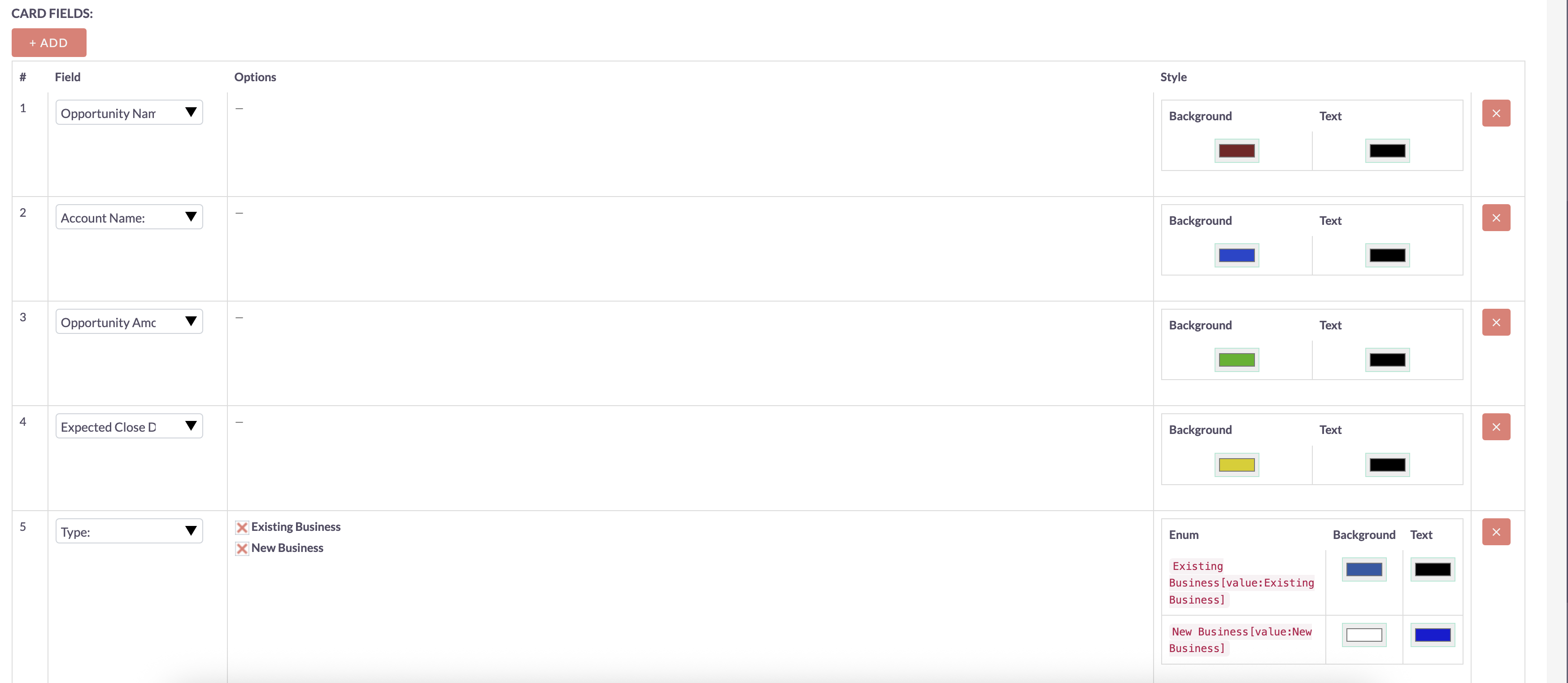
Card display configuration:
-
You can select any fields you want to display on the card.
-
We provide tools to configure text color and background color based on field values.
-
You can also set specific colors for each dropdown (enum) option.
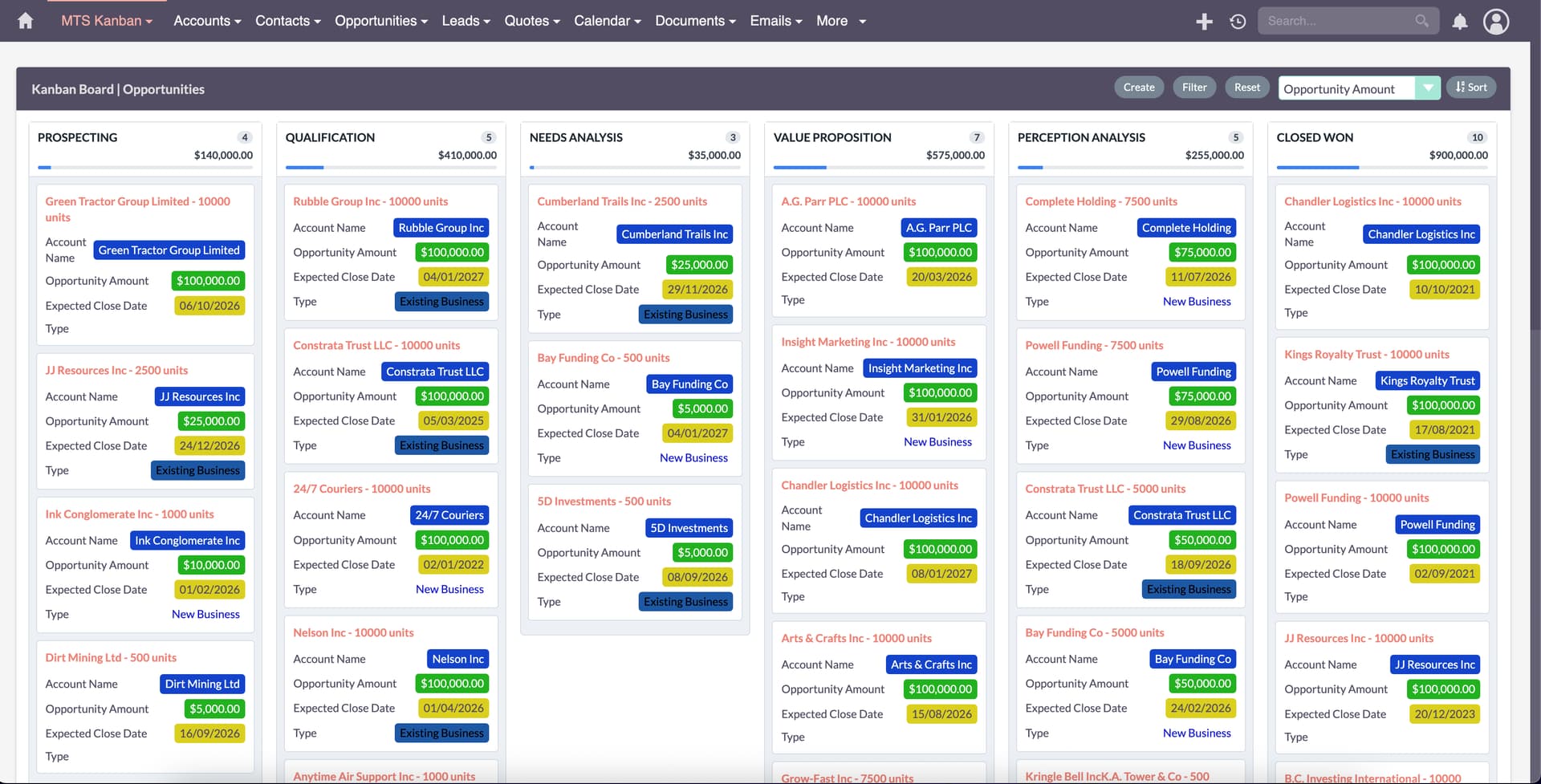
 Features available directly on the Kanban view
-
From Module menu > Select Kanban View
-
Drag and drop cards between columns.
-
Filters work the same way as in the module’s List View and are fully synchronized both ways.
-
Sorting is supported.

Since we designed this plugin to work with all modules, it may not fit very specific use cases.
If you only need Kanban for Opportunities or Projects, we recommend using the @pstevens solution. It is a specialized and truly excellent solution — and it is free.
We will continue listening to user feedback and will further enhance the product with additional features in the future. Every piece of feedback is valuable to us, as it helps us improve the quality of our product and ensure it better aligns with real-world needs.
Comfortable version: SuiteCRM 7, 8
UPDATED: Our kanban view already listing on the store
1 Like
@nhat.thieu Your Kanban Board add-on for SuiteCRM looks excellent and very impressive. At this stage, I do not see any improvements required.
Well done on the outstanding work. 

1 Like
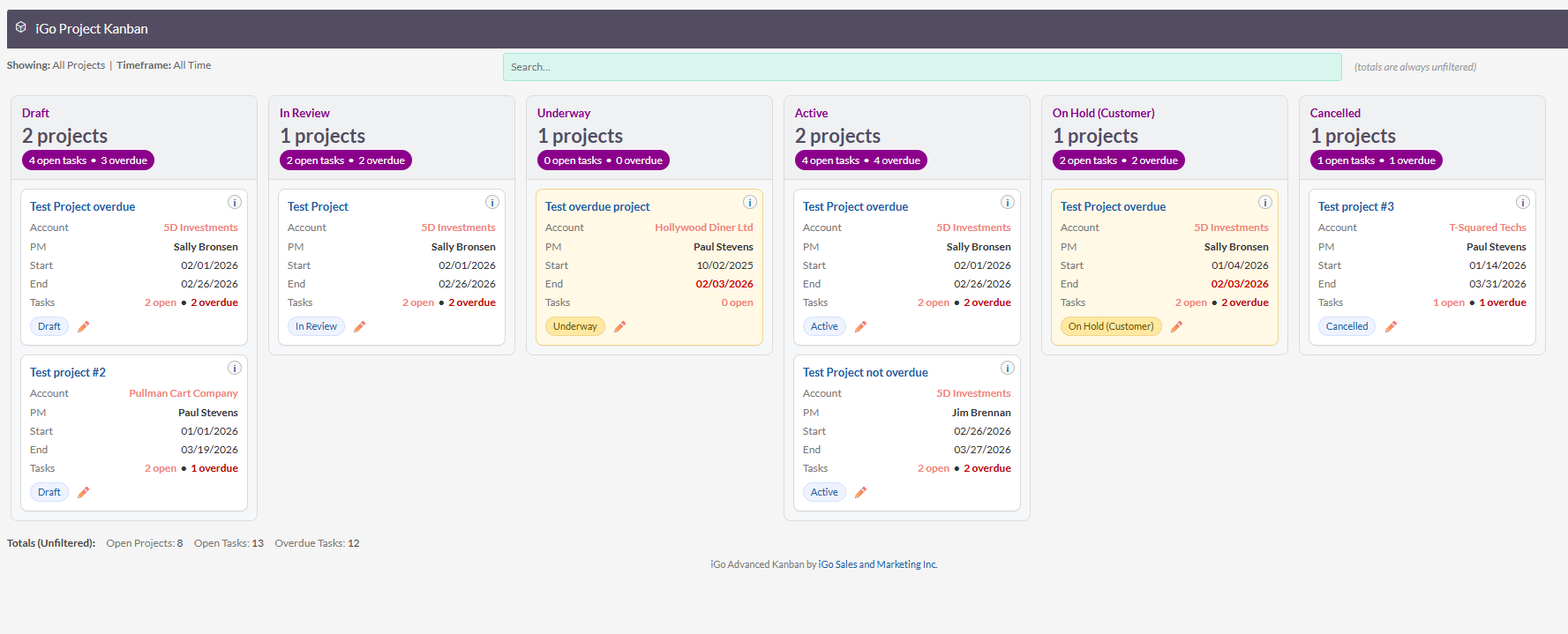
My Kanban also supports Cases, Project Tasks, Leads, Opportunities, Projects. It also has customizable display fields and custom ordering as well as saved and persistent filters. I’m pretty close to releasing my free plugin. Just working out the bugs between suitecrm 7 and suitecrm 8. There are some differences in display also urls that I had to address. As an added bonus because it’s not “global” each module is unique and each layout is uniquely desinged specifically for that module with little or no configuration. (I’ve pre-thought that out for the user).
1 Like
Get it released to the GitHub Repo so multiple resources can work and improve it.
thanks @cherub-chum I’m not sure throwing it on Github is what I want to do to distribute it or develop it. However, I am making good progress.
I currently have drag and drop working. Double click to edit the card and update status working. I have it working right now for Opportunities and Projects (this is just while I develop until I perfect it). I have search and filter working. Persistent search and filter working. All kinds of creature comforts specific to each module (like overdue opps highlighted in yellow, same for projects), project task open/overdue display in project cards. Drill down into project tasks from project card, etc.
My approach is a litte different from @nhat.thieu approach. He’s building a swiss army knife that works for any module. I’m building a Kanban that is specifically designed for each module. Both are good approaches and both have pluses and minuses.
I’m currently working on centralizing all the JS and the ACL’s so adding new modules is easy. I’m pretty close. Once I’m happy with these two it should be fairly easy to roll out the rest of the modules. Project Tasks is next. I’m super excited about that. I use projects in SuiteCRM quite extensively and managing project tasks it a bit of a chore. Not only trying to visualize what needs to be done next per project but also just updating them is a pain. From the subpanel you have to open each one and update the status. Or go to list view and filter by project and mass update there. A Kanban will make it super easy to visualize and manage this.
It is recommended that we implement Kanban boards with an automatic mechanism to hide or archive completed (“Done”) tasks in order to prevent board clutter.
Completed tasks should be archived after a defined period—commonly set to a default of 14 days—while allowing flexibility to adjust this timeframe (e.g., to 7 days) based on team preferences or project requirements.
This is exactly why I’m designing a per module Kanban. So that common sense rules, stats and drill downs and layouts can be implemented on a per module basis instead of globally.
I already have show/hide stages functionality that persists per user. Sort order of columns is Global. Based on how a Manager would want this, they would want to control the order of stages, so I made the call to make that a Global. Rules about stage changes, timeframes, etc. is best done in workflow not by the Kanban. The Kanban’s main purpose is visual not a rule system to manage stuff. Workflow is great at that.
1 Like
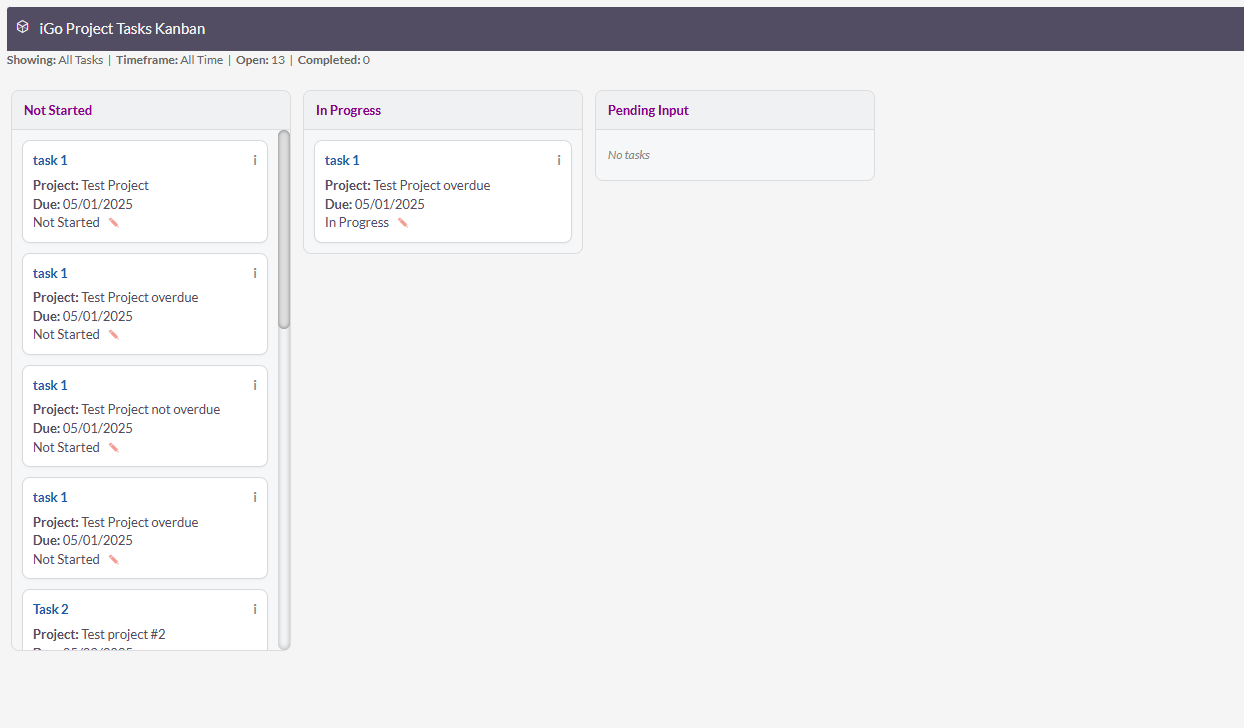
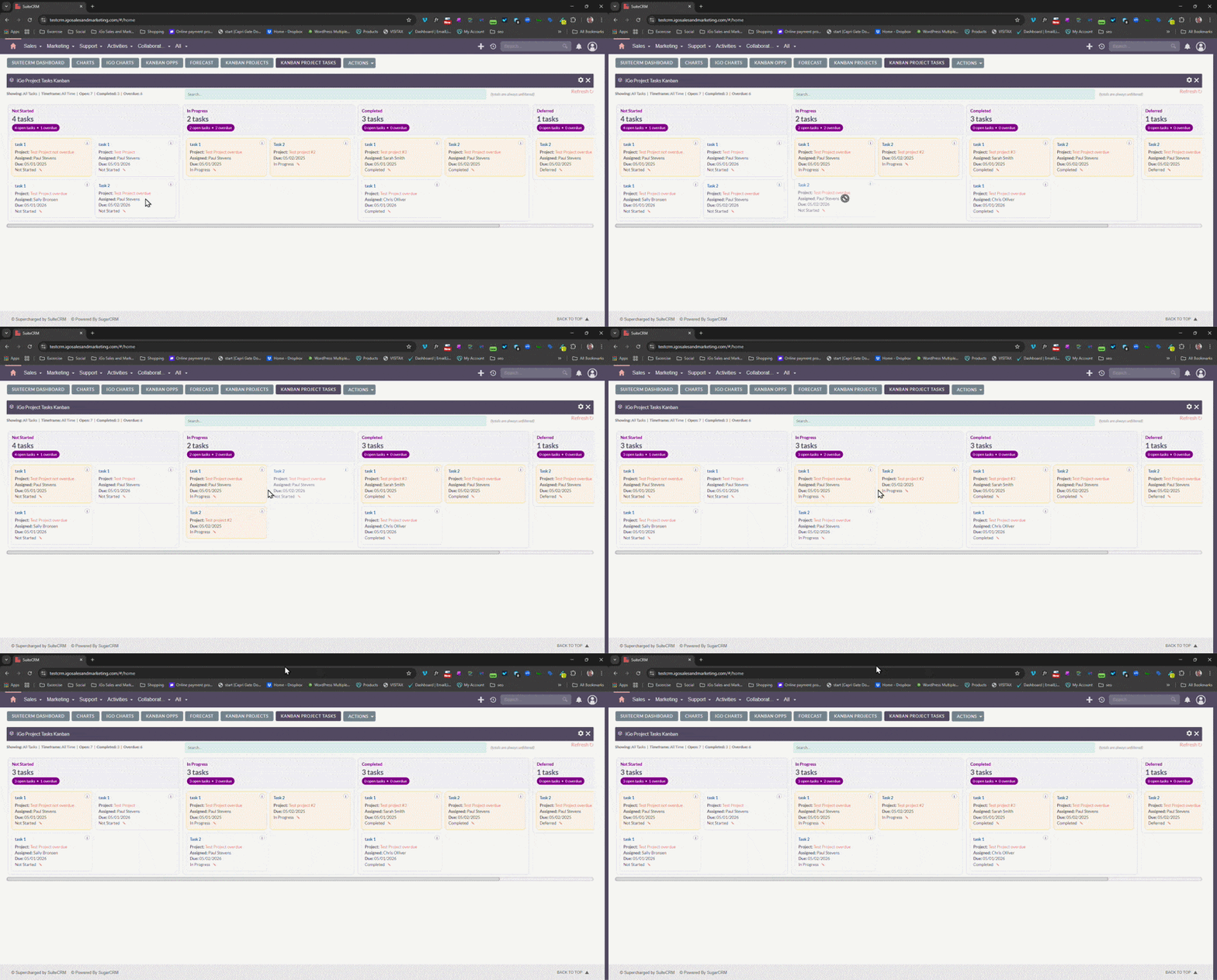
We have achieved drag and drop, along with centralized JS and query logic and stage change functionality and access control accross modules.
2 Likes
We truly appreciate the time and effort you’re putting into creating these Kanban boards for the different modules. 
Here’s the latest version of Project Tasks and Projects after another full weekend of coding.
Going backwards and centralizing key functions, JS and components is no fun, but it makes moving forward to other modules so much easier.
2 Likes